Page 27 of 66 0455-0323 Rev A
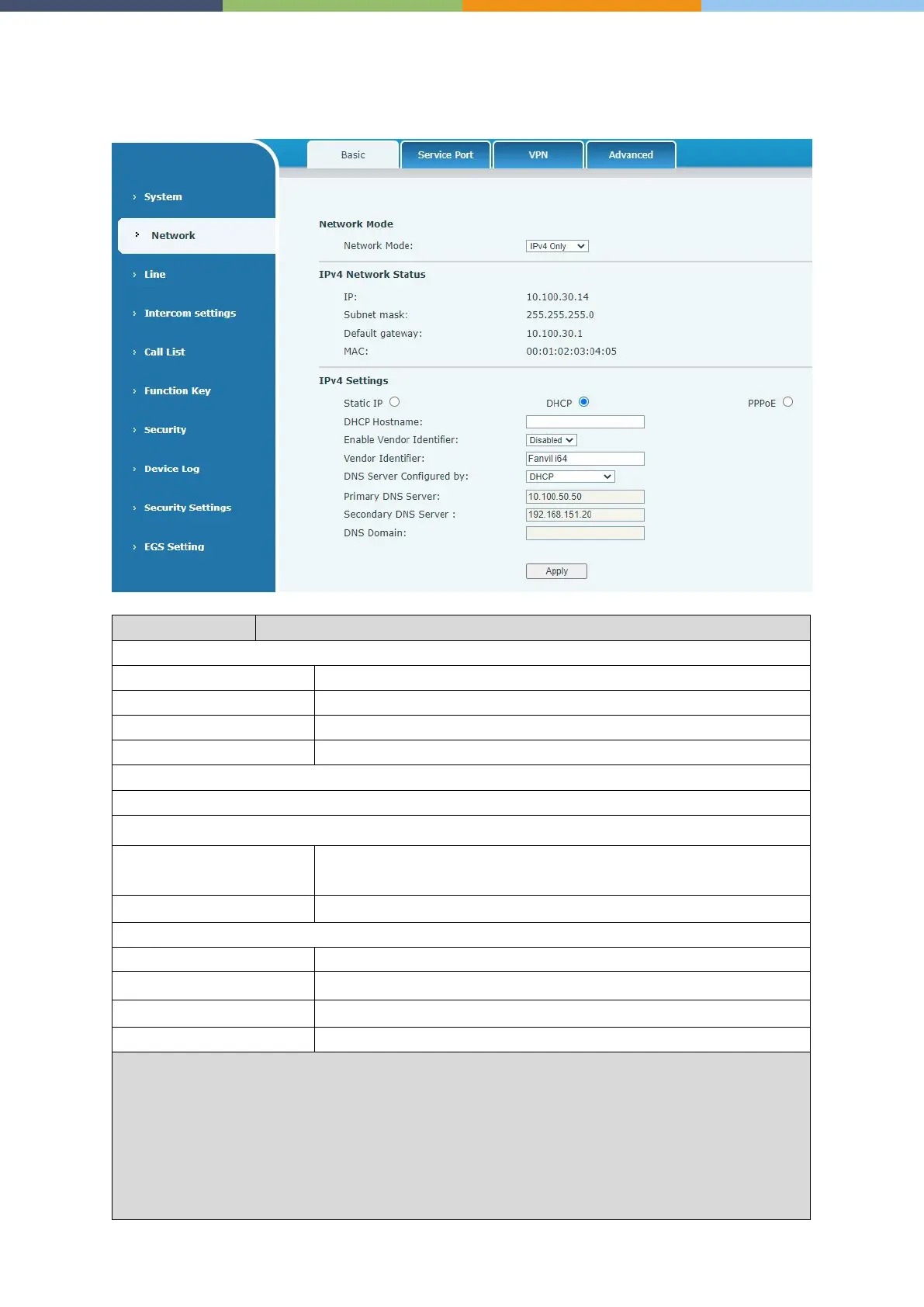
Network >> Basic
This page allows users to configure network connection types and parameters.
The current IP address of the device
The current Gateway IP address
The MAC address of the device
Select the appropriate network mode. The device supports three network modes:
Network parameters must be entered manually and will not be
changed. All parameters are provided by the ISP.
Network parameters are provided automatically by a DHCP server.
If Static IP is chosen, enter values provided by the ISP.
Select the Configured mode of the DNS Server.
Enter the server address of the Primary DNS.
Enter the server address of the Secondary DNS.
Enter the domain of the DNS.
:
1. After setting the parameters, click Apply to take effect.
2. If you change the IP address, the webpage will no longer respond. Enter the new IP address in
web browser to access the device.
3. If the device uses DHCP to obtain IP, and the network address of the DHCP Server is the same
as the network address of the system LAN, then after the system obtains the DHCP IP, it will
add 1 to the last bit of the network address of LAN and modify the IP address segment of the
DHCP Server of LAN. If the DHCP access is reconnected to the WAN after the device



 To Next Page