Page 63 of 66 0455-0323 Rev A
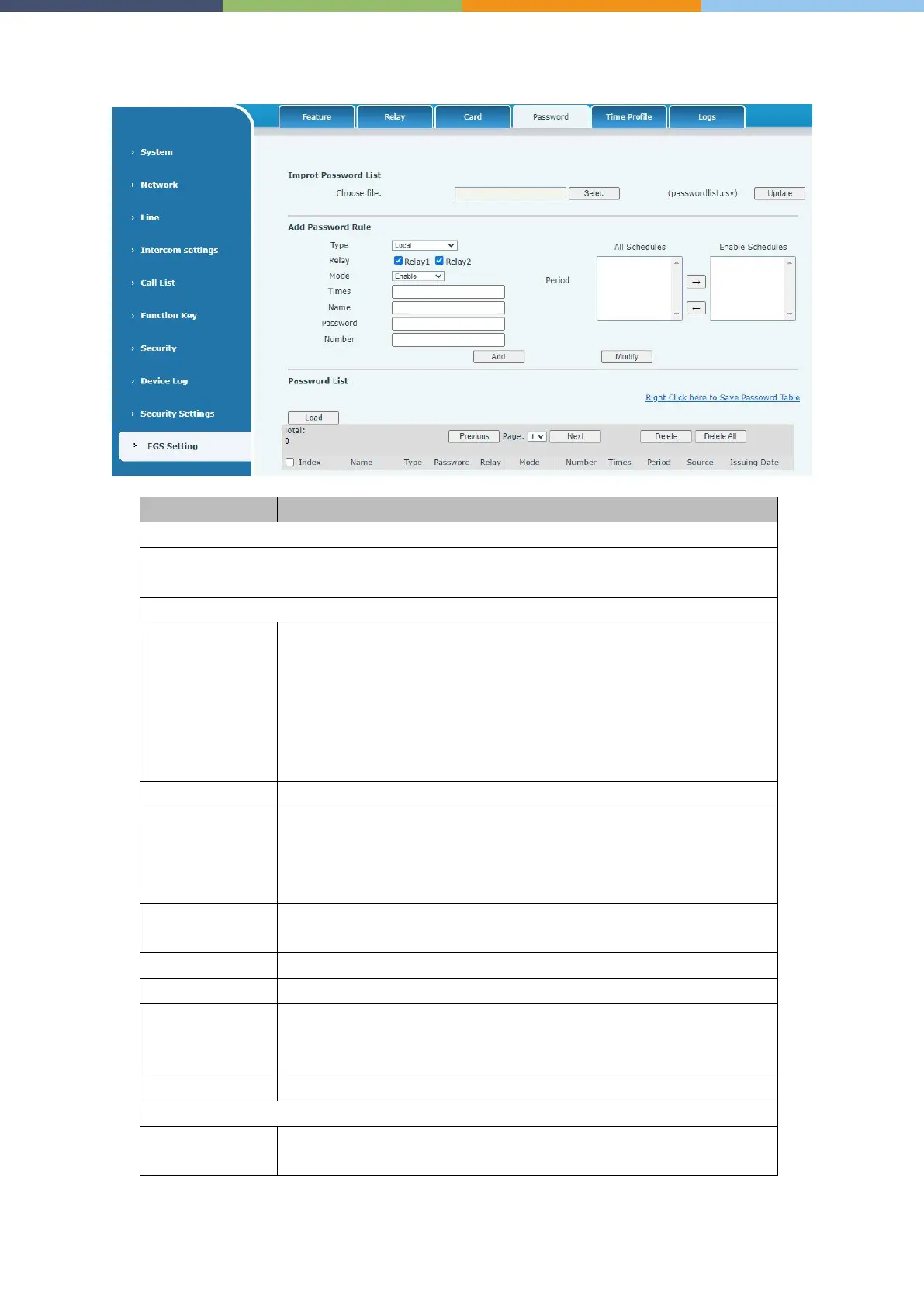
EGS Setting >> Password
Click the <Select> to choose to import remote password list file (passwordlist.csv) and
then clicking <Update> can batch import remote password rule.
Local: That is, the local door opening password, enter a password that
can be used to open the door.
Remote: Remote opening password, when the indoor unit calls the
door device or when the door device calls the indoor unit to open the
door, enter the DTMF password to open the door.
Remote and local: One password supports two door opening
methods at the same time.
Disable, unsuccessful password opening after disabling.
Enable, after enabling the password to open the door to take effect.
Time Profile
, the password to open the door takes effect during the set
time profile.
The number of times the door can be opened with a password
within a given time period
Password to open the door
When the indoor unit calls the access control or the access control calls
the indoor unit to open the door, enter the DTMF password to open the
door
Time to add the card, automatically generated
Operation
Export: Support to export to csv. file



 To Next Page