Page 20 of 66 0455-0323 Rev A
Web Configurations
Web Page Authentication
Users can log into the device's web page to manage user device information and operate the device.
Users must provide the correct user name and password to log in. If the password is entered
incorrectly three times, it will be locked and can be entered again after 5 minutes.
The details are as follows:
•
If an IP is logged in more than the specified number of times with a different user name, it will be
locked. If a user name logs in more than a specified number of times on a different IP, it is also
locked.
System >> Information
User can get the device information in this page including,
•
Model
•
Hardware
•
Software
•
Uptime
•
Last uptime
•
MEMInfo
•
System time
And summarization of network status,
•
Network Mode
•
MAC
•
IP
•
Subnet mask
•
Default getaway
Besides, summarization of SIP account status,
•
SIP User
•
SIP account status ( Registered / Unapplied / Trying / Timeout )
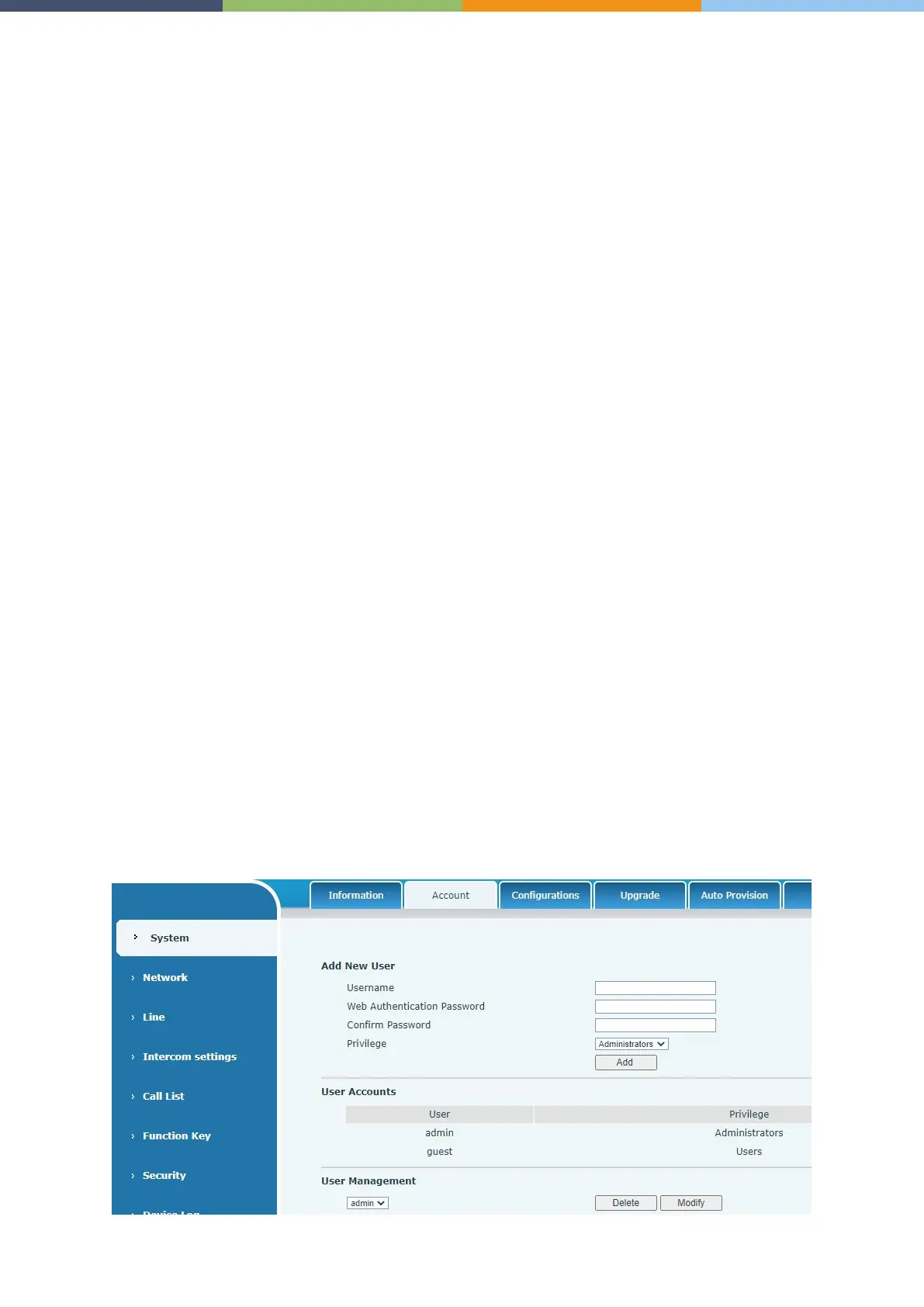
System >> Account
On this page the user can change the password for the login page.
Users with administrator rights can also add or delete users, manage users, and set permissions and
passwords for new users.



 To Next Page