Page 39 of 66 0455-0323 Rev A
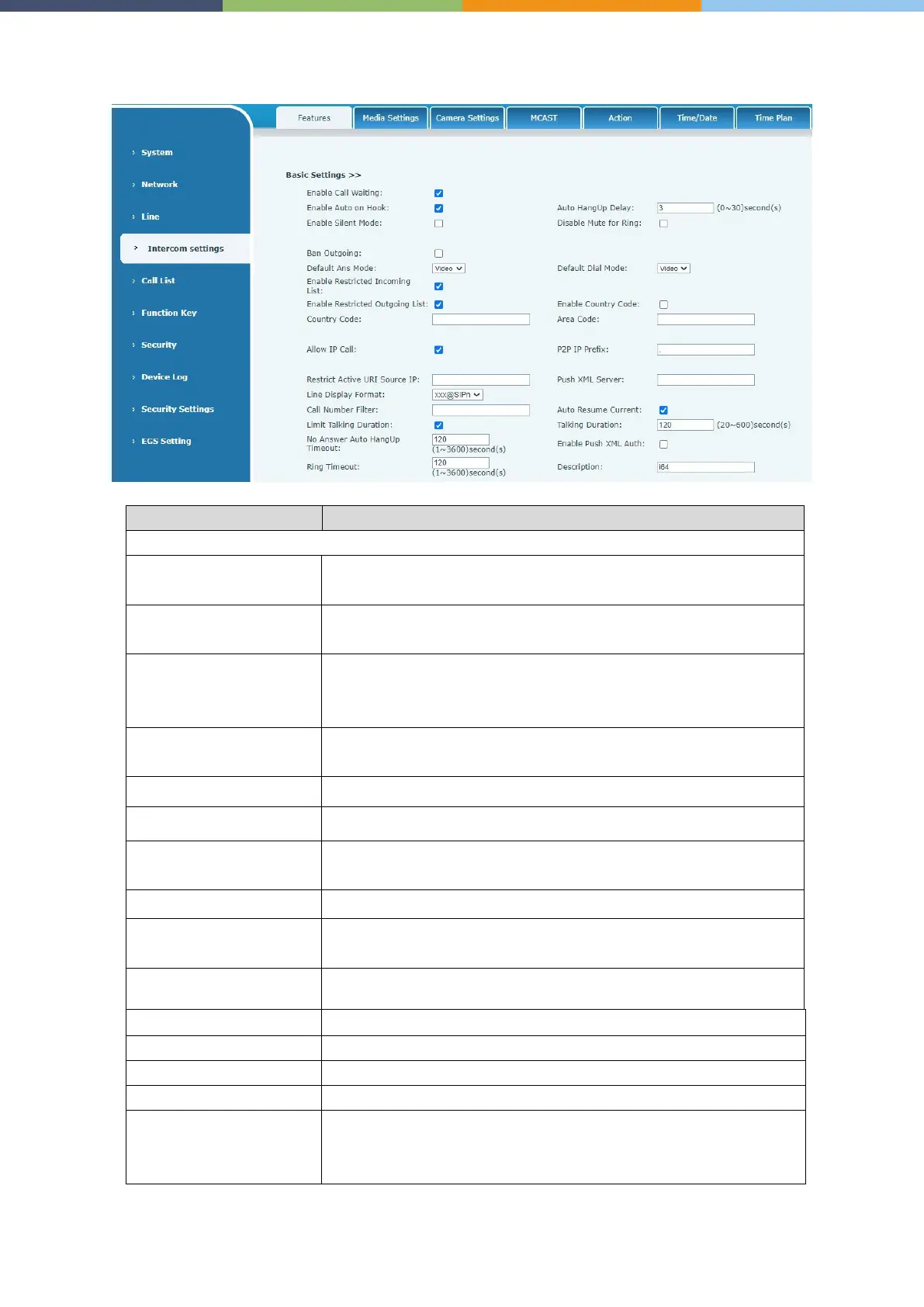
Intercom settings >> Features
Enable this setting to allow user to take second incoming call
during an established call. Default enabled.
The phone will hang up and return to an idle state automatically at
hands-free mode
Specify Auto handdown time, the phone will hang up and return to
an idle state automatically after Auto Hand down time at hands-free
mode, and play dial tone Auto handdown time at handset mode
When enabled, the phone is muted, there is no ringing when
calls, you can use the volume keys and mute key to unmute.
When enabled, you cannot mute the phone.
If you enable Ban Outgoing, you cannot dial out any number.
Select the default mode after an incoming call, including Video
and
Audio
Select the default mode after dialing, including Video and Audio
Enable Restricted Incoming
List
Enable Restricted Incoming List
Enable Restricted Outgoing
List
Enable Restricted Outgoing List
If enabled, user can dial out with IP address
You can set IP call prefix, for example, set P2P IP Prefix as
“172.16.2.”,then input #160 using the dialpad and press dial key. It
will call 172.16.2.160 automatically



 To Next Page