Page 62 of 66 0455-0323 Rev A
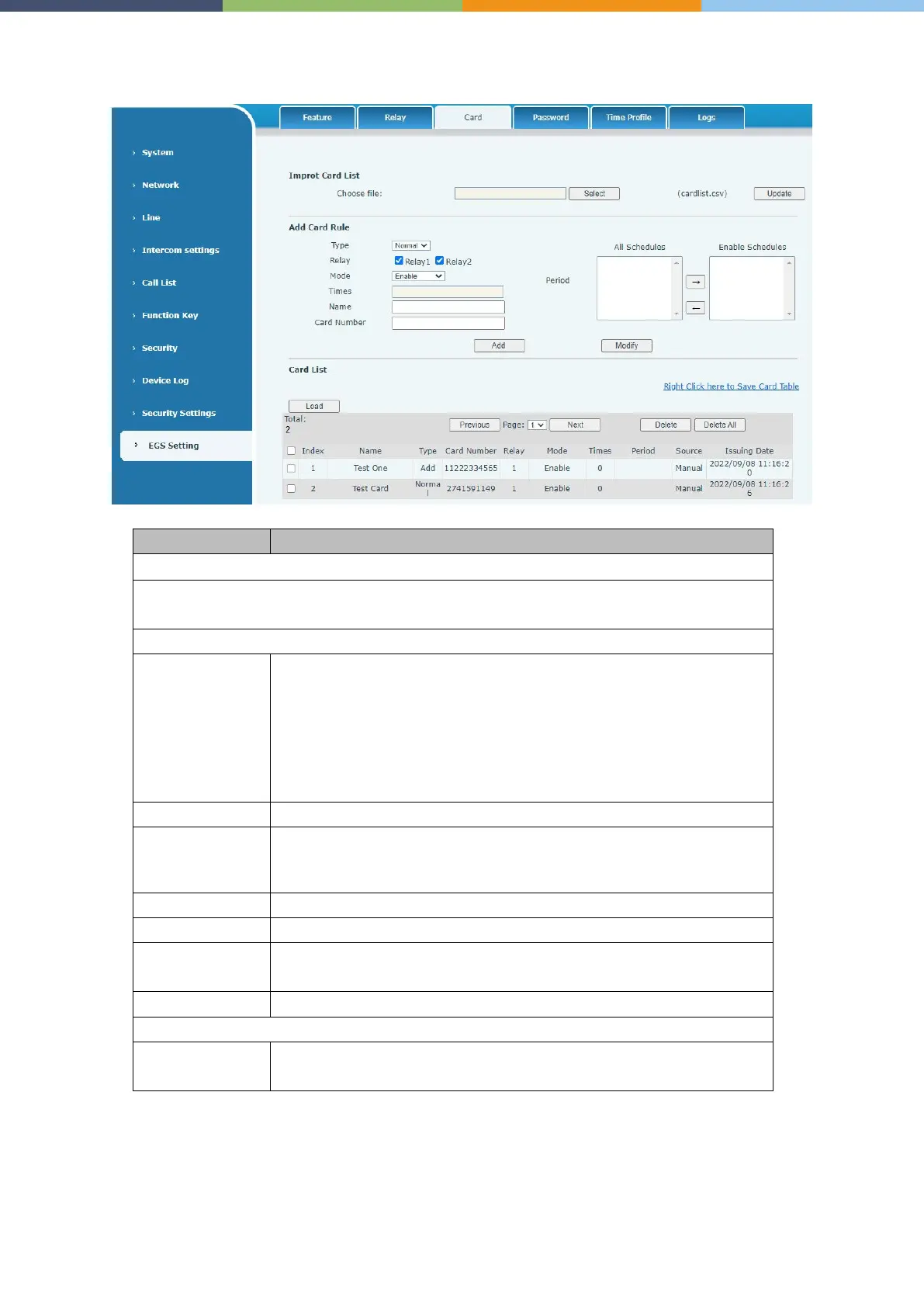
EGS Setting >> Card
Click the <Select> to choose to import remote card list file (cardlist.csv) and then clicking
<Update> can batch import remote card rule.
Normal, namely to open the door card
Add
, swipe the added card administrator card in the standby mode, the
device will enter the card add mode, and then swipe the card, the card
that has not been added to the card list will be added.
Delete, swipe the added card delete administrator card in standby, the
device will enter the card delete mode, and then swipe the card, the
added card will be deleted.
Swipe to open the door lock
Closed, swiping is unsuccessful after disabling Enable, swipe the card
to take effect after enabling.
Time zone, swiping the card in the set time zone takes effect.
The number of times the card can be swiped in a time period
RFID card number. You can manually fill in the first 10 digits of the card
number or select the existing card number
The time to add the card, automatically generated
Export, support to export to csv. file.



 To Next Page