170 Ion Operations Manual
Color Path
Note: Color path is only applicable for additive mixing systems.
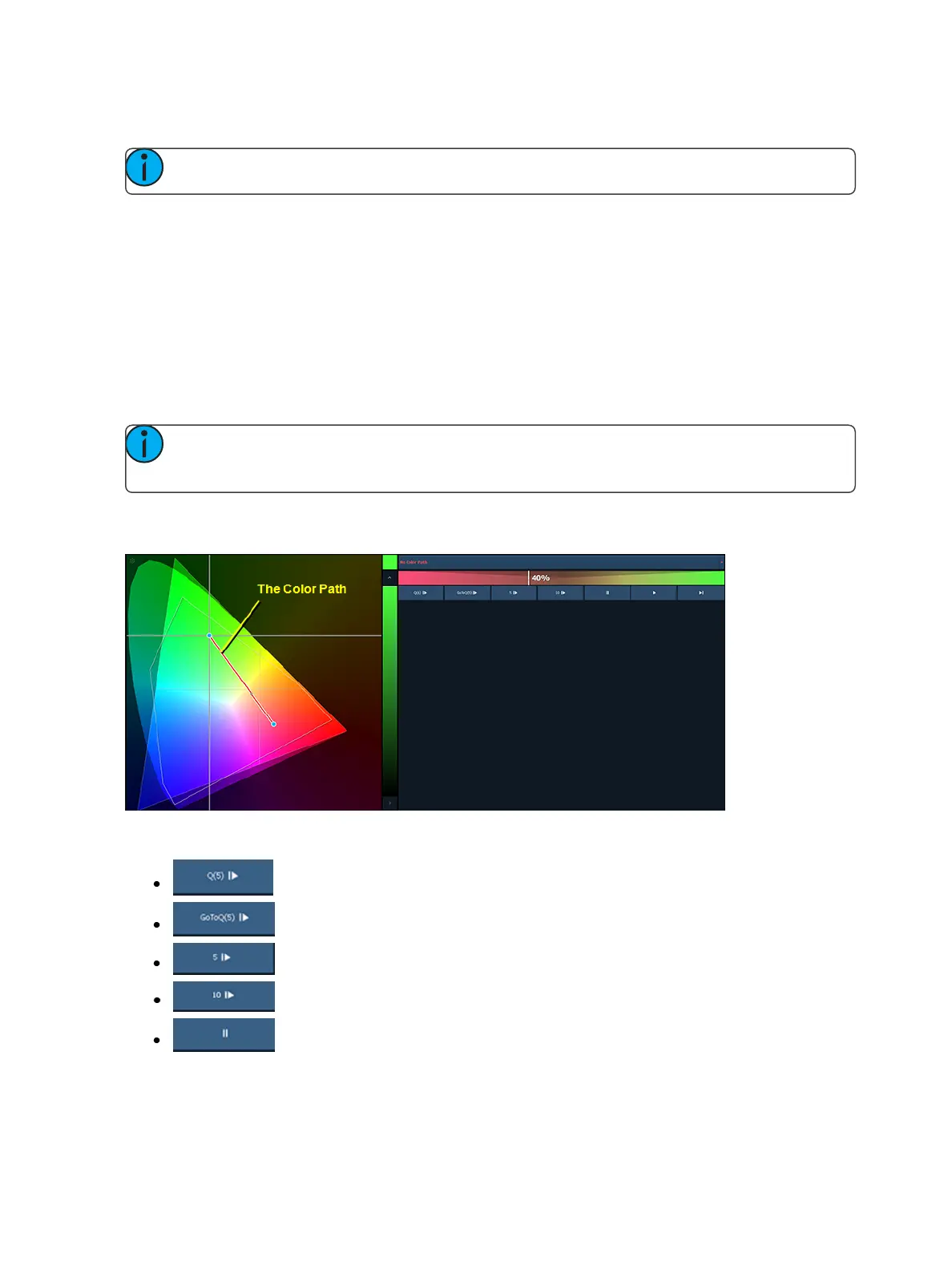
Color Path is a option for controlling color fades between cues. By default, color fades happen in the
native space of the fixture. If you want a fade that resembles a fade in a different color space, you
can do that using color paths. There are eight preprogrammed color paths, and you can also record
your own . Up to 1000 color paths are supported.
To open the color path display, click on the gear icon in the color picker display and select Fade. To
open the color path list display, press the {Color Path} icon in the home screen, use [Tab] [3][3], or
from the CIA by going to Browser>Record Target List>Color Path.
Color paths are selected either by clicking on the drop down above the color path or by using {Color
Path} [n].
Note: Channels involved in the fade have to be selected before you can choose or modify a
color path.
The color path display has a drop down list of the available paths, a color path preview bar, and con-
trol buttons. An indication line will display on the color space to show the color fade.
Availablecontrol buttons are:
- replays the color fade using the cue time.
- replays the color fade using the Go to Cue time from Setup.
- replays the color fade in five seconds.
- replays the color fade in ten seconds.
- pauses the color fade.



 To Next Page