IN1608 xi Scaling Presentation Switcher • Internal Web Pages 129
Date and Time Page
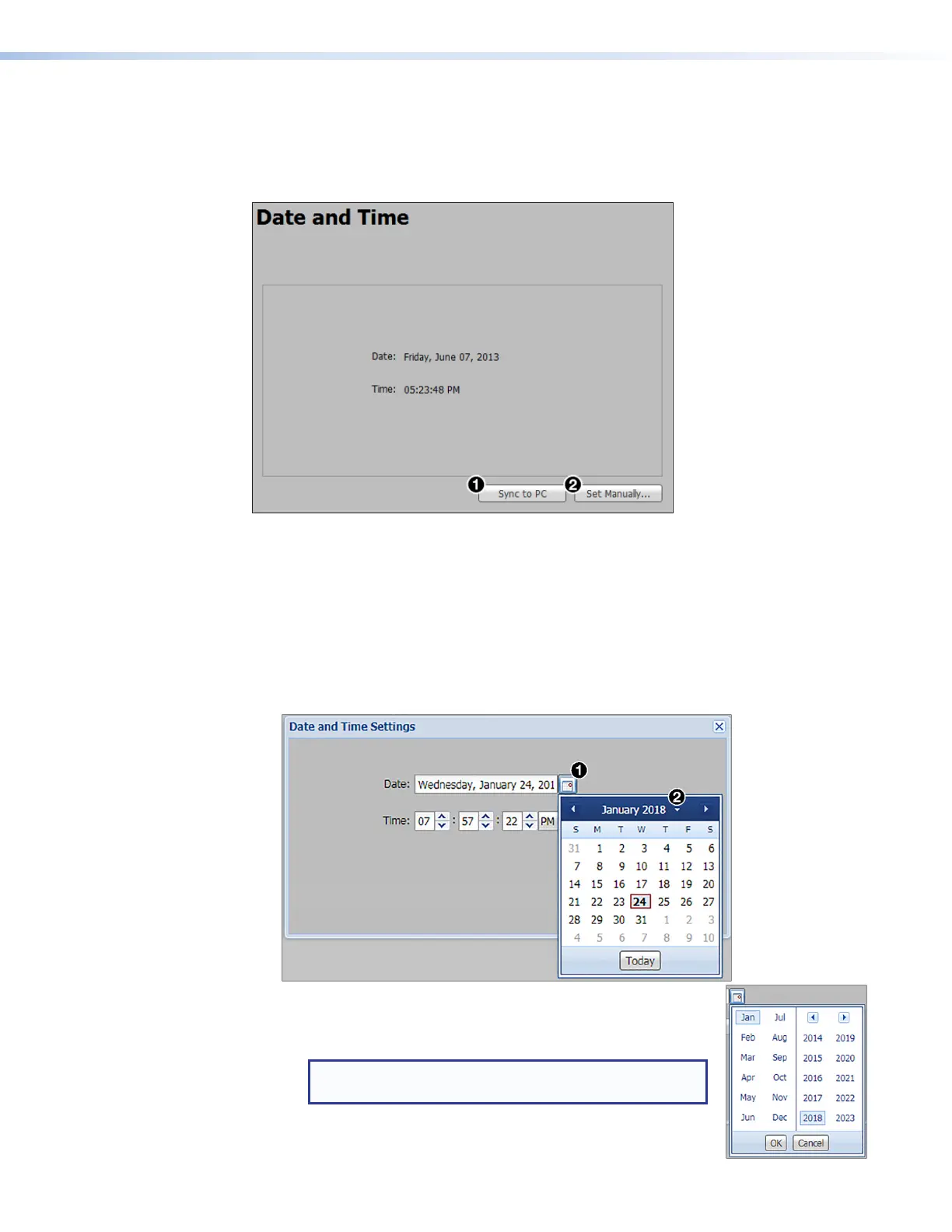
The Date and Time page contains adjustable device date and time settings. Click the Date
and Time icon (see figure 81,
7
, on page 124) on the Global Navigation Bar to open
the page.
Figure 88. Date and Time Page
To automatically sync the date and time to a connected PC:
Click the Sync to PC button (see figure 88,
1
).
To manually set the date and time:
1. Click the Set Manually... button (
2
). The Date and Time Settings dialog box
opens.
2. Click the Calendar icon (see figure 89,
1
) to open a calendar dialog box of selectable
dates.
Figure 89. Calendar for Date Settings
a. Click the Date Picker button to the right of the month and
year (
2
) to open a table of selectable months and years.
NOTE: Use the Left arrow or Right arrow button to
view more years.
b. From the Date Picker table (see the illustration at right)
select the month and year.



 To Next Page
 Loading...