Menu
Trip Information
4
Reset
Settings
BACK
1
2
3
Menu and Settings
The Menu and settings menu cannot be called up
whilst cycling.
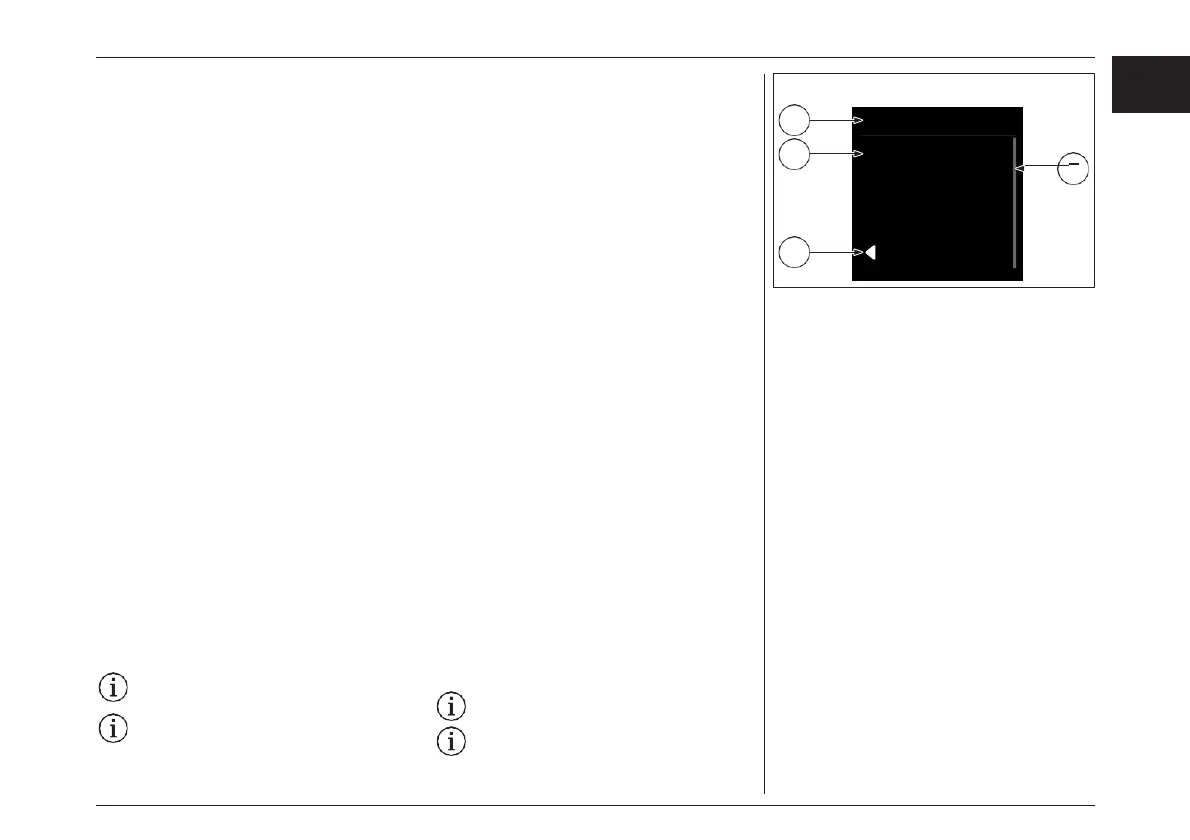
A menu in the Brose «Allround» display/control
unit is arranged as follows:
1. Title (always visible)
2. Menu sub-point
3. Back (last item, alternative to «Walk assist»
key)
4. Navigation bar
To call up the menu, stop or start the e-bike and,
with the bike stationary, do the following:
› Open the menu by pressing the «Menu» key for
two seconds.
› Use the «Increase» and «Decrease» keys to
navigate to the desired item and call it up with
the «Menu» key.
Menu
You can obtain the following information via the
menu:
› Trip information (overview of full trip
information)
› Reset (all trip data)
› Settings
Trip Information
Overview of all trip data.
Reset Trip Information
To reset the display values in the trip information,
proceed as follows:
› Select «Reset» in the menu by pressing the
«Menu» key.
› If you would like to delete all trip information,
confirm this by pressing the «Menu» key again.
All trip information values are reset to zero.
Reset cannot be called up while cycling.
メニューと設定
サイクリング中にメニューや設定メニューを呼び出
すことはできません。
ブローゼ オールラウンドディスプレイ/コントロール
ユニットのメニューは、以下のように構成されてい
ます。:
1. タイトル(常時表示)
2. サブポイントメニュー
3. 戻る(最後の項目、“ウォークアシスト ”キー
の代わり)
4. ナビゲーションバー
メニューを呼び出すには、e-bikeを静止させた状態
で以下の操作を行ってください。:
› 「メニュー」キーを押してメニューを開くを2秒間押
してメニューを開きます。
› 「増」「減」キーで目的の項目に移動し、「Menu」
キーで呼び出します。
メニュー
メニューでは以下の情報を得ることができます。 :
› トリップ情報(全トリップ情報の概要)
› リセット(すべてのトリップデータ)
› 設定
トリップ情報
全トリップデータの概要
リセット トリップ情報
トリップ情報の表示値をリセットするには、次のよう
に操作します。 :
› 「メニュー」キーを押して、メニューから「リセット」
を選択します。
›すべてのトリップ情報を削除したい場合は、再度
「Menu」キーを押して実行してください。
すべてのトリップ情報の値はゼロにリセットさ
れます。
走行中にリセットを呼び出すことはできませ
ん。
77
EN
JPN
ディスプレイ- DISPLAY



 To Next Page