B
C
D
F
5
TRIP
47.5
km
18
5
6
kmh
2
4
DISPLAY AND SETTINGS
Display
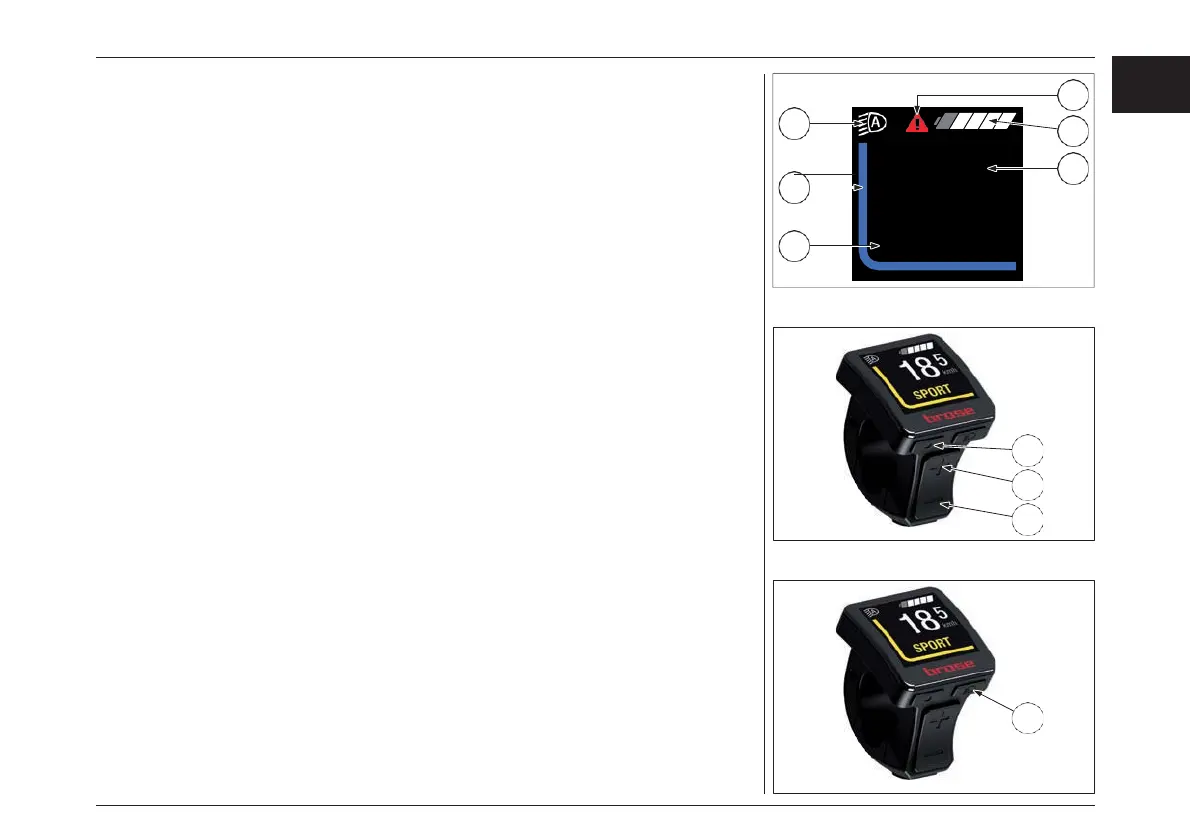
The display offers an overview of the following
information:
1. System status information (e.g. faults)
2. Lighting indicator
3. Battery charge level indicator
4. Display of current assistance
5. Trip information (incl. unit)
6. Speed (incl. unit)
The displays parts 1-3 form the status bar and are
displayed in the ride display on each screen.
With the «Menu» key (B) you can also display a
range of information about your trip while riding,
so both hands can remain on the handlebar
while riding.
Use the «Increase» (C) and «Decrease» (D) keys
to increase or decrease the assist level. If, for
example, you are in the settings menu, you can
use these keys to scroll up or down.
Bicycle lights
In the version in which the bike lights are powered
by the e-bike system, the front light and the rear
light can be switched on and off simultaneously
using the «Light» key (F) on the control unit.
設定
ディスプレイ
ディスプレイには以下の情報が表示されます。 :
1. システムステータス情報(故障など)
2. ライト表示
3. バッテリー残量表示
4. 現在のアシスタンス状況の表示
5. 走行情報(単位含む)
6. 速度(単位含む)
1〜3はステータスバーを形成し、ディスプレイに表
示されます。
「メニュー」キー(B)では、走行中のトリップに関する
さまざまな情報を表示することもできるので、走行
中は両手をハンドルバーに置いたままにすること
ができます。
「+」(C)、「-」(D)キーで、アシストレベルを上げた
り下げたりします。たとえば、設定メニューを表示し
ているときには、これらのキーで上下にスクロール
することができます。
ライト
自転車用ライトがe-bikeシステムから供給される
仕様の場合は、コントロールユニットの「ライト」
キー(F)を使って、フロントライトとリアライトを同時
にオン/オフすることができます。
71
EN
JPN
ディスプレイ- DISPLAY
1
3



 To Next Page