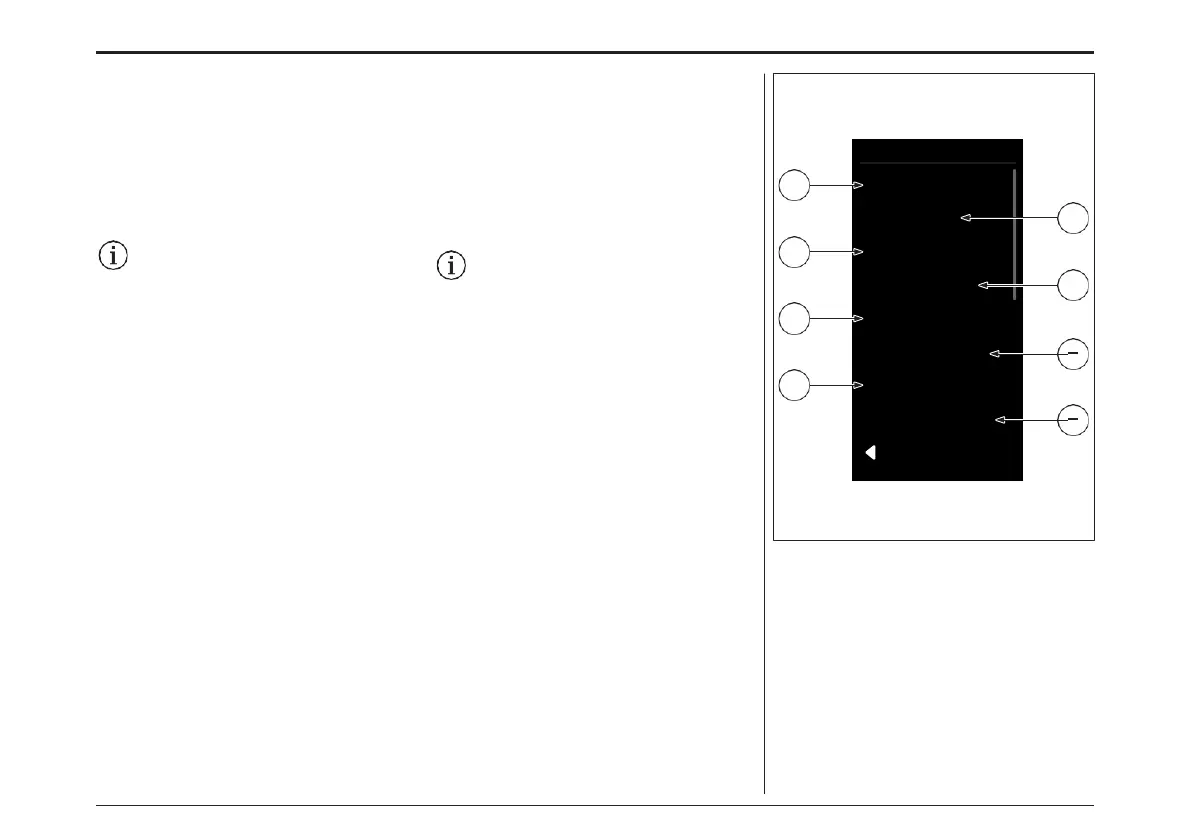
System
Light
Unit Format
Time Format
Battery Status
Clock
2
4
1
3
5
Shutdown Time
6
7
Custom. Assistance
Default Settings
8
BACK
System Settings
Navigate to the «System» sub-point.
You can use the «Increase» and «Decrease» keys
to select the required setting and open it and, if
necessary, further submenus using the «Menu»
key. From the respective point, you can return to
the previous menu by pressing the «Walk assist»
key. Alternatively, call up the last menu item with
«Back».
Please note that not every Brose Drive
System features a «clock» Module.
Therefore some options can´t be seen in
your e-Bike Display.
You can make the following settings here:
1. «Light»
» Activate automatic bike lighting
» Switch bike lighting on continuously
2. «Unit format»: The displayed units are
changed between «km/mi» and «km/h /
mph».
3. «Time format» (12h/24h): The display times
are switched between «12h / 24h». (optional)
4.
«Battery status»: Choose between:
» Battery status as segments
» Battery status in percent (%)
システム設定
「システム」の設定ページに移動します。
コントローラーの「↑」「↓」キーで必要な設定を選
択し、「Menu」キーでその設定と必要に応じてさら
にサブメニューを開きます。それぞれのポイントで、
「ウォークアシスト」キーを押すと、前のメニューに
戻ることができます。または、「戻る」で最後のメ
ニュー項目を呼び出します。
すべてのブローゼドライブシステムが “時
計 ”モジュールを備えているわけではあり
ませんのでご注意ください。 そのため、e-
Bike
のディスプレイに表示されないオプ
ションもあります。
ここでは以下の設定が可能です。 :
1. «Light»
» e-Bikeのライトを作動させる
» ライトを連続点灯させる
2. «Unit format»: 表示単位を "km/mi
" と "km/h / mph " の間で変更し
ます。
3. «Time format»: 表示される時間が「12h /
24h」で切り替わります。(オプション)
4. «Battery status»:
» 電池の状態をセグメントで表示
» バッテリーの状態をパーセントで表示(%)
ディスプレイ- DISPLAY
80



 To Next Page