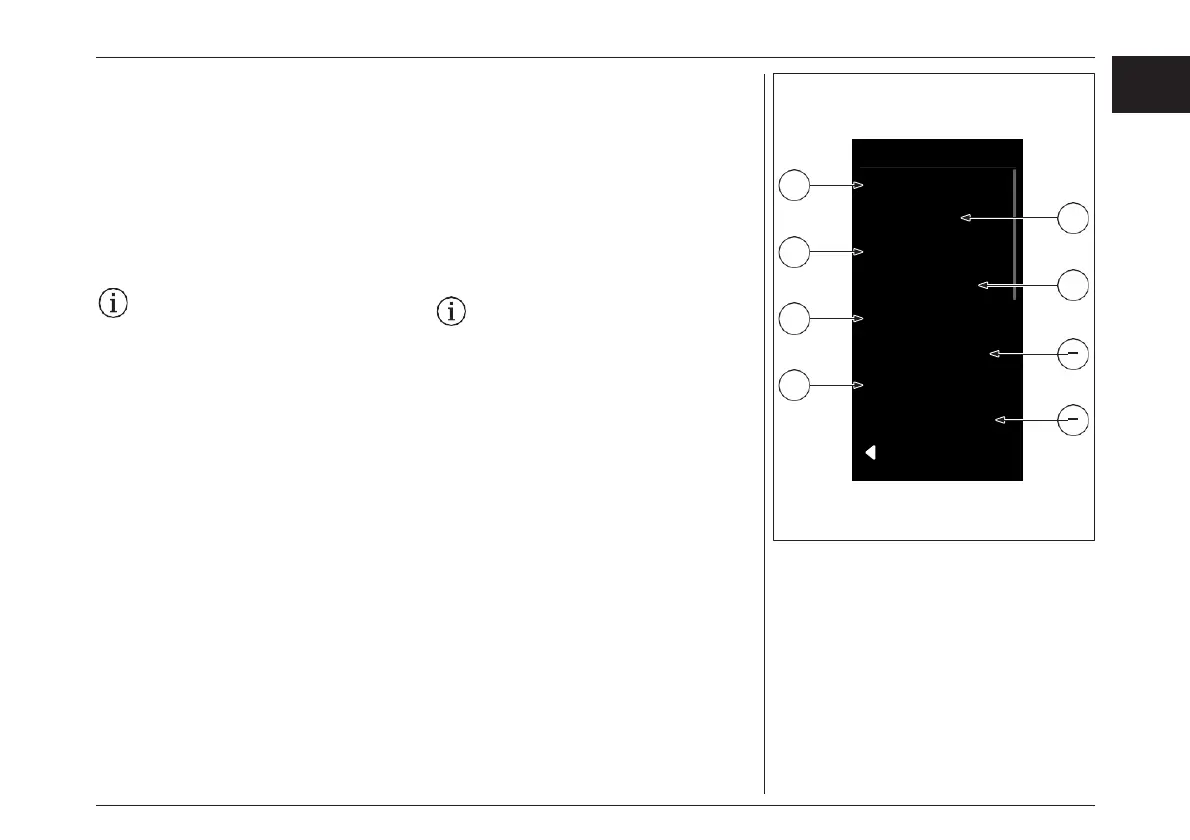
System
Light
Unit Format
Time Format
Battery Status
Clock
2
4
1
3
5
Shutdown Time
6
7
Custom. Assistance
Default Settings
8
BACK
5. «Clock» (ss : mm) (optional)
» Press the «Menu» key. The hours display
flashes.
» Set the required hour using the «Increase»
and «Decrease» keys. Confirm your entry
with the «Menu» key.
» The minute display flashes. Set the
required minute using the «Increase» and
«Decrease» keys. Confirm your entry with
the «Menu» key.
» Exit the menu with the help of the «Walk
assist» key.
Please note that not every Brose Drive
System features a «clock» Module.
6. «Shutdown time»: Define the automatic
switch-off time (1-20min) for your Brose
Drive System.
your
assistance mode individually to your needs.
7. «Custom.Assistance»: Adjust
8. «Default Settings» Reset
» Select the «Default Settings» menu point.
» Pressing the «Menu» key again resets all
settings to the delivery status.
5. «Clock» (ss : mm)(オプション)
» メニュー "キーを押します。時間表示が
が点滅します。
» 「+」「-」キーを使って、必要な時間を設定し
ます。「Menu」キーで入力を確定します。
»
分表示が点滅します。分を「+」「-」キーで設
定、「メニュー」キーで入力を確定します。
» 「 ウォークアシスト」キーでメニューを終了しま
す。
なお、すべてのブローゼドライブシステム
に「時計」モジュールが搭載されているわ
けではありません。
6. «Shutdown time»:ブローゼドライブシステム
の自動スイッチオフ時間(1~20分)を設定しま
す。
7. «Custom.Assistance»:
ニーズに合わせてアシスタンスモードを個別に
調整することができます。
8. «Default Settings»: デフォルトの設定に戻す
» 「Default Settings 」を選択します。
»もう一度「Menu」キーを押すと、すべての設
定がデフォルト状態に戻ります。
81
EN
JPN
ディスプレイ- DISPLAY



 To Next Page