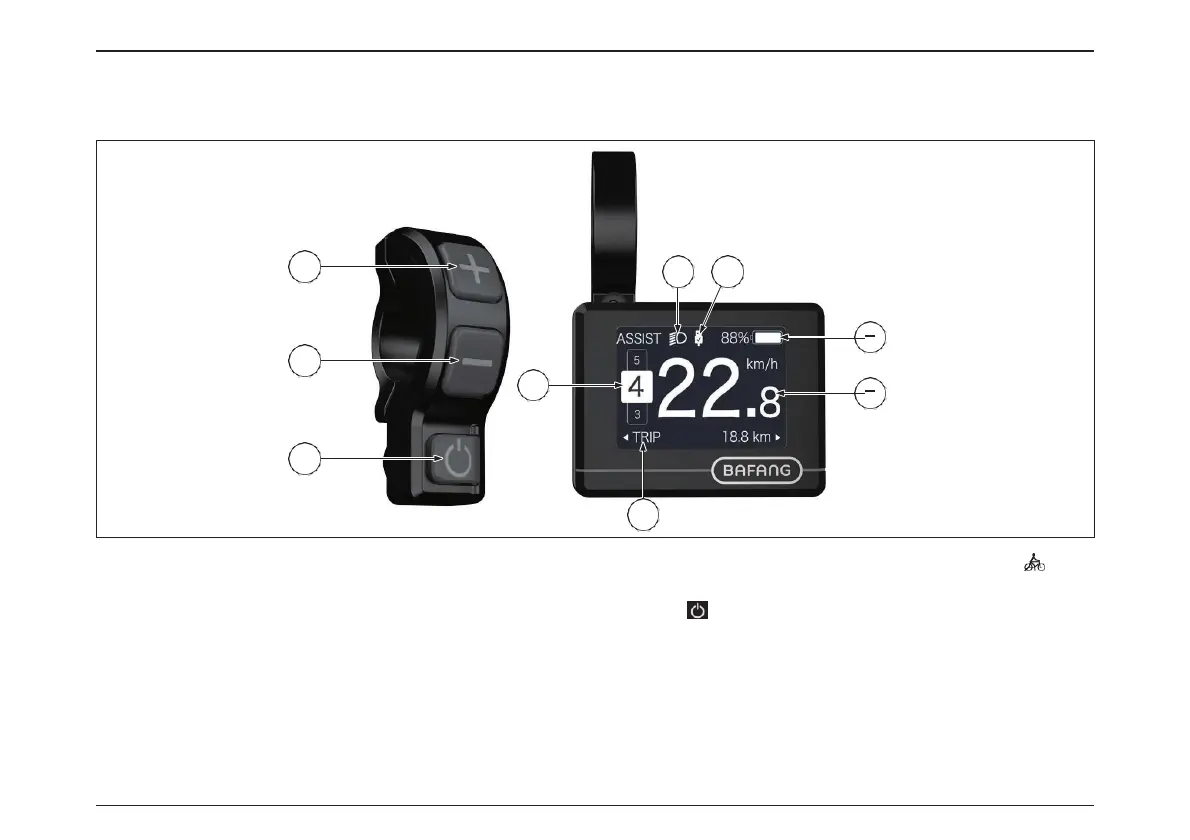
9
5
3
4
8
7
1 2
6
mode.
means level 0, no power assistance, means push assistance
7. Up.
8. Down.
9. ON/OFF .
INDICATION AREA AND BUTTON DEFINITION
1. Headlight indication: Indicate the working status of headlight.
2. USB connection indication: Indicate the status of USB connection to
peripheral device.
3. Battery capacity indication: Indicate the current remaining capacity.
4. Real-time speed indication: To indicate the real-time speed.
5. Multiple data indication: To indicate single (TRIP), Total range (ODO),
max speed (MAX), average speed (AVG), remaining distance(RANGE),
output power (POWER), energy consumption(Cal), riding time(TIME);
(Notice: Calory data will only come out when the display recognize
the sensor as torque sensor or the signal of torque in 10s after switch
on;Remaining distance will only come out when the display get the
data of range.)
6. Assistance level indication: To indicate the current support level, this
display has 0/1/2/3/4/5 mode, the chosen level will be indicated in am-
plifying and reverse color Arabic number; No chosen level indication
54
電動アシスト機構を使いこなそう - USING POWER ASSISTED PEDALLING



 To Next Page