USER SETTING
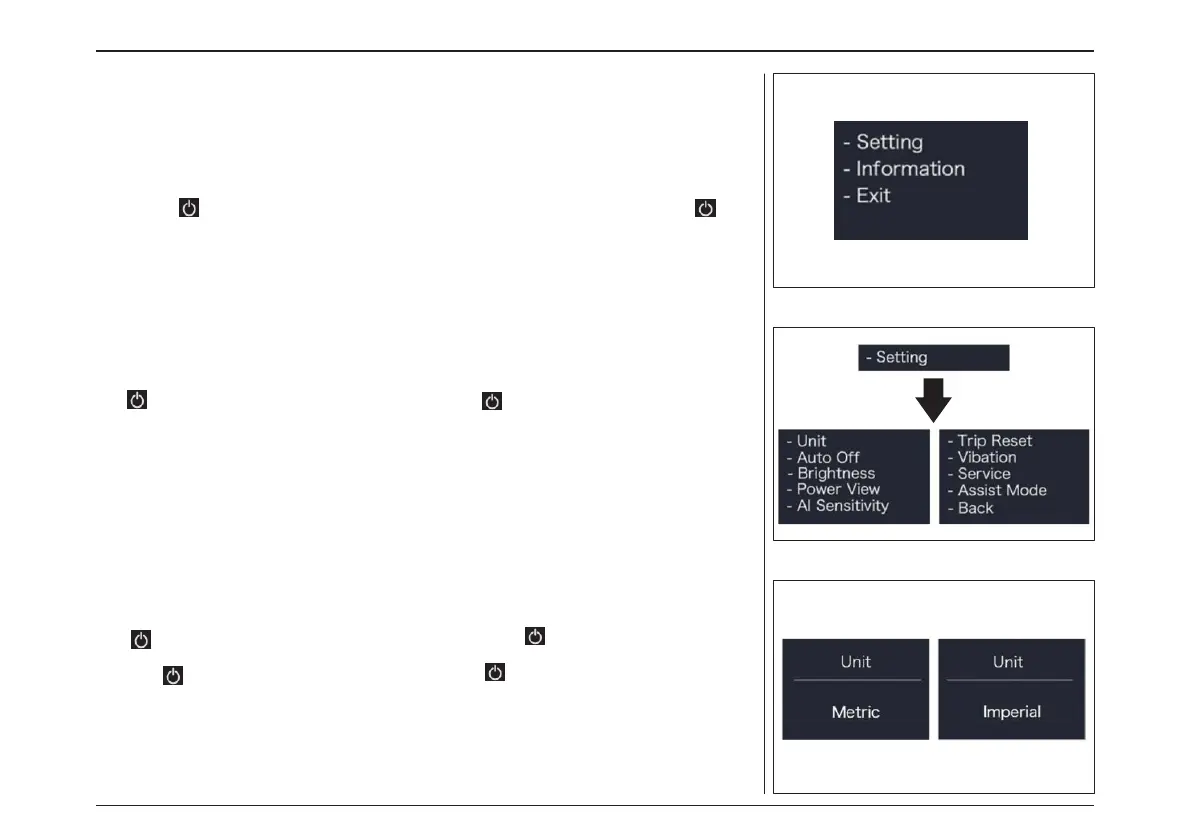
Setting
After the HMI powered on, press and hold “+” &
“-” button (at the same time) to enter into the
“SETTING”. Briefly press (<0.5S) “+” or “-” button
to select and then briefly press (<0.5S) button
to confirm and enter into the option.
“Setting” interface
In “SETTING” interface, briefly press (<0.5S) “+” or
“-” to select “Setting” and then briefly press
(<0.5S) to confirm and enter into “Setting”.
“Unit” - Set unit for km/mile
Briefly press “+” or “-” to select “Unit”, and then
briefly press to enter into the item. Select
“Metric”/ “Imperial”, and then briefly press
(<0.5S) to save and exit back to“Unit”. Press and
hold “+” and “-” synchronously to save and exit
back to the main interface, or you can also
select “BACK” and “EXIT” to exit back to the main
interface.
“距離の単位” – km/マイルの単位設定
“+” または “-” を押して「Unit(単位)」を選
択し、 短押しで項目に入ります。
「Metric(メートル)」/「Imperial(インペリアル)」
を選択し、 短押し(0.5秒間)で保存して「単
位」に戻ります。同時に “+”と“-”を長押しすると、
保存してメイン画面に戻ります。もしくは、
“BACK ”と “EXIT ”を選択することでメイン画
面に戻ることができます。
設定インターフェース
「SETTING」への移行方法は、(0.5秒間)「+」
または「-」を押して「Setting」を選択し、(0.5秒
間) を短押しし「Setting」に入ります。
ユーザー設定
セッティング
HMIの電源が入った後、“+”と“-”ボタンを(同
時に)長押しして、“SETTING ”に入ります。
(0.5秒間) “+”または“-”ボタンを押して選択し、
(0.5秒間) ボタンを押して確認し、オプショ
ンに入ります。
電動アシスト機構を使いこなそう - USING POWER ASSISTED PEDALLING
58



 To Next Page