Fanvil Technology Co., Ltd
HQ Add: Level 3, Block A, Gaoxinqi Building, Anhua Industrial Park, Qianjin 1 Road, 35th District, Bao'An, Shenzhen, 518101 P.R. China
Tel: +86-755-2640-2199 Fax: +86-755-2640-2618 Email: fanvil@fanvil.com www.fanvil.com Beijing Tel:+86-10-5753-6809
Suzhou Tel: +86-512-6592-0605 SEA Tel: +60-3-203-50737
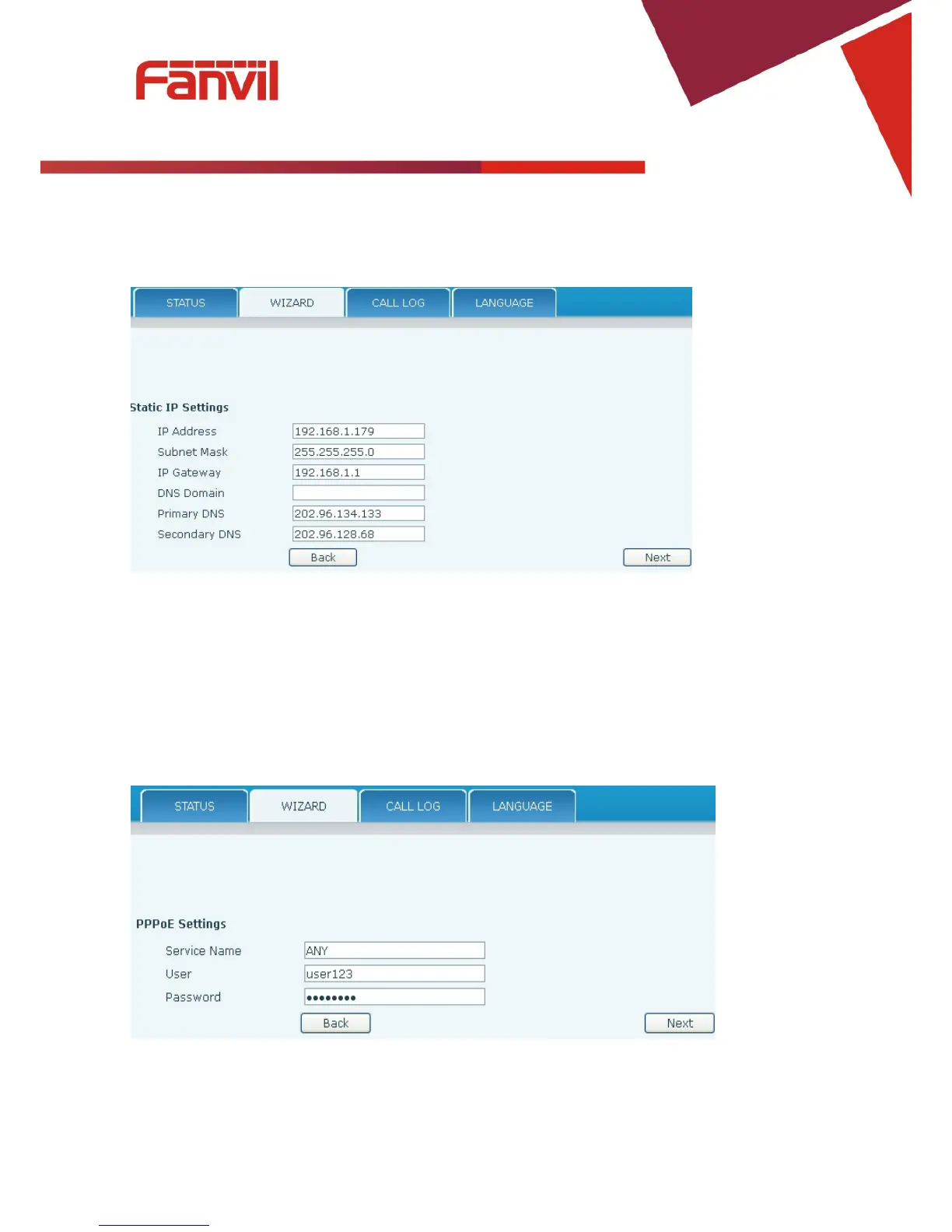
8.3.1.2.1 Static IP
If Static IP is selected, this screen will be displayed. Information provided by the ISP should be
entered.
Click Back to return to the Wizard screen. Click Next to go to Quick SIP Settings
8.3.1.2.2 DHCP
After selecting DHCP and clicking NEXT, the Quick SIP Settings screen will appear. Click Back to
return to the Wizard screen. Click Next to go to the Summary screen.
8.3.1.2.3 PPPoE
If PPPoE is selected, this screen will appear. Enter the information provided by the ISP.



 To Next Page