Fanvil Technology Co., Ltd
HQ Add: Level 3, Block A, Gaoxinqi Building, Anhua Industrial Park, Qianjin 1 Road, 35th District, Bao'An, Shenzhen, 518101 P.R. China
Tel: +86-755-2640-2199 Fax: +86-755-2640-2618 Email: fanvil@fanvil.com www.fanvil.com Beijing Tel:+86-10-5753-6809
Suzhou Tel: +86-512-6592-0605 SEA Tel: +60-3-203-50737
IP Address or name of DSL Server
DSL User Name or Login ID
Password DSL Password
After entering the new settings, click the APPLY button. The phone will save the new settings and apply
them. If a new IP address was entered for the phone, it must be used to login to the phone after clicking the
APPLY button.
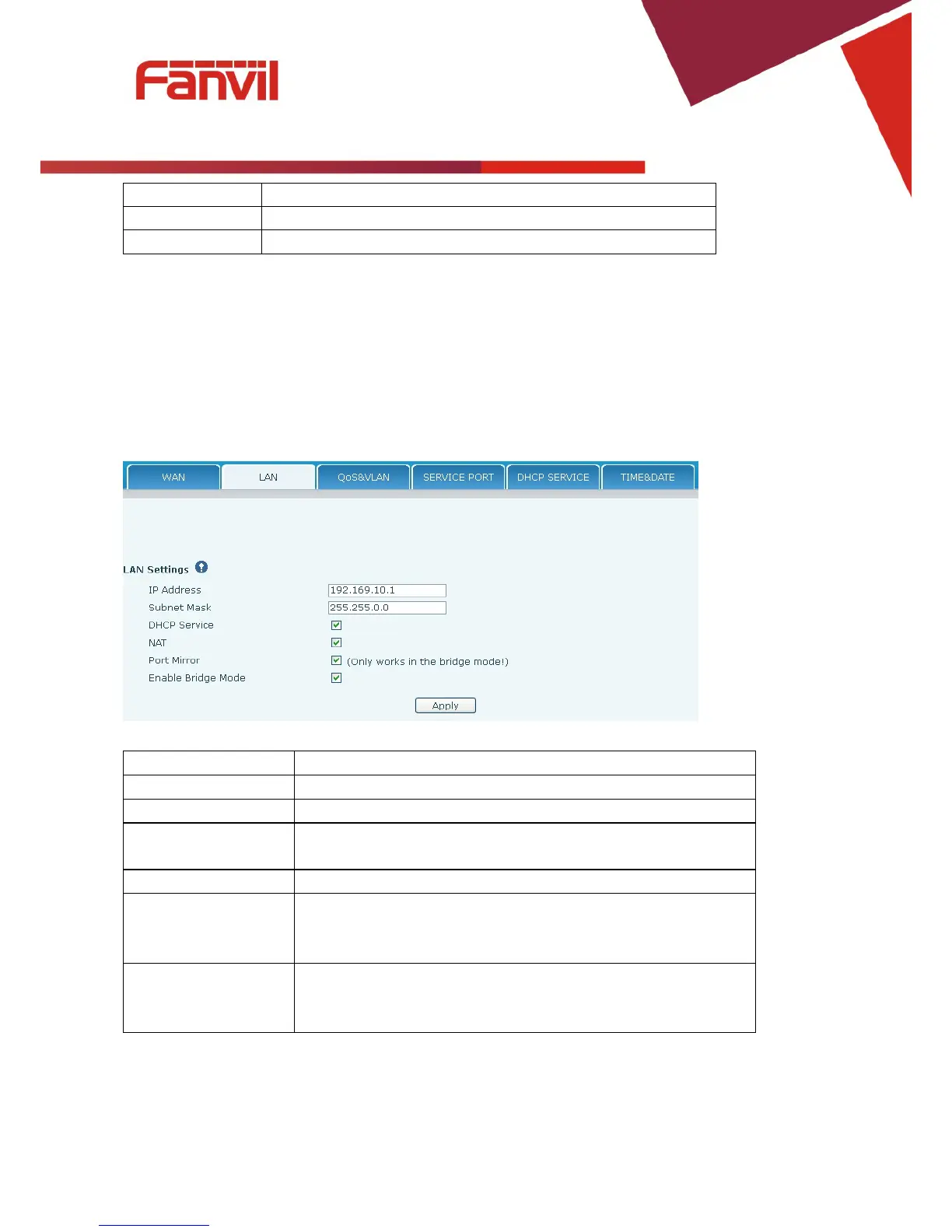
8.3.2.2 LAN Config
Field Name Explanation
DHCP Service Activate DHCP server for LAN port. The phone must be rebooted
for the DHCP server setting to take effect.
Port Mirror can only be activated in bridge mode. If activated, the
data stream from the WAN port is copied to the LAN port of the
Enable Bridge Mode If Bridge Mode is activated, the phone will not provide an IP address
for the LAN port. Instead, the LAN and WAN will be part of the
same network. If this is activated, clicking Apply, will cause the



 To Next Page