⑥
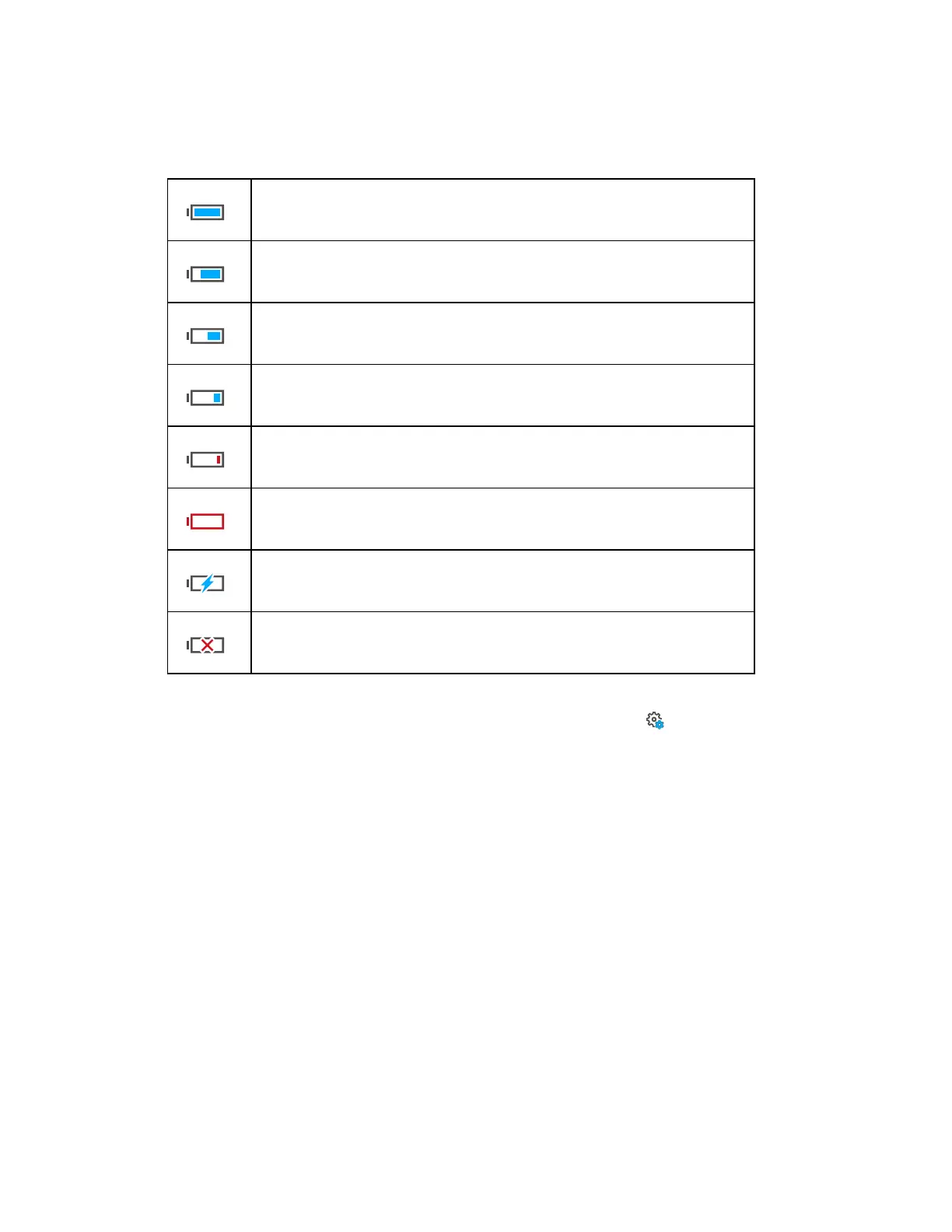
Battery - Shows the status and charge-state of the internal battery
:
Battery is fully charged
Charge state > 75% and < 100%
Charge state > 50% and < 75%
Charge state > 25% and < 50%
Charge state > 10% and < 25%, you should change the battery as soon as
possible.
Battery is almost empty; the scanner will automatically shut down within a
few minutes.
Battery is charging.
No battery in the scanner.
The exact charge-state of the battery can be viewed under Home Screen > Manage > General
Settings > Power Management (see Power Management on page87).
If the charge state of the battery is below circa 15%, you get a warning. Switch to the spare battery
as soon as possible.
If the charge state of the battery reaches circa 10%, the scanner stops scanning and automatically
shuts down. (If you start a new scan if the battery has less than 15% charge you many not be able to
finish the scan.)
⑦
Battery Charge Percent - Shows the exact amount of power remaining in the battery as a
percentage.
FARO
®
Focus Premium Laser Scanner User Manual
Chapter 6: Controller Software
FARO Focus Premium (March 2022) Page56of157



 To Next Page