Operating status Function
INFO mode – Display of input variables in the display
– Switch the display by pressing the A-pushbutton, B-pushbutton or A
and B-pushbuttons simultaneously.
SHOW mode – Display of current settings for the binary signals,
– Display and reset of the min/max values for the correlating distance
value and the supply pressure
EDIT mode – Setting or alteration of the parameters for the air gap sensor (switch-
ing outputs, display)
TEACH mode – Teaching of the switching points for the correlating distance values
(transfer of the current value as switching threshold)
Tab. 4 Operating statuses
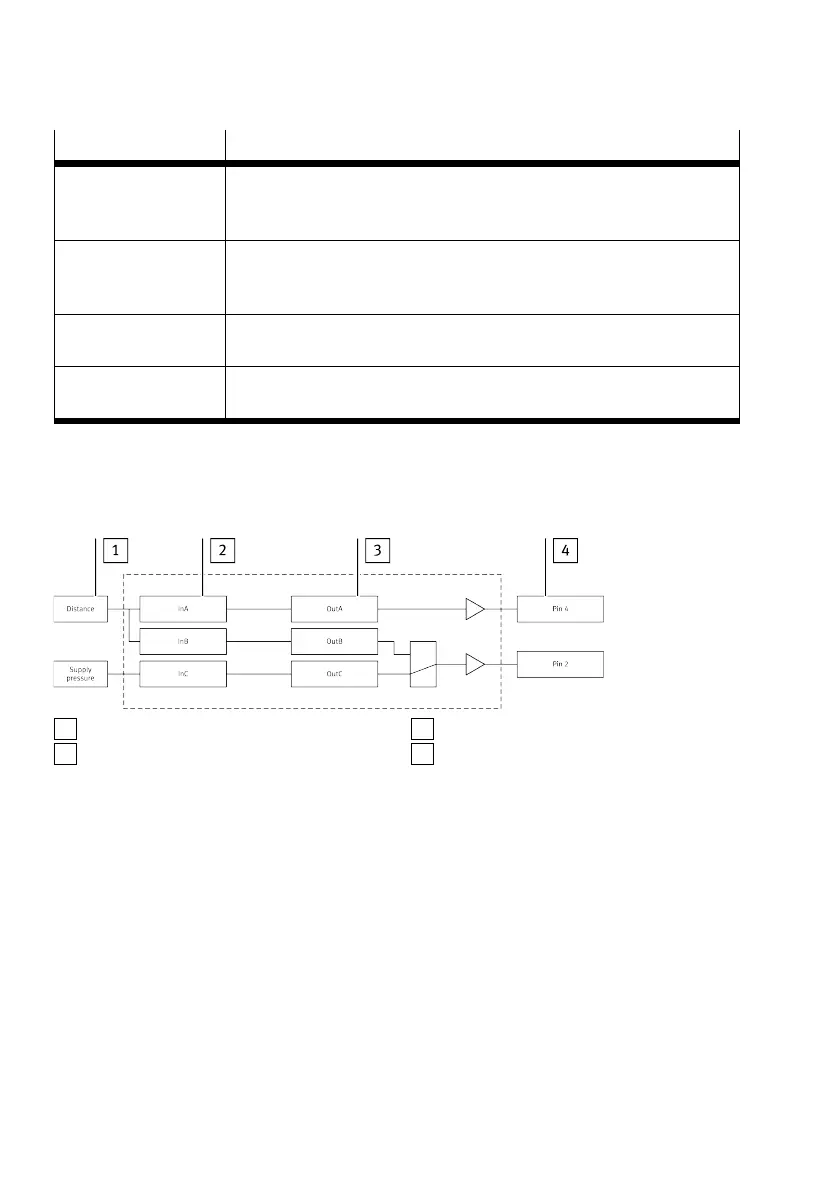
5.2.2 Switching outputs
5.2.2.1 Switching signals
1
Sensing variable
2
Input signal
3
Binary signal
4
Switching signal at sensor module plug
Fig. 3 Binary signals and switching signals SOPA-...-2P/2N-...
Product overview
12 Festo — SOPA — 2020-04








 To Next Page