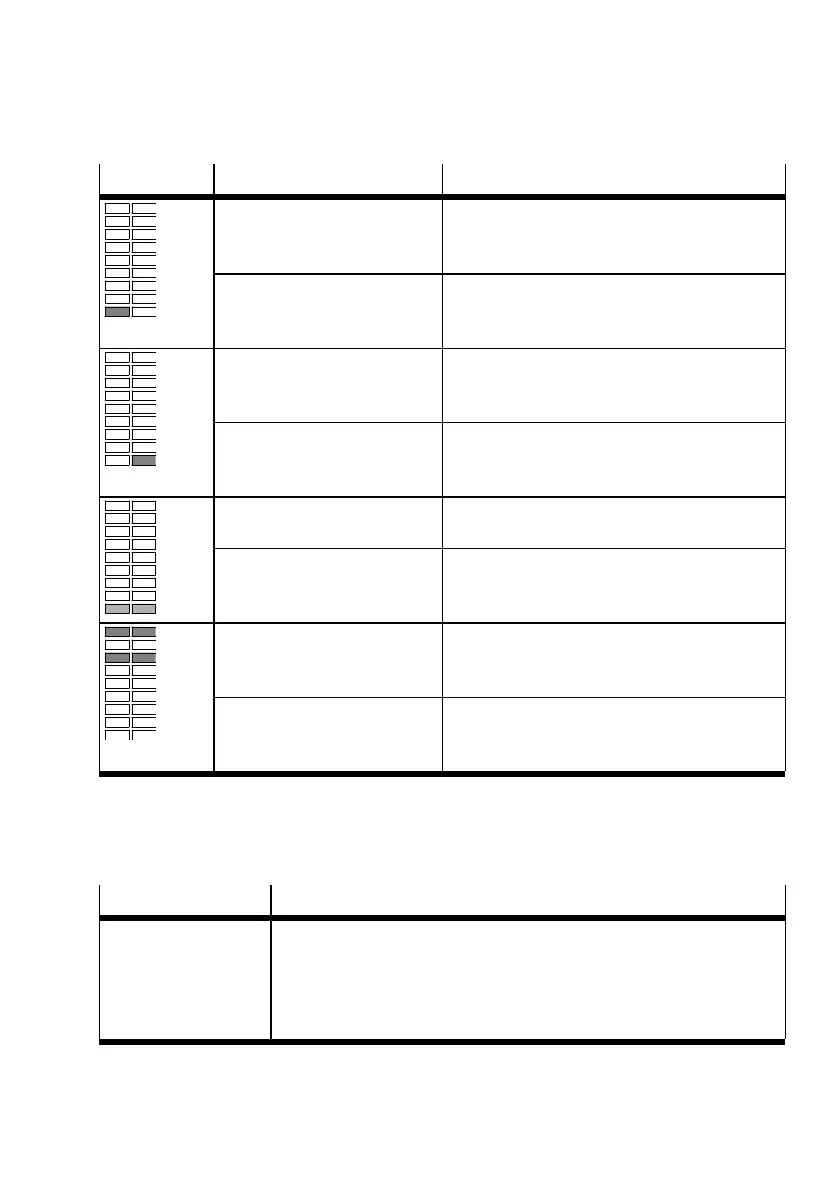
5.1.2.2 Bar graph on the display
Display Description
Segment at the bottom left and
[A] flash
– INFO mode active.
– 7-segment display shows the input value
InA.
Segment at the bottom left and
[A] light, [min] or [max] flash.
– SHOW mode active.
– 7-segment display shows the minimum or
maximum value InA.
Segment at the bottom right
and [B] flash.
– INFO mode active.
– 7-segment display shows the input value
InB.
Segment at the bottom right
and [B] light, [min] or [max]
flash.
– SHOW mode active.
– 7-segment display shows the minimum or
maximum value InB.
Segments at the bottom right
and left and [C] flash.
– INFO mode active.
– 7-segment display shows the input value InC.
Segments at the bottom left and
right and [C] light, [min] or [max]
flash.
– SHOW mode active.
– 7-segment display shows the minimum or
maximum value InC.
Marked segments light and
[Option] flashes.
– EDIT mode active.
– Special menu opens.
– 7-segment display shows the set option.
Marked segments light and
[Lock] flashes.
– EDIT mode active.
– Special menu opens.
– 7-segment display shows the security code.
Tab. 3 Special bar graphs on the display
5.2 Function
5.2.1 Operating statuses
Operating status Function
RUN mode – Basic status after the operating voltage is applied
– Numerical and graphic display of distance-correlated values (bar
graph)
– Display of measured values for supply pressure (in bar)
– Display of the signal statuses of the binary signals OutA, OutB, OutC
Product overview
11Festo — SOPA — 2020-04








 To Next Page