5.6. Camera configuration
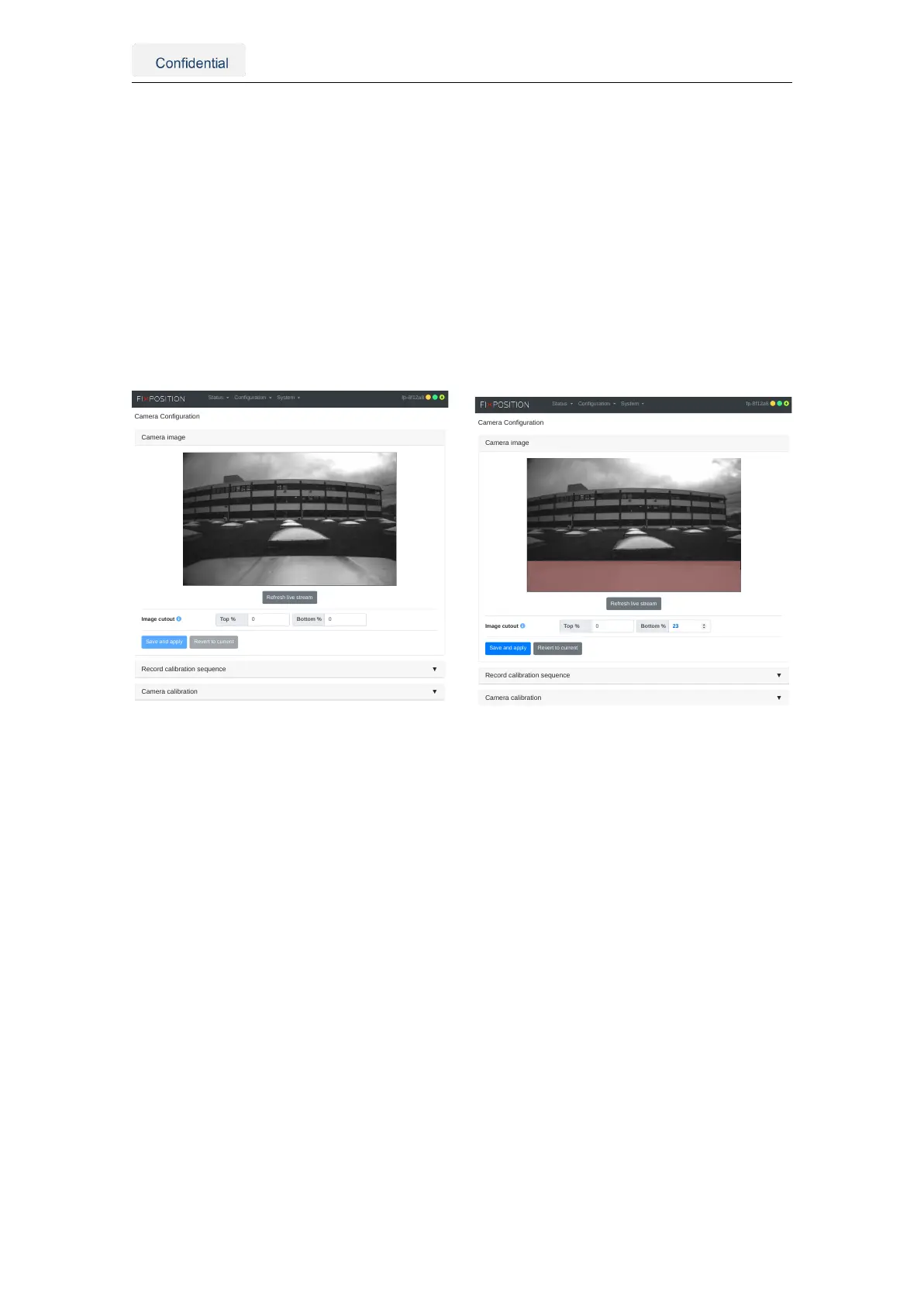
The user can visualize the camera stream in the "Configuration → Camera" panel of the
web interface. A distorted and downsampled (both in resolution and frame rate) stream
of the camera is presented here. As Chapter 4.1 mentions, no static parts or featureless
scenes must be present in the image view, as these would affect the sensor’s perfor-
mance. The user can use the cropping tools on the page to eliminate these featureless
areas.
Also, note that the auto-exposure calibration of the camera is affected by the cropped
area. Thus, cropping this section will help with exposure if there is a bright object at
all times in the camera view. Figure 5.16 presents an example of how to crop these
undesired features from the camera view.
Camera image
Image cutout
Refresh live stream
Top %
▼Record calibration sequence
▼Camera calibration
Status Configuration System fp-8f12a8
(a) Static features on the bottom of the image
Camera image
Image cutout
Refresh live stream
Top %
Save and apply Revert to current
▼Record calibration sequence
▼Camera calibration
Status Configuration System fp-8f12a8
(b) Cropping 23% on the bottom
Figure 5.16.: An example of the image view’s cutout
Vision-RTK 2 | Fixposition Positioning Sensor 29



 To Next Page