5.13. Web interface indicators
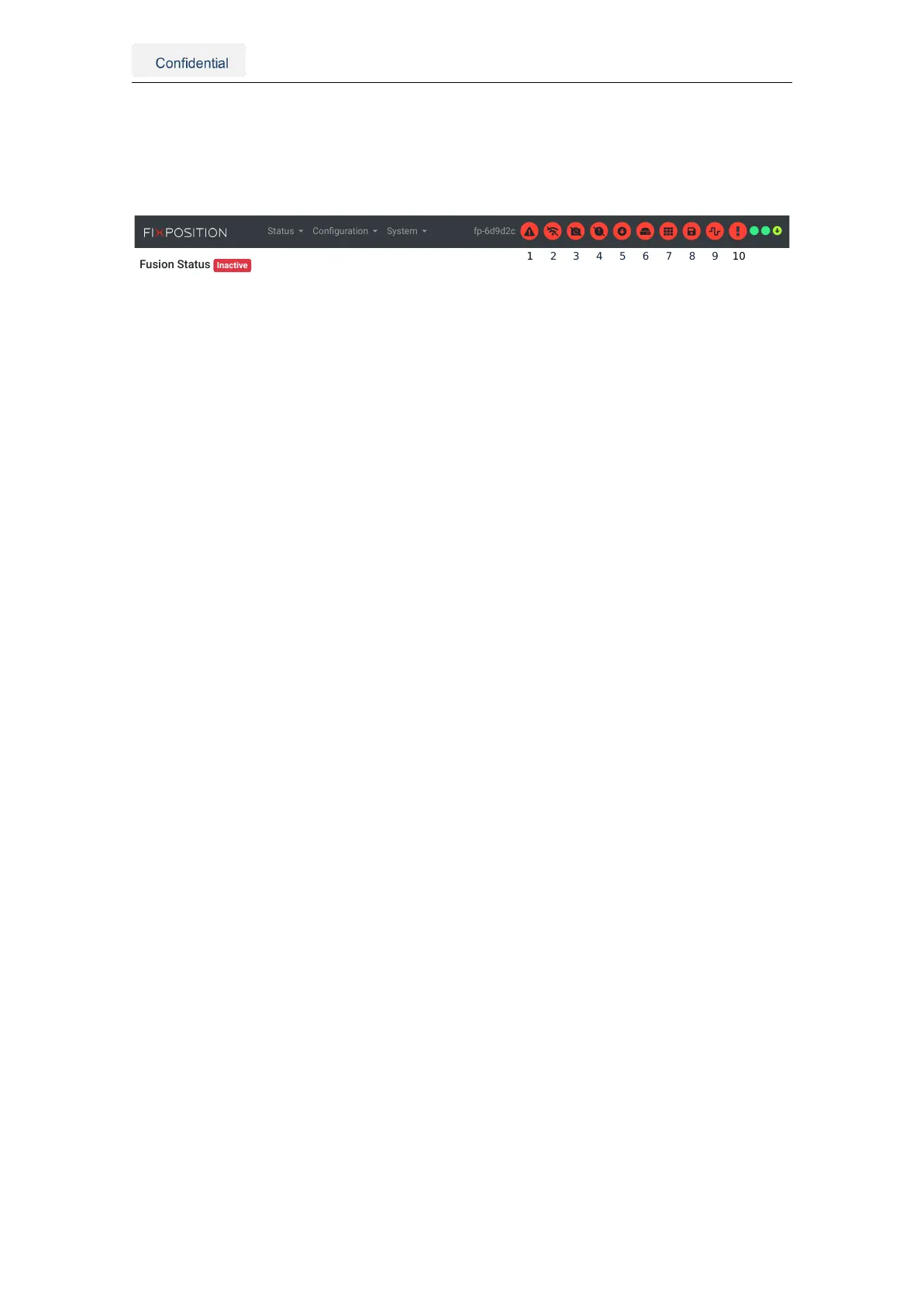
The navigation bar of the web interface contains useful indicators to signal the status of
the Vision-RTK 2 and its related processes. Fig. 5.30 presents all the available indicators.
Status Configuration System fp-6d9d2c
Figure 5.30.: Indicators on the web interface
The available indicators are:
1. System: This indicator can arise when the system state is not "running," e.g., during
boot-up, shut-down, or when a component fails to initialize.
2. Internet: The system is not online. This indicator will appear if the sensor cannot
ping the 8.8.8.8 address.
3. Camera: Missing camera calibration or failure during camera initialization.
4. Time synchronization: The system time is not synchronized with GNSS or NTP
time info resources.
5. Correction data stream: The sensor is not receiving RTCM3 data. The tooltip will
show details (e.g., "warning, connected but no data").
6. External disk connected: An external hard disk is connected to the sensor. Note
that the user still needs to mount/unmount the disk in "System → Logs" manually.
7. Recording calibration: A calibration sequence is being recorded.
8. Recording log: A log file is being recorded.
9. IO stream: One or more error counters are increasing (I/O of any port). Additionally,
a more detailed alert is shown on the I/O status tab of the "System → Info" page (see
Fig. 5.31). The alert stays visible as long as the error counter(s) keep incrementing
and will disappear after a timeout (5s for the indicator, 30s for the alert in the I/O
status page). Typical error sources include:
UART ports:
a) Too many output messages are configured for the selected bandwidth (deter-
mined by the baud rate).
b) Too long, faulty, and/or low-quality cables.
c) Occasional errors on a UART connection are expected, albeit rare.
CANSTR port:
a) Too many output messages are configured for the selected bandwidth (deter-
mined by the bitrate and other devices on the bus).
b) Bad CAN termination (missing when required, present when not).
c) Too long CAN cable (e.g., for OBD2, it must be shorter than 30cm).
d) A misbehaving device on the CAN bus.
e) Too much load on the CAN bus.
Vision-RTK 2 | Fixposition Positioning Sensor 44



 To Next Page