FLAMIC S.R.L. 5 Via dell’Artigianato, 36035 Marano Vicentino (Vicenza) - Italy
46
Dough sheeter SF450 - SF500 - SF600 Operation and maintenance manual (translation of original instructions) – Ed. 10/2016
Rev.02 10/2017
All rights reserved. Reproduction in whole or in part of this manual is prohibited.
To replace a table:
21. Install the table support ref. 28 and secure it using the screws and nuts ref. 26 and ref. 27. The washer ref.
30 should be used with the nut ref. 27 inside the table whilst the spacer ref. 31 should be placed outside,
between the support and the bench (photo S). Do not install the residue collection tray ref. 25 and leave the
conveyor belt ref. 29 very slack
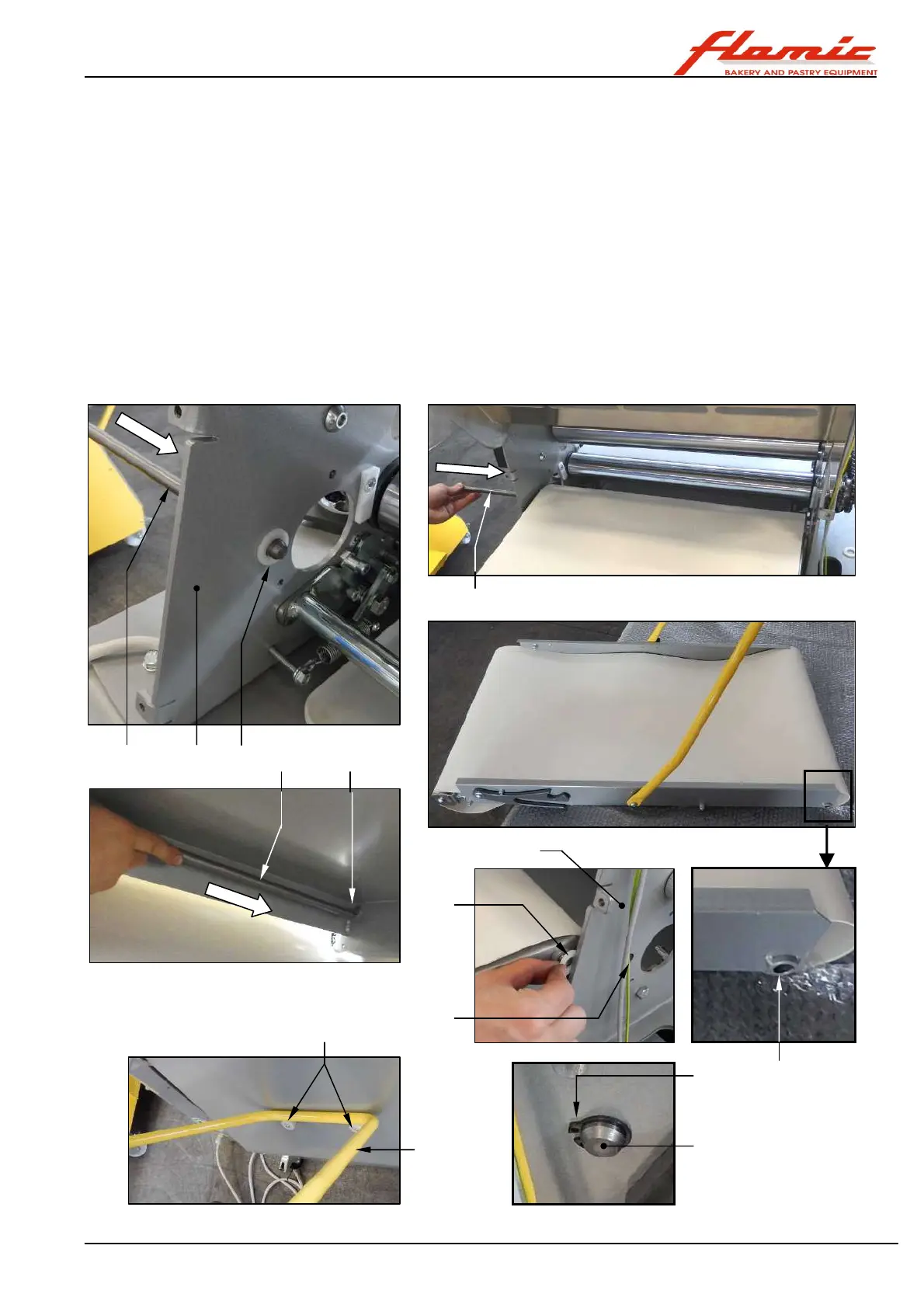
With reference to Figure 38:
22. one person should insert the rod ref. 24, so that it just protrudes from the side of the upright ref. 32 (the side
opposite the controls) and places the plastic spacer ref. 33 on the part that protrudes inside the upright. The
other person should hold the table between the uprights, so that the hole ref. 34 at the end of the side is
lined up with the rod ref. 24.
23. push the rod ref. 24 into the hole ref. 34 and from underneath, guide it into the hole ref. 35 on the opposite
side, but make sure that it doesn’t go into the hole ref. 36 of the upright ref. 38 on the controls side.
24. place the spacer ref. 37 onto the end of the rod ref. 24. Insert the rod into the hole ref. 36 of the upright ref.
38 on the controls side and using needle nose snap ring pliers, install the snap ring ref. 23 in the groove at
the end of the rod ref. 24.
25. rest the support ref. 28 onto the lower rests ref. 39. You can now let go of the table that will be firmly
supported by the rod ref. 24 and the support ref. 28.
Figure 38 - SF450 and SF500: installing the table support rod between the uprights
24 32 33
24
34
35
24
36
37
23
24
28
39
38



 To Next Page