FLAMIC S.R.L. 5 Via dell’Artigianato, 36035 Marano Vicentino (Vicenza) - Italy
48
Dough sheeter SF450 - SF500 - SF600 Operation and maintenance manual (translation of original instructions) – Ed. 10/2016
Rev.02 10/2017
All rights reserved. Reproduction in whole or in part of this manual is prohibited.
16 46
14
15
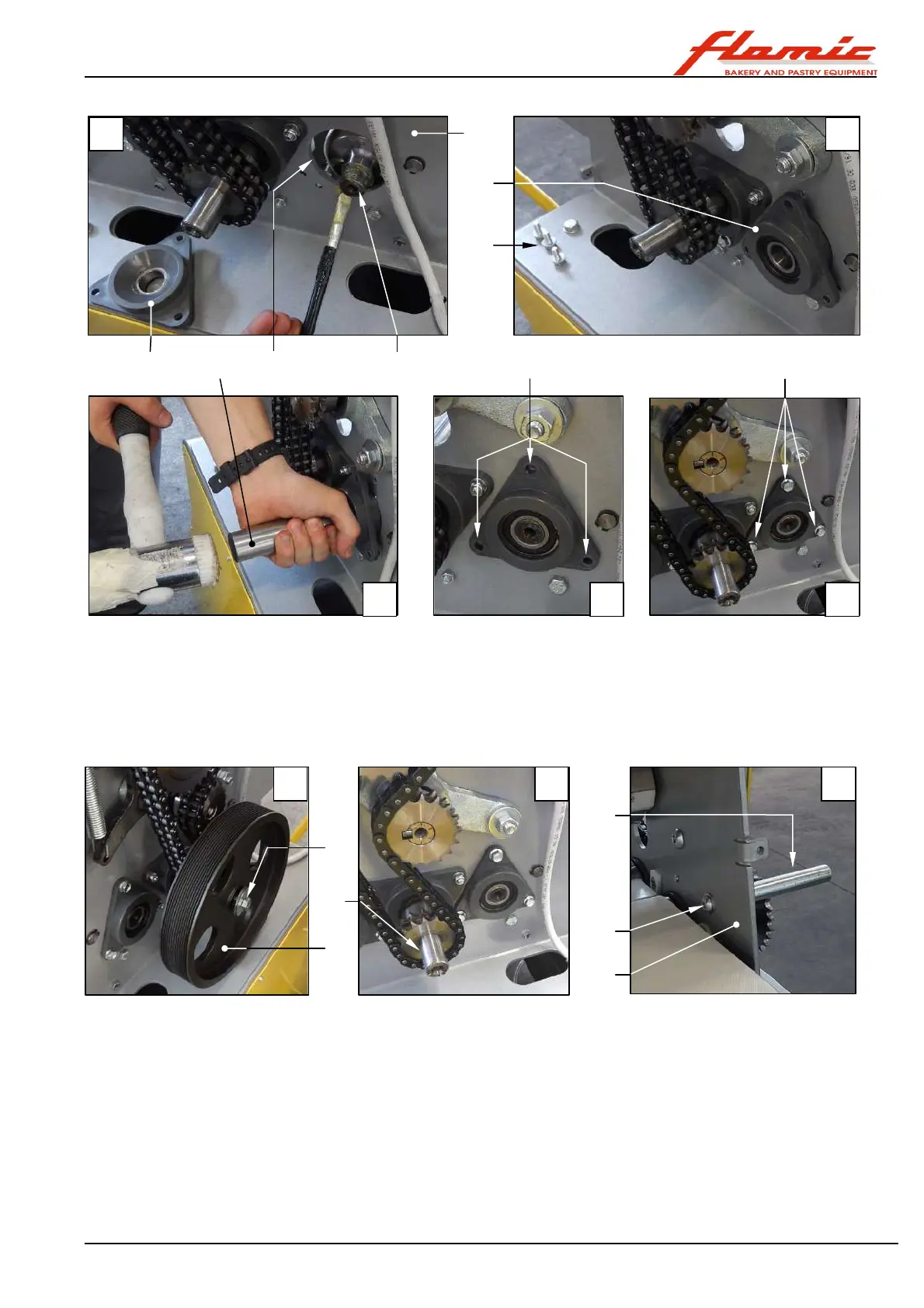
Figure 40 - SF450 and SF500: installing a conveyor belt drive roller
With reference to Figure 41
31. place the pulley ref. 14 onto the shaft ref. 15 and secure it using the screw ref. 13 (photos A - B)
32. install the drive belt and adjust its tension (see section 4.3)
33. hold the tube ref. 11 on the outside of the upright ref. 38 on the controls side and fasten it with the screw ref.
12 (photo C)
34. install the chain ref. 46 (photo F) (see section 4.7) that drives the conveyor belt drive roller ref. 22 Figure 40
Start Figure 41 - SF450 and SF500: installing the handle and other parts
35. place two normal sheets of paper, 80g/ m
2
ref. 47 between the two rollers
36. using a locking adjustable wrench ref. 48, rotate the shaft ref. 49 and lower the upper roller assembly
completely (photos D - E)
37. insert two M12 hexagonal head bolts or larger, between the bar ref. 50(if necessary, remove the upper
scrapers, see section 4.5) and the shaft ref. 49 that have a total length of 70 mm for the SF450 and SF500
models and 60 mm for the SF 600 model, with their nuts screwed on but without the ends of the screws
protruding. Turn the nuts until the screws+nuts are locked against the bars. Check that the sheets of paper
are gripped between the rollers (photo E shows the assembly tools used by Flamic instead of the nuts and
bolts, but the principle is the same).
38. reinstall the control devices in their original positions on the casing ref. 9. Press the actuators ref. 51 and the
terminal blocks together ref. 52 through the holes ref. 53 (photo G)
39. install the casing ref. 9 on the controls side and secure it using all the screws provided.
21 44
17
32
17
45
16
13
11
12
E F
G H I
End
38
A B C



 To Next Page