Limitorque
®
MX Electronic Actuator FCD LMENIM2306-09-AQ – 08/17
40
• LCD contrast
• Password
• Motor thermostat
• Valve Data
• Port
• Back-up Power
• Restricted Setup (consult factory)
6. Make changes in each setup group as desired. Each display shows the state or value of the existing settings.
See Figure 4.3.
7. When configuration is complete, answer “YES” to “EXIT SETUP?” Alternatively, the “SETUP” mode may be
terminated at any time by moving the red selector knob from “STOP” to “LOCAL” or “REMOTE.” All the changes
made so far will automatically be saved.
NOTE: Once you exit this mode and enter either the “VIEW SETTINGS?” mode or “VIEW DIAGNOSTICS?” mode, the
password will need to be entered again to gain access to the “CHANGE SETTINGS?” mode in order to make further
changes.
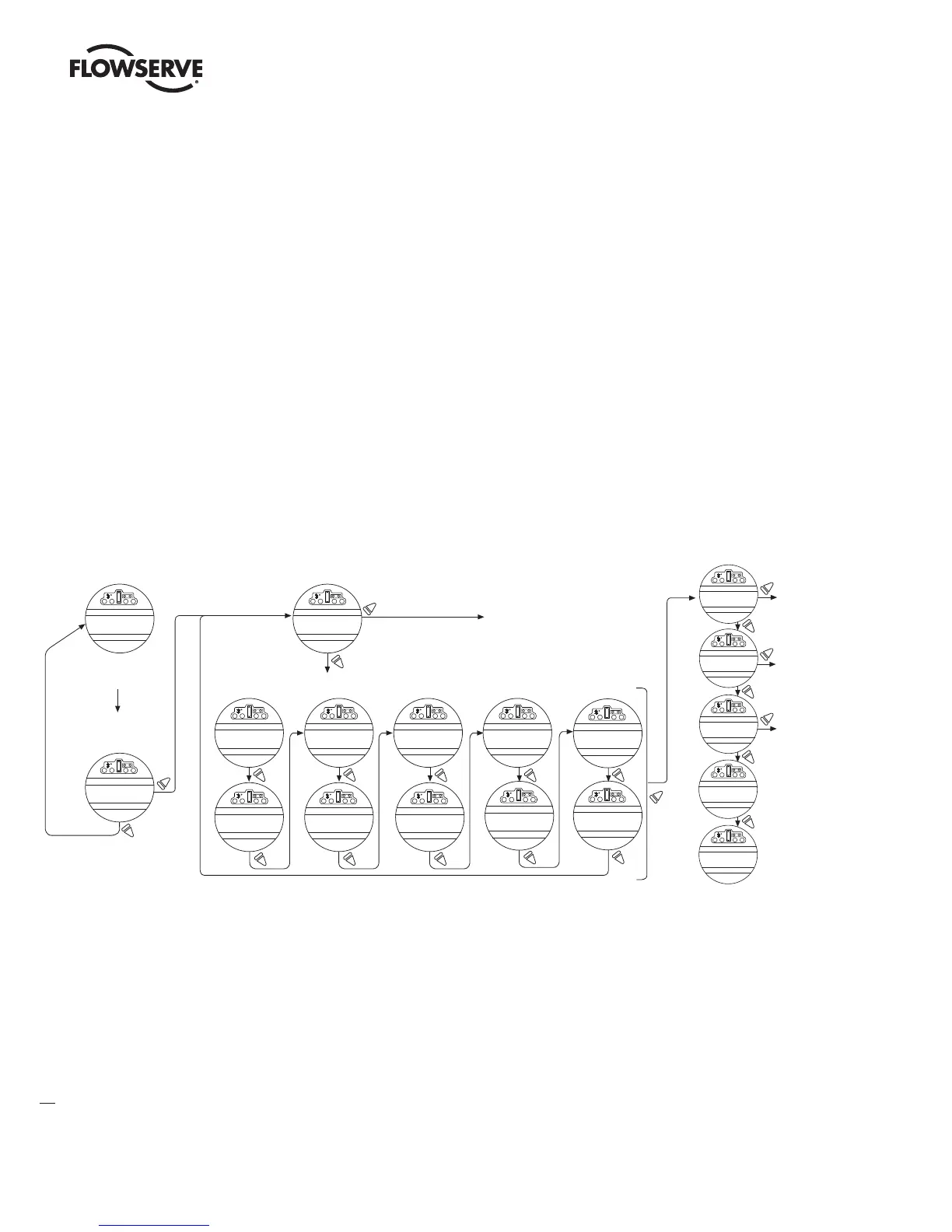
Figure 4.1 – Entering the setup mode
Entering the setup mode
Language selection
Change or view settings
See Figure 4.3
See Figure 3.22
See Figure 5.2
SETUP
IN ENGLISH?
XX% OPEN
STATUS OK
SETUP?
SETUP
IN MANDARIN?
SETUP
IN ESPANOL?
SETUP
IN GERMAN?
SETUP
IN RUSSIAN?
SETUP
IN FRANCAS?
To place actuator in the
“SETUP” mode, put red
selector knob in “STOP.”
Operate black selector knob
“YES,” “NO,” “YES.” The
message “SETUP?” will be
displayed for 10 seconds.
CHANGE
SETTINGS
VIEW
SETTINGS?
VIEW
DIAGNOSTICS?
EXIT
SETUP?
SETUP?
YES
NO
NO
NO
NO
NO
NO
NO
NO
NO
NO
NO
YES
Toggle “NO” to select between English and other languages for setup dialogue.
YES
YES
YES
YES
SETUP
IN ITALIAN?
NO
SETUP
IN PORTUGUESE?
NO
SETUP
IN KATAKANA?
NO
SETUP
IN TURKISH?
NO
SETUP
IN INDONESIAN?
NO
LMENIM2306-09 AQ.indd 40 Mittwoch23.08.17 08:53







 To Next Page