Limitorque
®
MX Electronic Actuator FCD LMENIM2306-09-AQ – 08/17
69
flowserve.com
• Maintain mode: the unit will operate continually in either direction when the black knob is actuated and released, until
the position of the black knob is changed or the red knob is changed from “LOCAL” to either “STOP” or “REMOTE.”
• Inching mode: the unit will operate only when the black knob is held in the open or close position. If the black knob is
released, the unit will stop.
To Customize the Settings:
1. Select “CHANGE LOCAL CONTROL?” from the “SETUP” routine.
2. Select “YES” to enter the mode display.
3. Select “NO” to change from Maintain to Inching control.
4.17.2 LED Customization
This selection allows the customer to reverse the colors of the LED in open and close mode from the default setting.
Default = Red-Open/Green-Close
1. After mode selection, select “YES” to change the colors of the LEDs.
2. Select “NO” to change from the default to Red-Close/Green-Open.
4.18 ESD (Emergency Shutdown) Overrides
An external contact may be used to place the actuator in emergency shutdown mode. An ESD contact may be
connected to the actuator to override existing command signals and send the valve to a predetermined position.
The ESD Action and Signal presence is selected in Section 4.20, Inputs. The default ESD input = Input 0., pt. 30 on
wiring diagram.
4.18.1 ESD Override
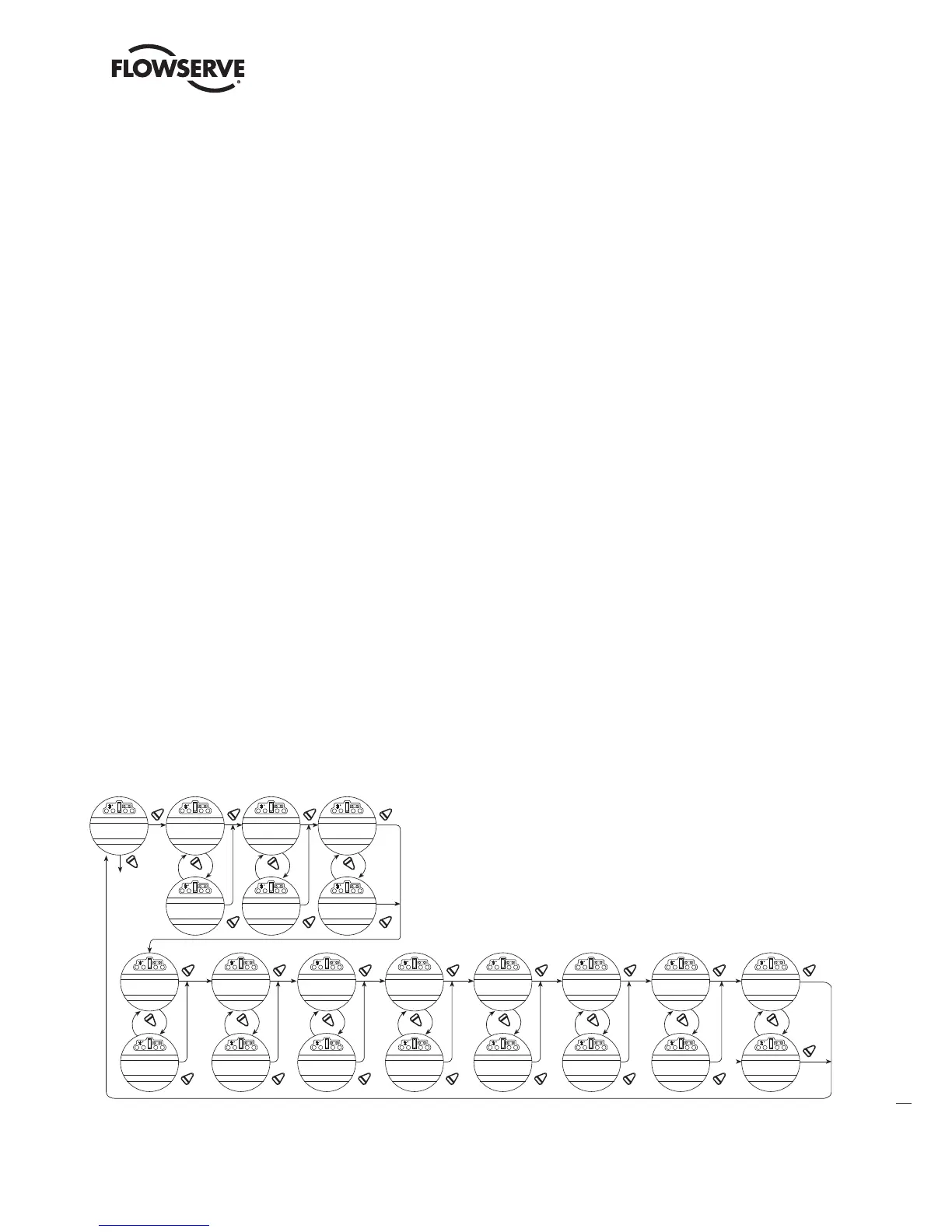
It may be desirable that ESD override other events. These events are selectable. The “>” symbol after ESD indicates that
ESD will override that particular event. Sections 4.19.2 through 4.19.12 list the choices.
Figure 4.28 – ESD overrides
YES YES YES
NO
YES YES YES
YES
YES
YES
YES YES
YES YES YES
NO NO NO
NO NO NO NO
*
*
*
* CAUTION: The user may select “ESD” to
override these situations. Should these
conditions occur and the user has
selected “ESD >,” be advised that
the actuator motor may be compromised
Therefore, selection of “ESD>”
in these situations will void the
warranty and certification.
*
CHANGE
ESD OVERRIDES?
PRIORITY
INHIBIT>ESD
PRIORITY
LOCAL CMD>ESD
PRIORITY
STOP>ESD
PRIORITY
JAMMED>ESD
PRIORITY
LOST PHASE>ESD
PRIORITY
OVERTORQUE>ESD
PRIORITY
INHIBIT<ESD
PRIORITY
LOCAL CMD<ESD
PRIORITY
STOP<ESD
PRIORITY
ESD>JAMMED
PRIORITY
ESD>LOST PHASE
PRIORITY ESD>
OVERTORQUE
PRIORITY
NW ESD>LOCAL ESD
PRIORITY
*
YES
YES
NO
PRIORITY
THERMOSTAT>ESD
PRIORITY
ESD>THERMOSTAT
*
YES
YES YES
NO
PRIORITY
2SPD > ESD
PRIORITY
ESD > 2SPD
*
LOCAL ESD>NW ESD
YES
YES
NO
PRIORITY
OIL OVERTEMP>ESD
PRIORITY
ESD>
OIL OVERTEMP
*
YES
YES
NO
PRIORITY
TORQUE TIMER>ESD
PRIORITY
ESD>TORQUE TIMER
LMENIM2306-09 AQ.indd 69 Mittwoch23.08.17 08:53







 To Next Page