Limitorque
®
MX Electronic Actuator FCD LMENIM2306-09-AQ – 08/17
92
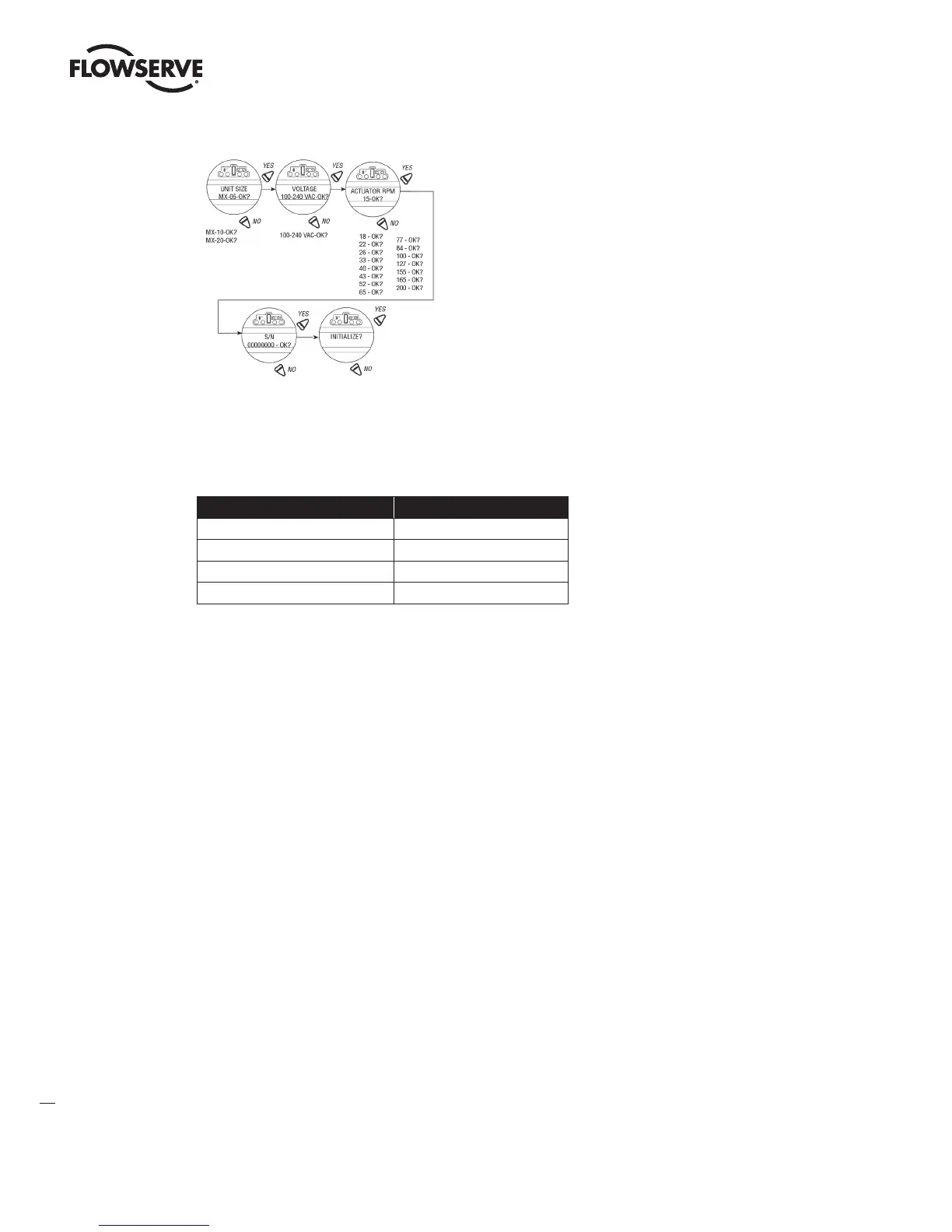
Figure 5.2, Single phase only Initialize Routine
Run Load Alarm – Single phase MX only
The run load and LCD torque setting need to follow the requirements of the table below. If the run load exceeds the
table value, the output RPM of the actuator may be reduced when compared to the nameplate value. The run load
alarm feature may report a reduced speed if the run load exceeds the table values.
Run Load (% of nameplate rating) Required LCD torque setting
≤15% ≥40%
>15% up to 25% ≥50%
>25% up to 35% ≥60%
>35% up to 40% ≥70%
5.3 View Diagnostics
A large amount of historical data is stored in the actuator memory and can be retrieved very easily, without the need for
password entry. The data is displayed in dialog format.
1. Enter the “SETUP” mode routine detailed in Section 2.1.1, Entering the Setup Mode.
2. Select “VIEW DIAGNOSTICS?”
3. Select “YES” to access the first display “VIEW HARDWARE?”
NOTE: It is recommended that ALL diagnostics information be recorded prior to contacting an authorized Limitorque
service coordinator at (434) 528-4400. This information aids in diagnosing any problem the actuator may experience.
LMENIM2306-09 AQ.indd 92 Mittwoch23.08.17 08:53







 To Next Page