Limitorque
®
MX Electronic Actuator FCD LMENIM2306-09-AQ – 08/17
59
flowserve.com
4.13 HART Option
HART option enables the actuator to be controlled by a Highway Addressable Remote Transducer communications signal.
If the option is purchased, it is automatically enabled. The device address is fixed for point-to-point connection, but must
be set by customer for multi-drop topology.
NOTE: If the HART option has not been purchased, the screens for changing HART will not be available. To add the HART
option, please consult Limitorque service at (434) 528-4400.
The MX is equipped with the ability to either hardwire to digital inputs for control, set-up for analog control (Modutronic),
or control via network protocols. In order to utilize this feature, select “Multi-control mode” operation located in Section
4.16, Remote Mode. This is the default setting for remote control. There are three modes of remote control when remote
mode is configured for multi-control: digital control, analog control, and network control. Digital and network control
operation is based on the last command received. Analog operation is initiated be either toggling user input 2 (configure
for CSE input) or breaking and reapplying the analog control signal.
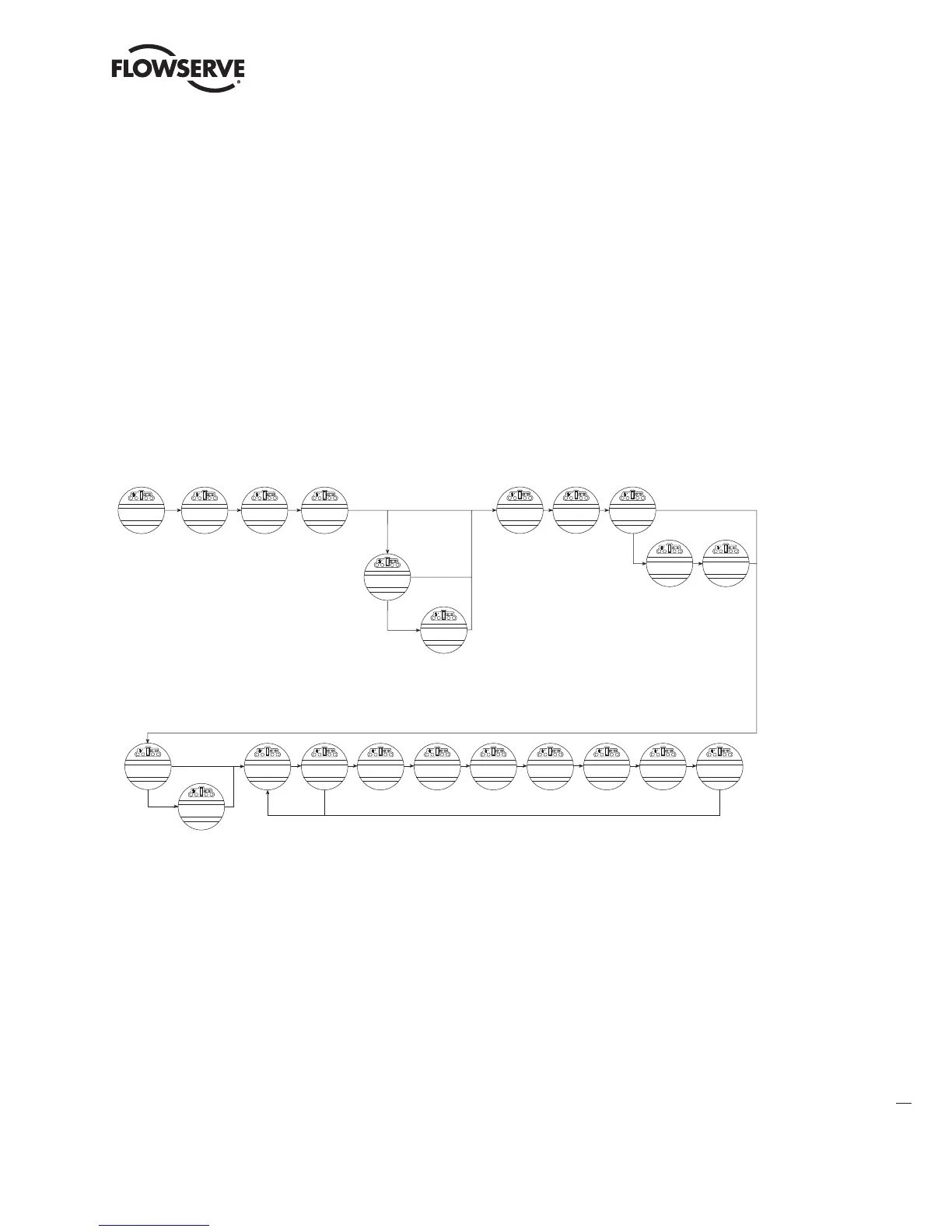
Figure 4.18 – HART
4.13.1 Status
Default = ON
HART Status enables user to change from the default condition to turn on and off the digital control capability of
the actuator.
4.13.2 Multi-drop
Default = Disabled
MULTI-DROP (ENABLED) or (DISABLED) allows the user to select the desired network topology. To change the setting,
select NO until the required option is displayed. Select YES if the setting is correct to go to the next display.
NOTE: Changing the topology also requires that the network be wired correctly for the selected topology.
CHANGE
HART?
ESD ACTION
(IGNORE)-OK?
CHANGE
CLOCK?
CLOCK
(DISABLED)-OK?
YEAR
2012
MONTH
1
DAY
1
CHANGE
HART?
MINUTE
0
SECOND
0
SAVE
CLOCK?
MOVE TO
XXX% OPEN
(OFF)-OK?
STATUS
(ON)-OK?
(ENABLED)-OK?
MULTI-DROP
(DISABLED)-OK?
FAIL POSITION
(CLOSE)-OK?
MOVE TO
XXX% OPEN?
POLLING ADDRESS
(O)-OK?
SAVE
SETTINGS-OK?
CHANGE PROP/
DEADBAND?
PROP BAND
(5%)-OK?
DEADBAND
(2%)-OK?
(POSITION SETPOINT)-OK?
(OPEN)-OK?
(STOP)-OK?
(POSITION)-OK?
Input no matter if
Digital or Analog
If Hart Actuator
and Multidrop
If fall position is
not “position”
If fail position is
“position”
(ENABLED)-OK?
Address default is zero
Range is 0-63
If Hart Actuctor
and not Multidrop
INPUT ACTION
(USER INPUT)-OK?
YES
NO
(CLOSE)-OK?
(STOP)-OK?
(OPEN)-OK?
LMENIM2306-09 AQ.indd 59 Mittwoch23.08.17 08:53







 To Next Page