Limitorque
®
MX Electronic Actuator FCD LMENIM2306-09-AQ – 08/17
84
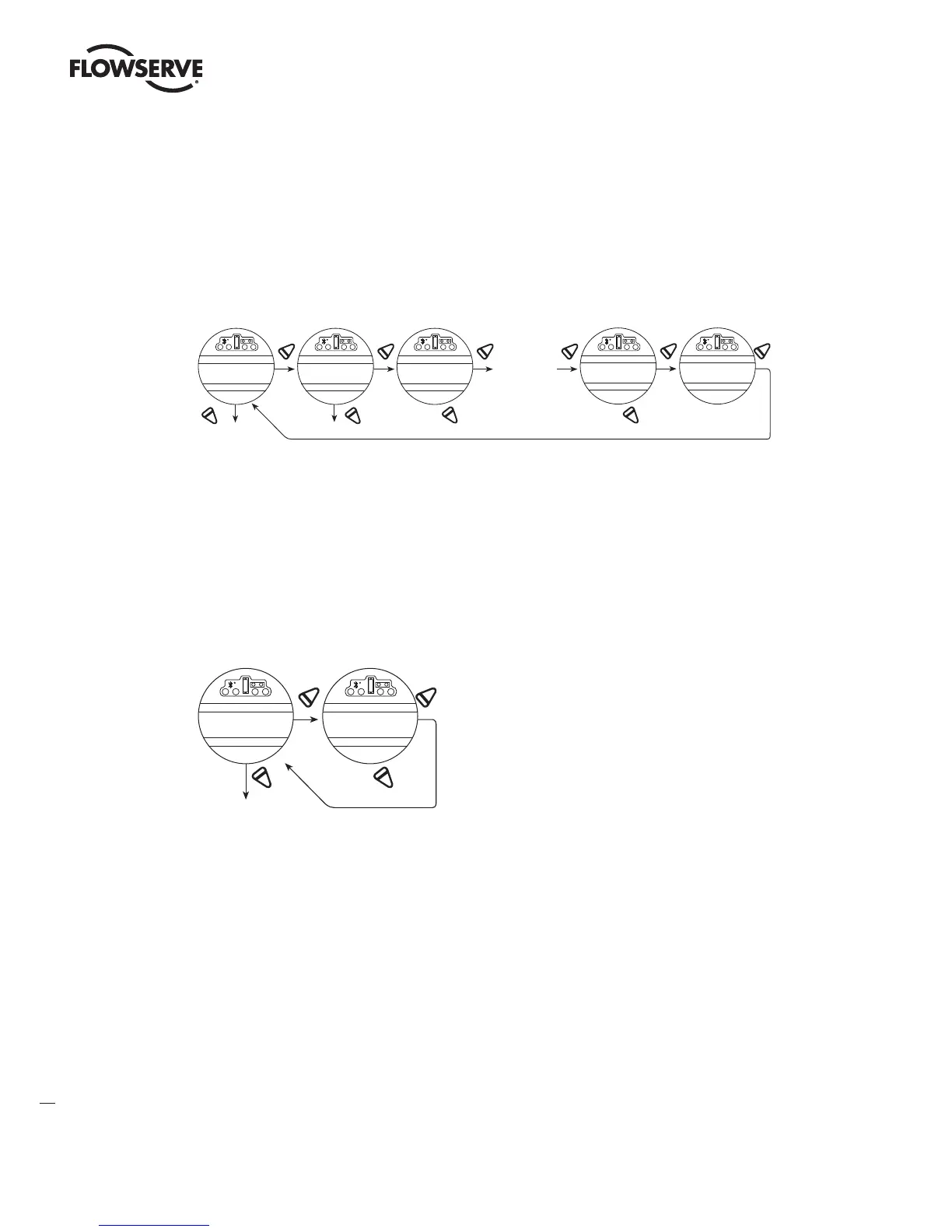
3. Select “NO” to choose the required number or letter for each digit of the valve tag number, up to a maximum
number of 16 digits.
The alphanumeric display scrolls from a symbol set, numerals and then A-Z in the following order: ! “ # $ % @ ‘ (
) * + , - . / 0-9 : ; < = > ? A-Z. There is one blank at each end to enable a tag number with less than 16 digits to be
entered clearly. To highlight the digit being entered, a dot appears over the space and the letter above the space
disappears.
Figure 4.36 – TAG number
YES YES YE S
NO
NO
YES YES/NO
“ NO ”
changes
digi t
NO
NO
Same procedure for
digits 3-16
YES
Up to 16 digits ma y
be used. Alpha-
numerics 0-9, then
A-Z, plus blanks
Blank space
appears first, then
This allows easy
entry for tags of less
“ NO ”
changes
digit
CHANGE
TAG?
ENTER DIGIT #1
"0"------_
ENTER DIGIT #2
MO “0”-----
ENTER DIGIT #16
M OOOOOOOOO“0”
RECORD TAG
OK?
4.23 LCD Contrast
Permits adjustment of the viewing contrast of the LCD.
1. Select “YES” to enter the “LCD CONTRAST” display.
2. Select “NO” to adjust contrast to desired level.
Figure 4.37 – LCD contrast
YES
NO NO
“ NO ”
adjusts
LCD contrast
CHANGE
LCD C ONTRAST?
LCD CONTRAST
OK ?
4.24 Torque Boost – only available for arctic temperature actuators
Default = “AUTO”
Torque boost increases the capacity to move valves under conditions of low temperature or extreme valve stiffness. In
the default setting, the MX will permit more output torque up to the unit’s maximum torque rating when the tempera-
ture falls below 32°F (0°C). When configured as ON, torque boost will be present under all conditions regardless of
temperature, and when OFF, torque boost will not be present.
LMENIM2306-09 AQ.indd 84 Mittwoch23.08.17 08:53







 To Next Page