Limitorque
®
MX Electronic Actuator FCD LMENIM2306-09-AQ – 08/17
95
flowserve.com
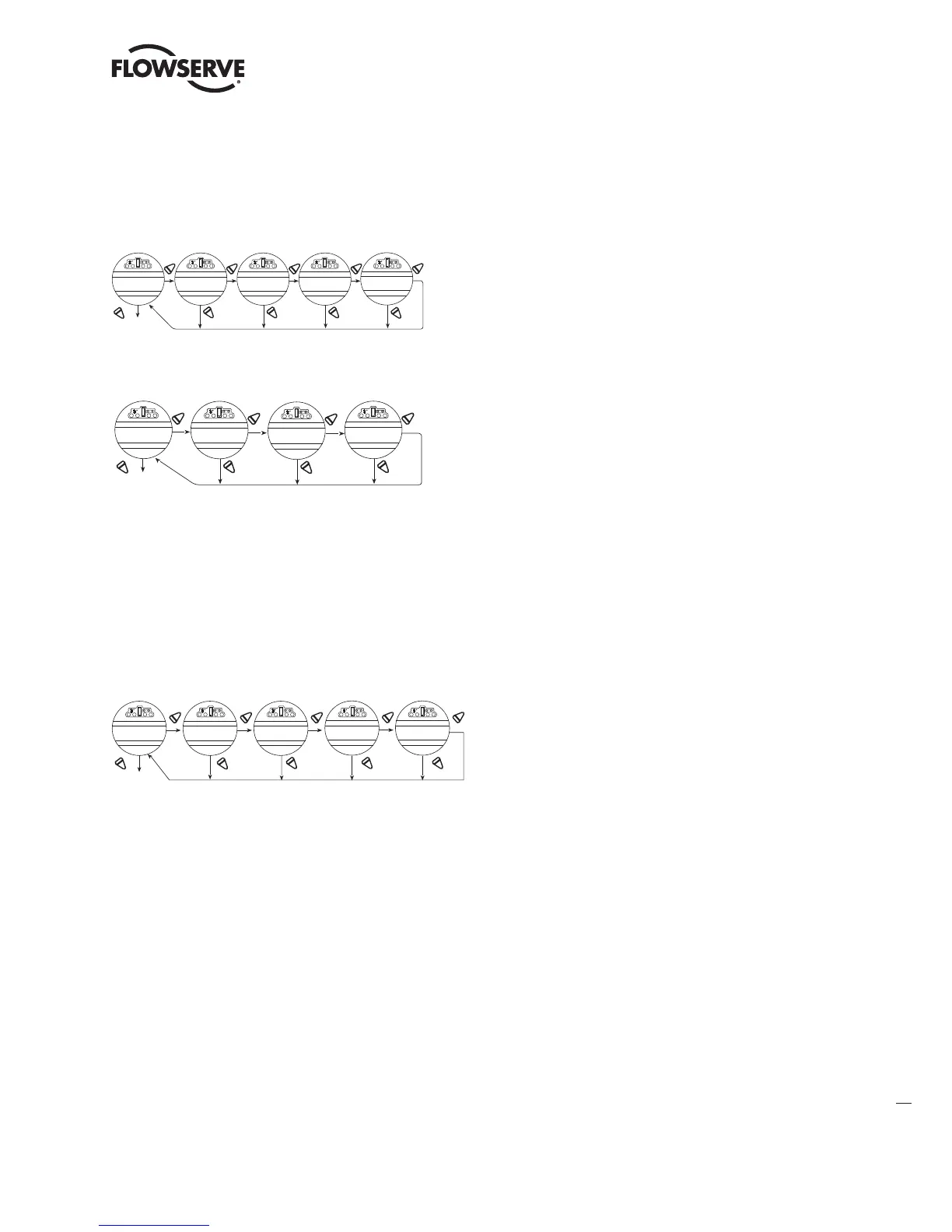
5.6 View Power Supply
Viewing “POWER SUPPLY” will provide historical data on the maximum and minimum voltages that have been applied to the actuator, as well
as the frequency of the AC supply. These can be reset. See Section 4.21, Diagnostic Reset.
Figure 5.8 – View power supply
YES YES YES
NO
NO
YES
NO
NO
VIEW
POWER SUPPLY?
M AXIMUM VOLTAGE
(460 V)-NEXT?
CURRENT VOLTAGE
(451 V)-NEXT?
FREQUENCY
(60 Hz)-EXIT?
YES
NO
MINIMUM VOLTAGE
(440 V)-NEXT?
NOTE: Motor temperature and
voltage updates every
0.5 seconds.
Figure 5.9 – View Single Phase Power supply
YES
YES
NO
NO
VIEW
POWER SUPPLY?
YES
NO
MAXIMUM VOLTAGE
(115 V) - OK?
YES
NO
MAXIMUM VOLTAGE
(109 V) - OK?
CURRENT VOLTAGE
(110 V) - OK?
5.7 View Identification
In this dialog, the identity of the actuator may be reviewed. This dialog provides valuable information for the ordering of spare parts or checking
the specification of the actuator.
NOTE: The serial number, order number, and software revision number were entered at the time of manufacture and cannot be changed on
screen. The software revision number is necessary when option boards are ordered.
FIGURE 5.10 – VIEW IDENTIFICATION
YES YES YES
NO
NO
YES
NO
NO
YES
NO
VIEW
IDENTIFICATION?
TAG #
MOV257
SERIAL #
M002567
ORDER #
366765F
FIRMWARE REV.
E654
-OK?-OK?
-OK?
*Network revisions will only be displayed if the optional network board is installed within the MX.
LMENIM2306-09 AQ.indd 95 Mittwoch23.08.17 08:53







 To Next Page