Limitorque
®
MX Electronic Actuator FCD LMENIM2306-09-AQ – 08/17
64
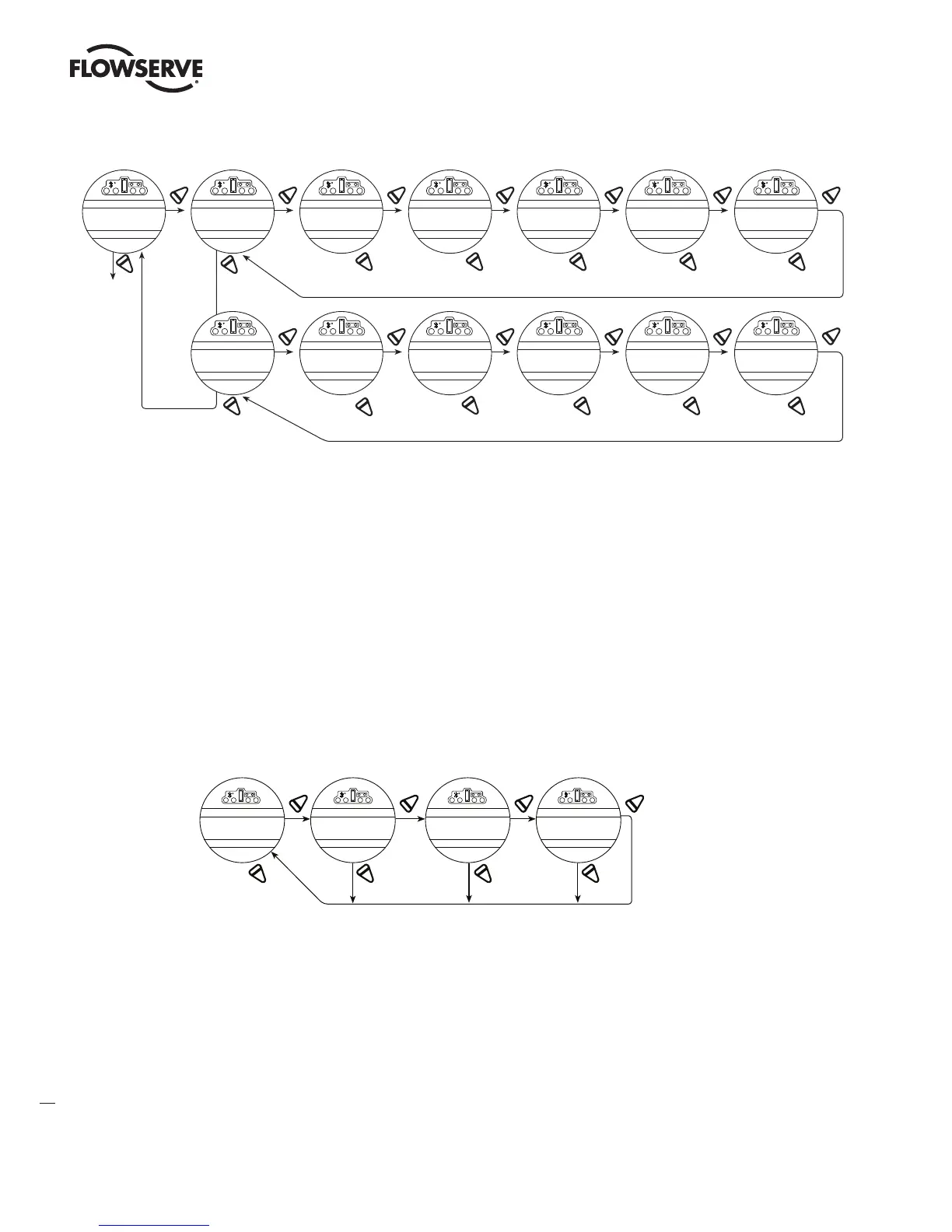
Figure 4.20 – Two-speed timers
NO
YES YES YES YES YES YES
NO
NO
YES YES YES YES YES
NO
YES
NO NO
NO
NO
(0% - 99%)
(Start
+1% - 99% )
(OFF)
(OFF)
(1% - 100%)
1% increments
(1% - 100% )
1% increments
(1-20 sec)
0.5 sec
increments
(1-200 sec)
1.0 sec
increments
YES
NO NO NO
NO
NO
(1-20 sec)
0.5 sec
increments
(1-200 sec)
1.0 sec
increments
CHANGE 2-SPEED
TIMERS?
CHANGE
OPEN TIME
R
STATUS
(ON) OK?
START POSITION
(90% OPEN)
STOP POSITIO N
(100% OPEN)
PULSE TIM E
(ON=2 SEC)-OK?
PULSE TIME
(OFF=1 SEC)-OK?
CHANGE
CLOSE TIMER?
STATUS
(ON)-OK?
START POSITION
(10% OPEN)
STOP POSITIO N
(0% OPEN)
PULSE TIM E
(ON=2 SEC)-OK?
PULSE TIM E
(OFF=1 SEC)-OK?
4.15.5 Pulse Time – OFF
This mode allows user to change the OFF pulse time from the default setting.
Default Setting = 1 Second
Select “NO” until the required length of OFF pulse is displayed. Adjustable between 1 and 200 seconds, in 1.0 second
increments.
4.16 Analog Output
The MX offers an optional, configurable analog output feedback signal. The User may select between APT (Analog
Position Transmitter) or ATT (Analog Torque Transmitter) functionality. Each selection is defined below.
Figure 4.21 – Change analog out
YES YES
NOOUT 2? ON-OK? ATT-OK?
NO
CHANGE
ANALOG OUT?
ANALOG
OUT 1?
YES YE
NO
NO
STATUS
OFF-OK?
STATUS FUNCTION
APT-OK?
LMENIM2306-09 AQ.indd 64 Mittwoch23.08.17 08:53







 To Next Page