Chapter 4: Maintenance
Autosampler Module Maintenance
102 CyTOF XT User Guide
Replace Syringes
IMPORTANT If a syringe leak is observed, contact Fluidigm technical support before
replacement. Replace the syringes only after leaking is observed and acquisition has been
stopped.
NOTE Before inserting the replacement plunger into the syringe barrel, condition the
plunger tip.
1 As per manufactures recommendation, precondition new syringe prior to use. Wet the
tip with DIW and insert it into the glass syringe barrel. Stroke the syringe barrel 10 times
while applying steady and even pressure. Avoid twisting movements.
2 Disconnect the Autosampler CAS (green) and WASTE (black) fluidic lines from the pump
for the syringe being replaced.
NOTE Failure to do so may contaminate the syringe.
3 For greater maneuverability, disconnect all fluidic lines from the pump-valve unit for
WASTE (black), CAS (green), WASH (white), and DIW (blue).
NOTE It may be necessary to remove the sample loop as well.
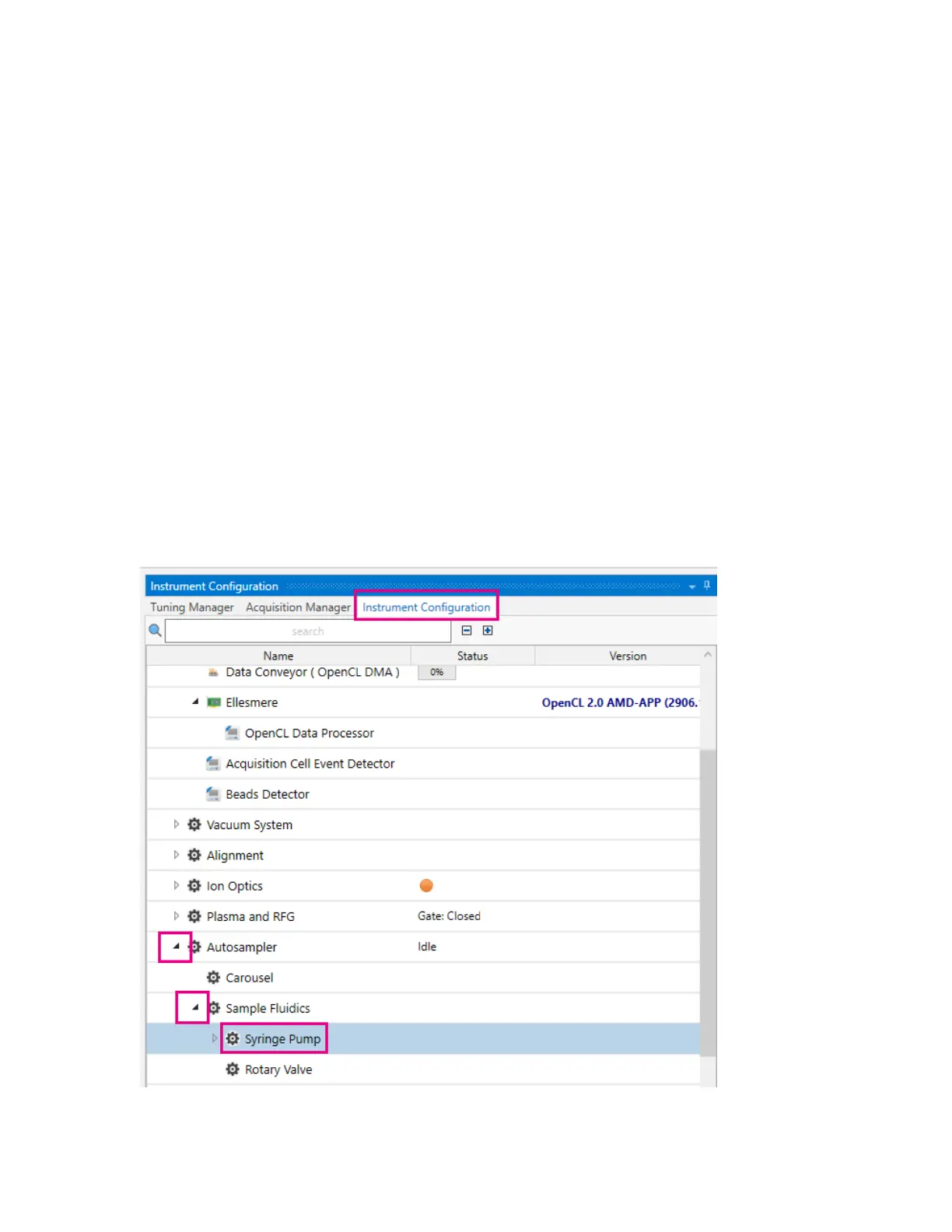
4 In CyTOF Software, open the syringe pump settings and actions. On Instrument
Configuration > Autosampler > Sample Fluidics, expand, and then click Syringe Pump.
5 Move the Push Pump and Fill Pump drive stems down.



 To Next Page