INSTALLATION AND OPERATION
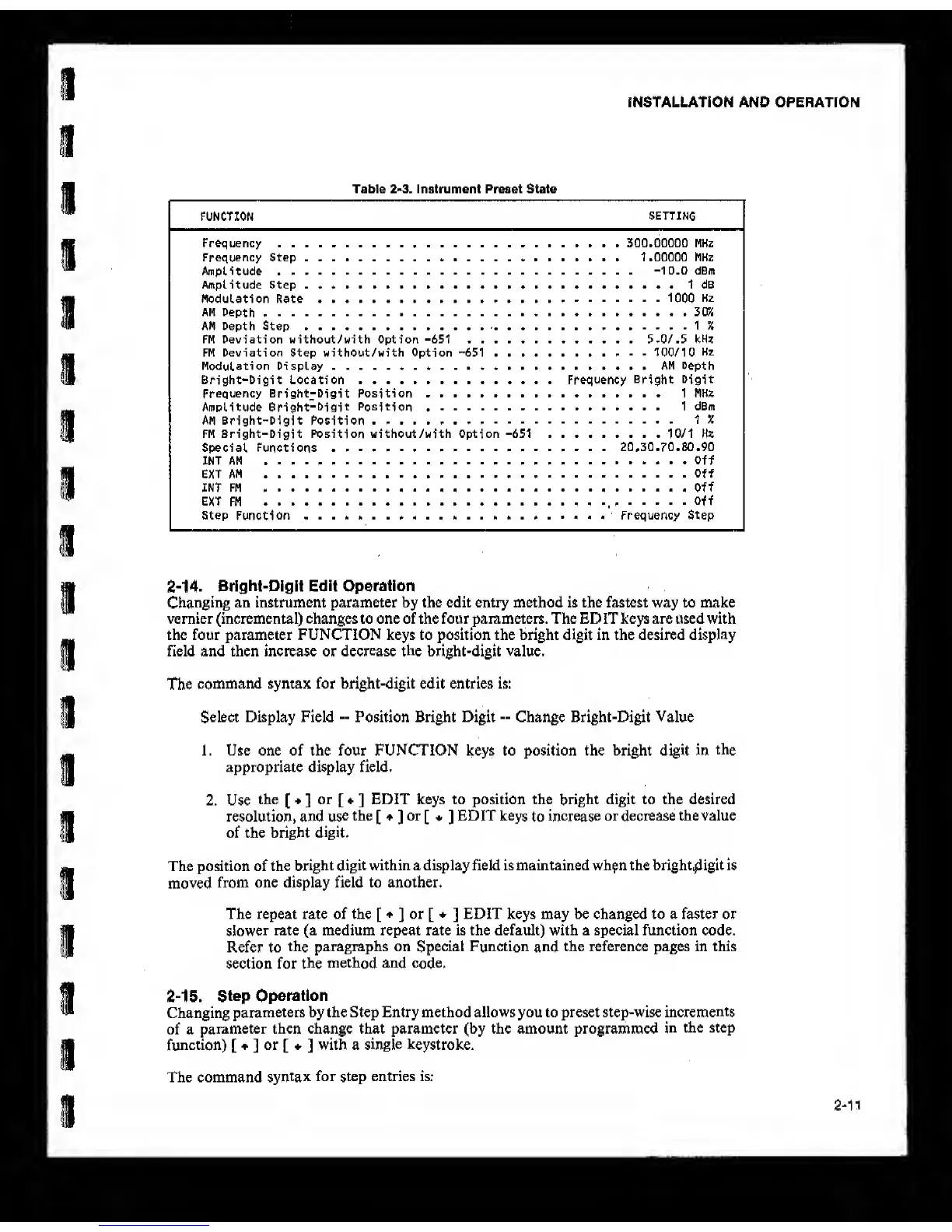
Table
2»3.
Instrument Preset State
FUNCTION
SETTING
Frequency
Frequency Step .... .......
Amplitude
Amplitude Step ...
Modulation Rate
AM
Depth
AM Depth Step
FM Deviation without/with Option
-651
FM Deviation Step without/with Option
-651
. . .
Modulation Display ..........
Bright-Digit Location
Frequency Bright-Digit Position ........
Amplitude
Bright-Digit Position
AM Bright-Digit Position .
FM Bright-Digit Position without/with Option
-651
Special Functions
....
INT AM
EXT AM
INT FM
.
EXT FM
Step
Function
.................
.... 500.00000 MHz
.... 1.00000 MHz
-10.0
dBm
1 dB
1000
Hz
3CK
IX
5.0/. 5 kHz
100/10
Hz
AM Depth
Frequency
Bright Digit
1 MHZ
1 dBm
1 %
10/1 Hz
. . . 20,30.70.80,90
......... Off
Off
Off
Off
...
Frequency Step
2-14. Bright-DIgIt Edit Operation
Changing
an instrument parameter by the edit entry method is the fastest way to make
vernier (incremental) changes to one of the four parameters. The EDIT keys are used with
the four parameter FUNCTION keys to position the bright digit in the desired display
field and then increase or
decrease the
bright-digit value.
The
command syntax for bright-digit edit entries is:
Select Display Field
--
Position Bright Digit
--
Change Bright-Digit Value
1. Use one of the four FUNCTION keys to position the bright digit in
the
appropriate display field,
2, Use
the
[
]
or
[ ]
EDIT keys to position the bright digit to the desired
resolution, and
use
the
[ ]
or
[
*
]
EDIT keys
to
increase
or decrease the value
of the bright digit.
The position of the
bright digit within a display field is maintained wh^n the bright,^igit is
moved
from one display field to another.
The repeat rate of the
[ ]
or
[ ]
EDIT keys may be changed to a faster or
slower
rate (a medium repeat rate is the default) with a special function code.
Refer to
the paragraphs on Special Function
and
the reference pages in this
section for
the
method and
code.
2-15. Step Operation
Changing
parameters by the Step Entry method allows you to preset step-wise
increments
of a
parameter then change that parameter (by the amount programmed
in
the step
function)
[ ]
or
[ ]
with a
single keystroke.
The command
syntax
for step entries is:
2-11



 To Next Page