72
5-3. Function Buttons
Functions that are assignable to Remote control panel buttons are as shown in the below table.
Normally, functions are assigned via Web-based Control ([Web-based Control: Assign
Function page]).
MFR-39RU (see section 5-4-3-12. “BTN ASSIGN”) and MFR-16RUD (see section 5-5-2. “Button
Assignment Change”) are enabled to assign functions.
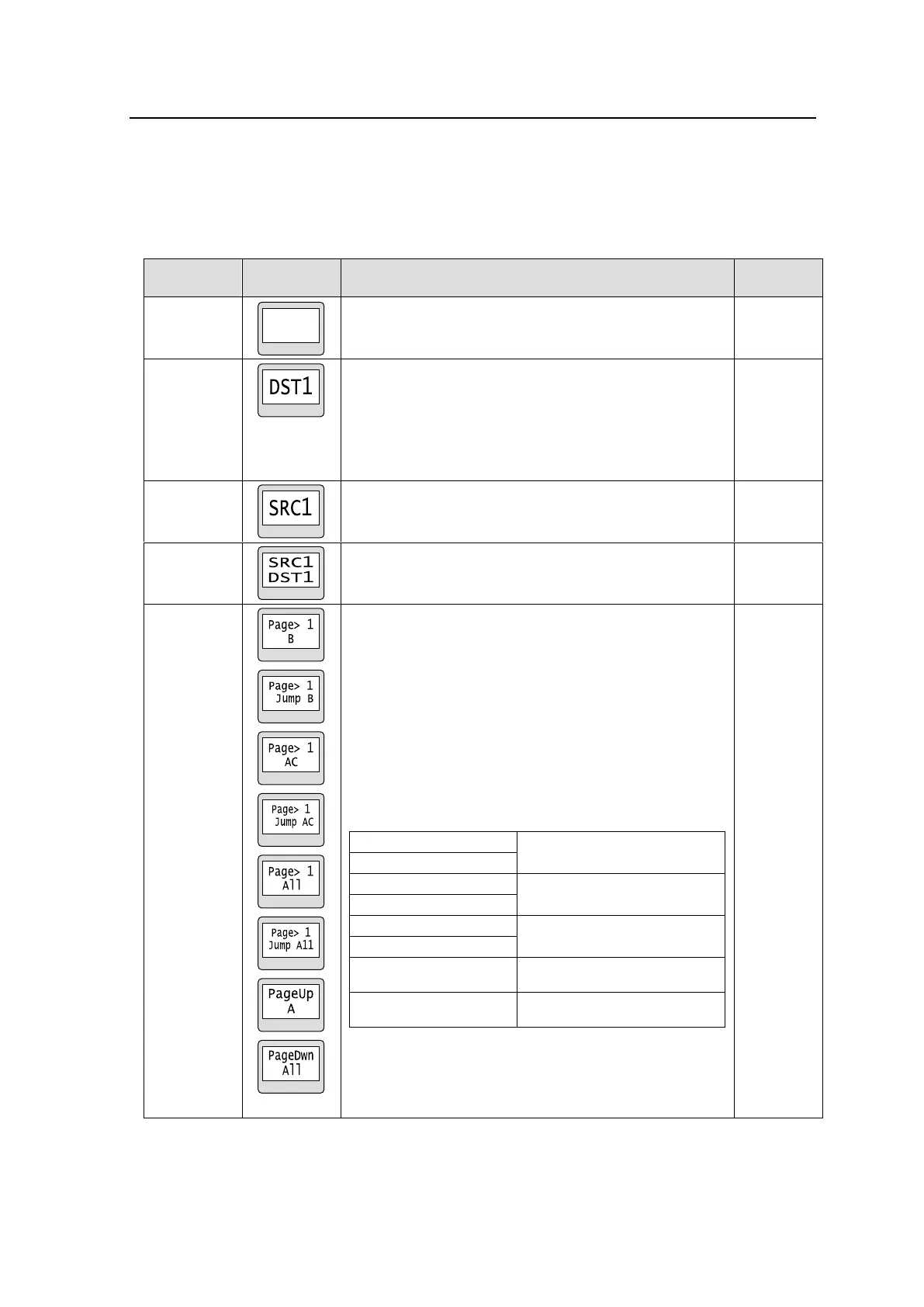
Allows you to change a destination to the destination
specifically assigned to the button.
If locked, the button lights up with a color indicating
LOCK OTHER or LOCK ALL, which can be set in the
[Web-based Control: RU Settings page].
Re-pressing the button allows you to display the Unit ID
that locks the destination button.
Allows you to change a source to the source specifically
assigned to the button.
Allows you to change a source to the source specifically
assigned to the button for a destination of the
source-destination assignment of the button.
Allows you to change pages to be displayed to a
specific, next or previous page.
There is a menu that allows you to select whether to
return to the previously displayed page or to display the
next specified page.
Target group(s) is/are displayed on the bottom of the
button indication.
See Sec. 5-2-2. “Page Function” and Appendix: “How
to use Page buttons” for details on Page button setting
and operation.
Button indications (from the top to the bottom)
Switches the page to 1 for
Group B.
Switches the page to 1 for
Group A and C.
Switches the page to 1 for all
groups.
Moves the page forward by 1
for Group A.
Moves the page backward by 1
for all groups.
* A corresponding page name is displayed when
assigning PAGE JUMP on MFR-18RUA/39RUA/
16RUTA units.
(*1) MFR-18RUA/39RUA/16RUTA only



 To Next Page