SEP user’s manual Page 58 of 89 Doc no. RD-7243-MA-001-02
7.11. Overload detector (optional)
The manufacturer proposes to equipe (optionally) the platform with an overload detection system.
This device calculates load locally. The detector is programmed to stop the unit and prevent
operation of the platform when the permitted maximum load is exceeded.
To correct the issue, unload the platform of any excess load.
7.12. Emergency stop button
It is possible to proceed to an emergency stop, and this at all time and at any level of the
platform.
In situations presenting a risk for operating staff or for the platform or structure, stop the platform
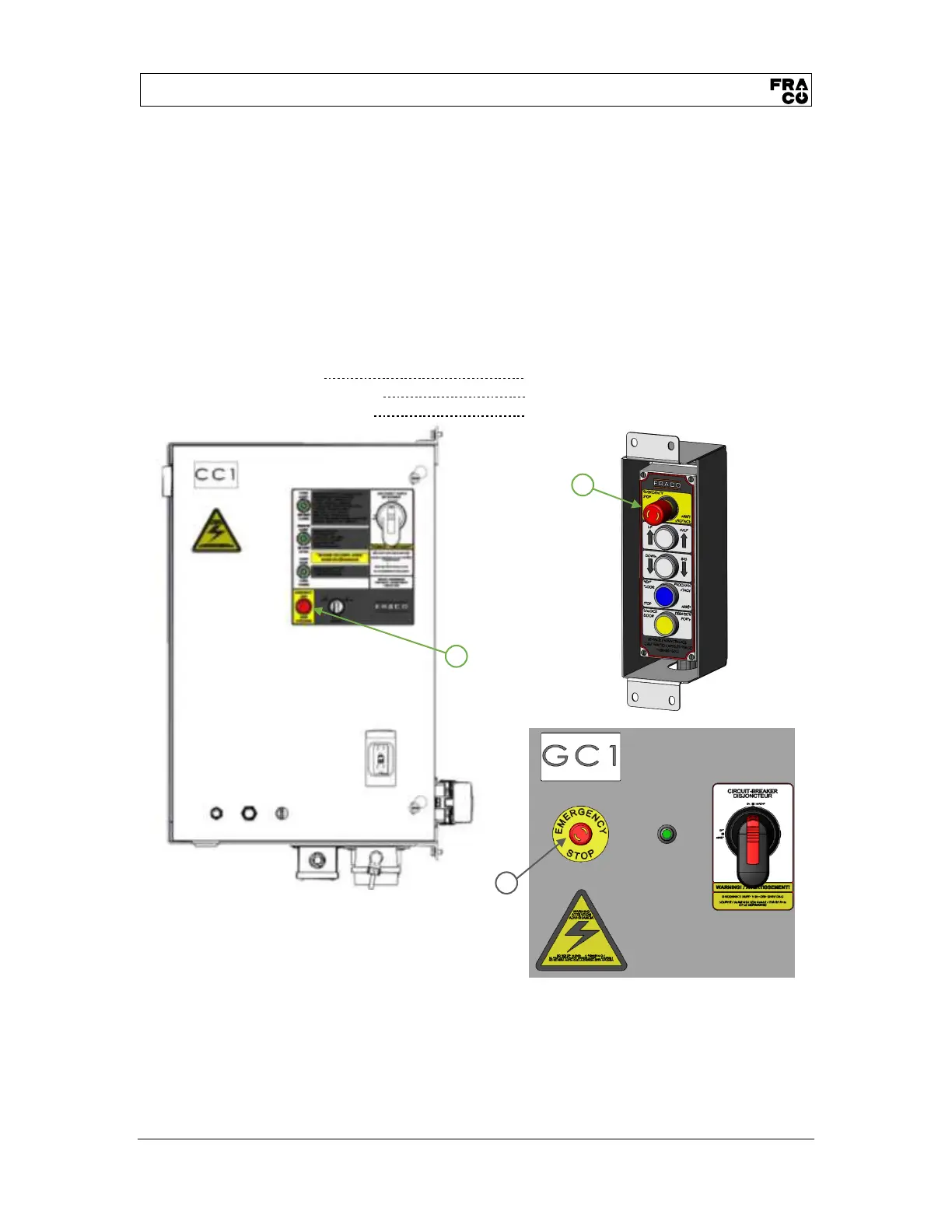
by pressing one of the emergency stop buttons:
• Ground box (GC1) (1)
• Operator control box (CC2) (2)
• Main contron panel (CC1) (3)
NOTE :
The emergency stop buttons are equipped with a lock mechanism and remain active until they
are manually unlocked (turn the red button to the right and pull).


 To Next Page