Rev. 5 – Jun 2020 Page 27 of 91
The Trig/Gate Input and the Trig/Gate Button trig the en-
velope: you can use either the manual button or an exter-
nal trig or gate (for details concerning trig and gate
thresholds see the technical specification, p. 87). If the
function is running, any retrig signal recalls the function’s
rise stage, this means that:
· if the function is already in its rise stage, nothing
changes;
· if the function is in its hold stage, nothing changes;
· if the function is in its fall stage, it goes back to rise,
starting from the level on which it left the fall stage;
· if the function is in its rest stage, it starts a new func-
tion.
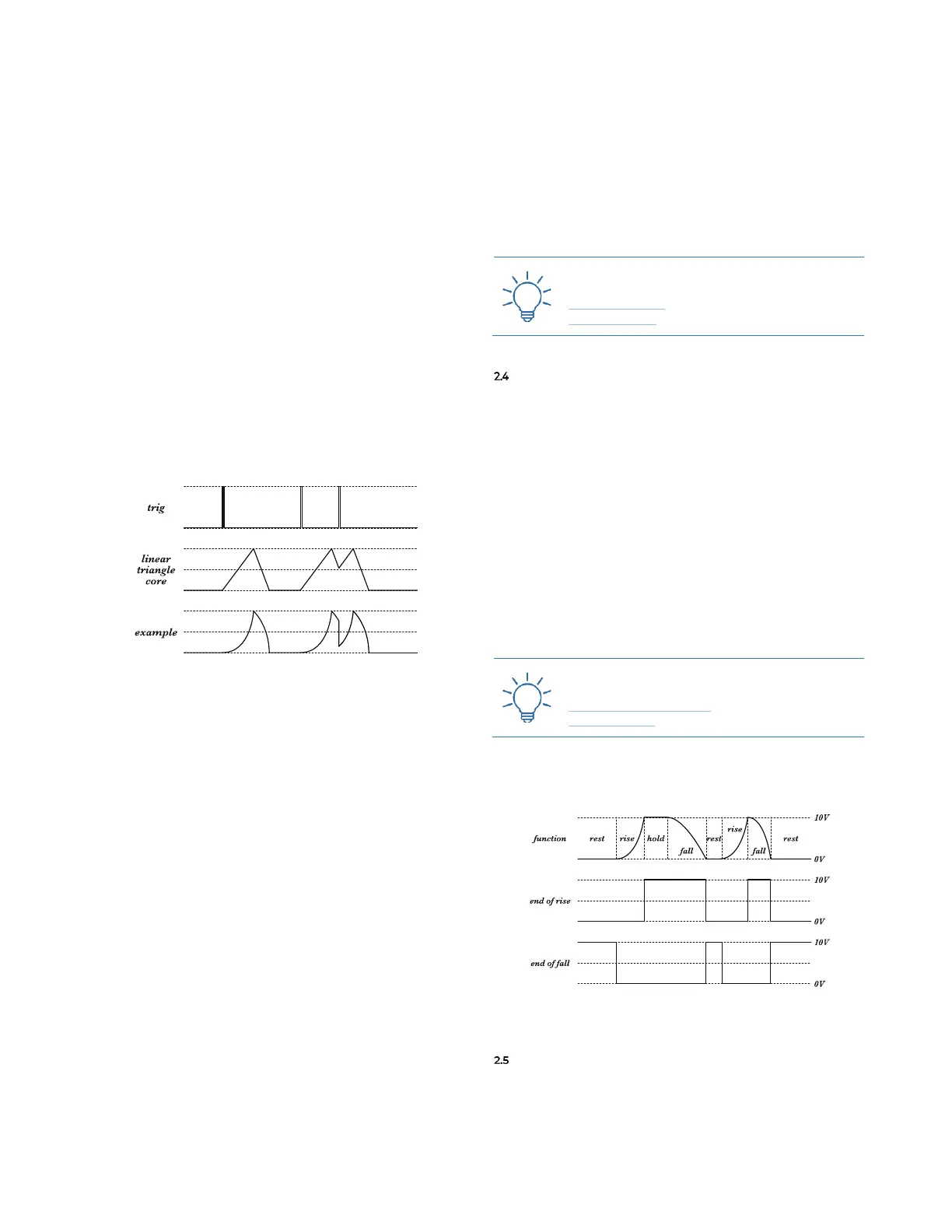
It is useful to know that, being FALISTRI a triangle
core generator, and having a wave shaper stage applied
after the core, if the retrig happens during fall stage and
you are using different wave shapes than linear, some in-
teresting discontinuity will occur.
Figure 22: FALISTRI’s retrigs with different envelope shapes.
2.3.1 Green Alternative Retrig (On Rest)
The green function generator offers a unique feature
which can be activated with a switch on the back of the
module. It is up to the user to decide how it should be-
have:
· To Rise (lower position) – same behavior as the yellow
one;
· On Rest (higher position) – the retrig is effective only
when the generator is at its rest stage.
This last feature allows you to use the generator as a
formant oscillator, maintaining roughly the spectral con-
tent of the function you designed across several notes, and
resulting in frequency divisions ( /2, /3, /4, /n… ) of the
external frequency used to trigger it, when this “slave”
period is longer than the “master” one.
Since this switch is on the back of the module, it is
meant to provide a set-and-forget option. However, in
case of more than one FALISTRI on the same system,
one might actually forget the setting: for this purpose,
when the green generator is set On Rest and its play mode
is Transient (see above, §2.3), the trig/gate LED will not
light up.
To check whether the green generator is set On Rest or
To Rise, set the generator to Transient Mode and push the
Trig/Gate button (A.2): if the LED lights up, it’s To Rise; if
it doesn’t, it’s On Rest.
Please note that the Quadrature mode forces the To Rise
mode, so the switch is ignored (see below, §2.5.1).
OUTPUTS
Each generator provides 5 different outputs: two gates
and three CV.
The Control Voltage outputs are:
· Bipolar (A.5, marked with two dots): range ±5V, use-
ful for bipolar LFO or when the function is used as an
audio rate oscillator
· Unipolar (A.6, marked with one dot): range 0/+10V,
useful for any traditional envelope modulation.
· Attenuverted (A.8, connected to the A.7 attenuverter):
ranges from 0V to anything up to +10V or 0V to any
down to −10V. It is still unipolar, but with the polarity
and amplitude you prefer.



 To Next Page