Rev. 5 – Jun 2020 Page 51 of 91
As described in Blue Gate Layer above, the Variation Range
is bipolar: a positive CV will increase such range both
above and below the stage value, and a negative CV will
decrease it.
Please note that if the CV Variation Chance (green CV
layer) is set to 0, this modulation will not produce any au-
dible effect.
7.3.6 Pattern Shift
It has been said that the default order of patterns in Pat-
tern mode can be temporarily altered through Pattern Re-
call and Pattern Mix or defined in a different structure
through Song Mode.
However, it is also possible to automatically recall other
patterns though Pattern Shift. This function uses an exter-
nal CV to change the pattern which would naturally fol-
low the current one in the Pattern Loop: it does not recall,
therefore, any pattern outside the defined Pattern Loop. For
the same reason, the Pattern Shift is not designed to operate
in Song Mode.
By default, in Pattern Mode USTA moves forward by 1
pattern at a time. Pattern Shift adds an offset to the default
+1 operation: for example, if a fixed CV offset equivalent
to 1 is applied, USTA will skip a pattern out of two (thus
moving from 1 to 3 and from 3 to 5); if the pattern loop
contains only three pattern, USTA will skip from pattern
1 to 3, then it will loop back to 2, then back again to 1, 3,
2 and so on. If a pattern contains four patterns, and an
offset of 3 is applied, usta will seem to keep looping only
the pattern on which the Pattern Shift started, because
the new offset will force the loop always back to it.
When Pattern Shift is enabled, the Reset button will be-
have accordingly: instead of resetting the loop to the First
Pattern, it will reset to the pattern whose number is de-
fined by first pattern + the pattern shift offset.
7.3.7 Phase Shift
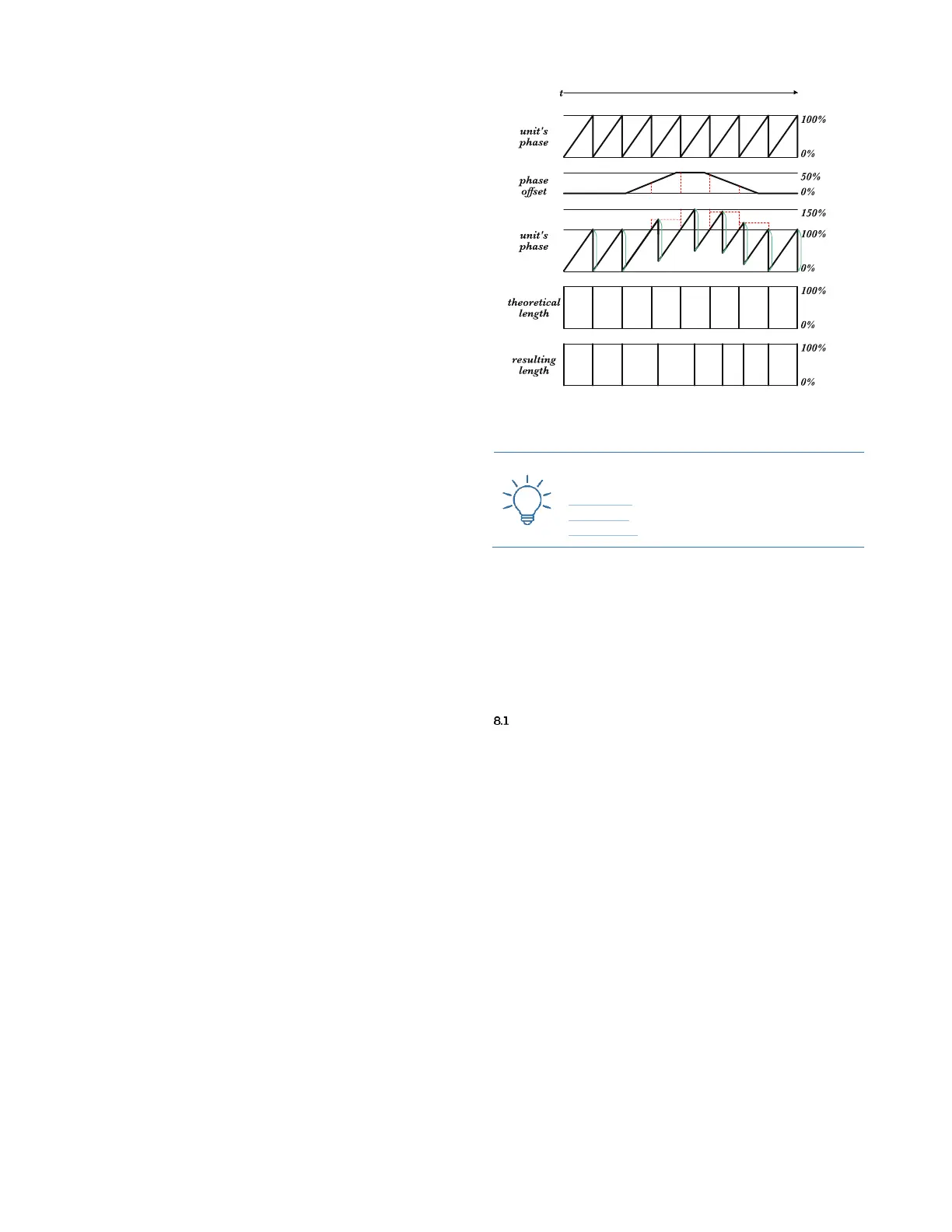
USTA allows you to use an external CV to shift the
phase of a track, i.e. its position in relation to the expected
timing: a positive voltage will shift a track up to half time
unit “behind the beat”, thus allowing effects such as ru-
bato or delays.
The great advantage of the Phase Shift is that even if it
may seem to slow down the track, it does not affect the
clock: when the incoming CV goes back to 0, or when the
cable is unplugged, the track will immediately get back to
the usual position in time.
Interesting effects can be obtained with manual offsets
(like 321), envelopes (like FALISTRI) or clocked random
voltages (like SAPÈL).
Figure 73: Visual representation of Phase Shift.
8 ADDITIONAL OPERATIONS
In addition to the previous operations, USTA allows
you to perform deeper editing options. According to their
position in USTA’s architecture, such options are located
either in the Project Menu (§3.1) or in the Track Menu (§3.2).
SELECT CV MODE (RAW OR PITCH)
In each track, CV A and CV B can be set to work in Pitch
or Raw mode, independently. These two modes have
been created to fulfill any need depending on the address-
ing of that control voltage: if a control voltage for an os-
cillator’s pitch is needed, or for anything that responds in
V/oct, it is suggested to use pitch mode, while Raw mode
is suggested for any other application.
By default, CV A is set to work in pitch and CV B in Raw.
To change that, select the track you want to modify, push
the Navigation Encoder to access the Track Menu (B.14), and
scroll to reach the CV A Mode or CV B Mode menu item:
push again the navigation encoder, scroll to select the de-
sired mode, push again to confirm and push Esc (B.4) to
exit.
Remind that when CV A or CV B are set to work in Pitch
mode, the dashboard will display the note; when they are
set to work in raw mode, the dashboard will display the
voltage on a milliVolt scale.



 To Next Page