Rev. 5 – Jun 2020 Page 45 of 91
5.4.2 Pattern Mix
The Pattern Mix function is similar to the Full Pattern
Recall, the main difference being when the pattern
change happens. It is achieved by holding Coarse (B.3) be-
fore selecting the pattern through the Stage Encoders (A.1–
Remember to hold Shift All to select patterns no. 17-32).
Once the new pattern is selected by pushing the encoder,
the playhead will wait for the playing stage to end and
play the consecutive stage on the selected pattern, instead
of the current one. For example, if you are playing stage
7 of the second pattern and select the fifth pattern, USTA
will wait until the end of stage 7, then move to stage 8 of
pattern 5, mixing them.
If the selected pattern does not have enough stages to
maintain the sequence length of the current pattern, or if
it is selected during the last stage of the current pattern,
USTA will play the selected pattern starting with its first
available stage.
To sum up, Full Pattern Recall juxtaposes patterns, while
Mix combines them.
MUTE
One of the most popular features of live performances
is the Mute function, i.e., being able to immediately re-
move or add certain parts of the composition. USTA fea-
tures two levels of muting: Mute Track and Mute Channel.
5.5.1 Mute Track
This function temporarily disables all the outputs of the
muted track.
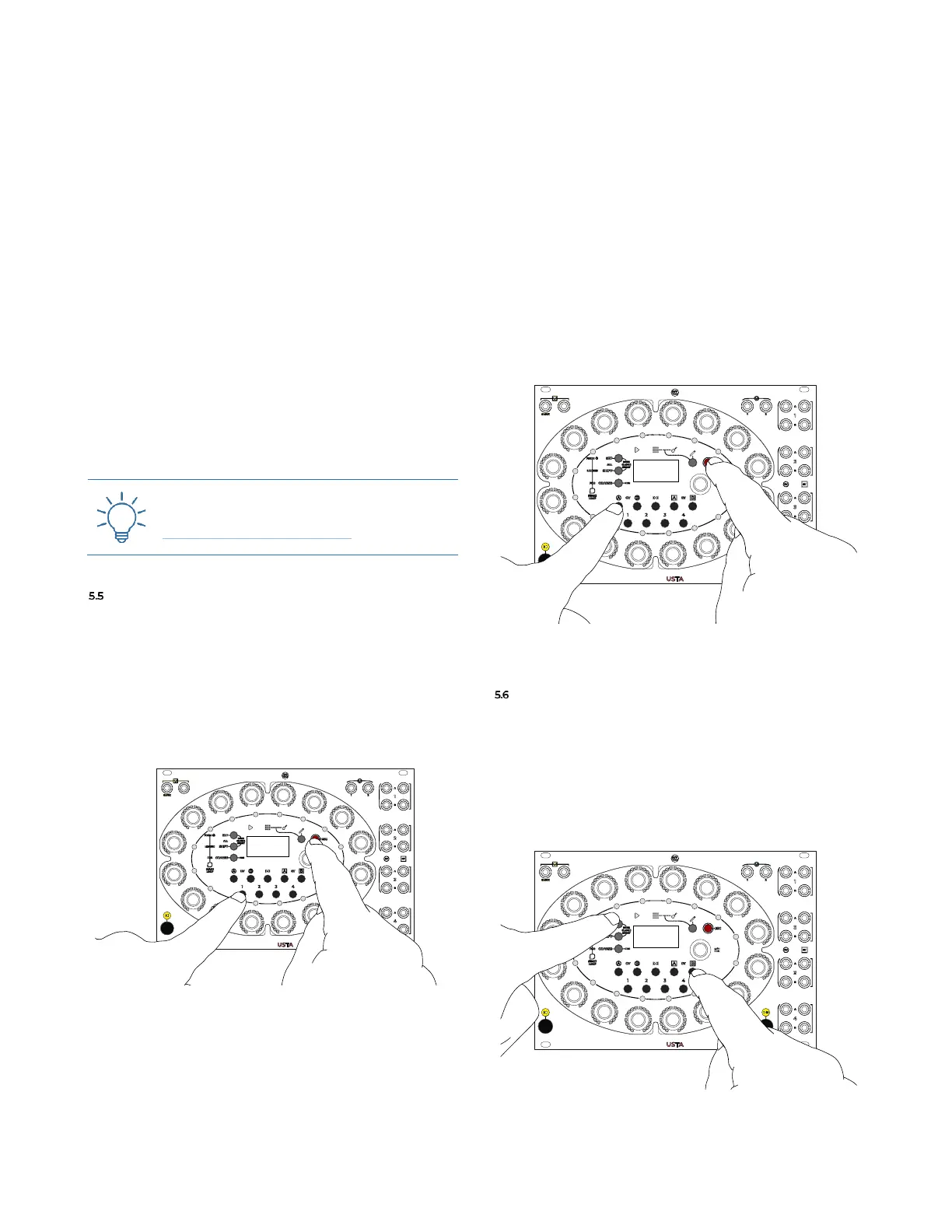
Figure 59: Mute Track button combination.
Muting a track results in it having no Gate A and B out-
put and no CV A and B output (all 4 outputs of the muted
track provide a constant 0V). To achieve this function,
hold the Esc button (B.4) and push the button of the track
you want to mute (B.11 see Figure 59). It is possible to
mute any desired track, even it is not the currently se-
lected one.
A muted track shows the TRACK MUTED text on the current
stage section of the Dashboard when selected.
5.5.2 Mute Channel
On a more specific level, the Mute Channel function al-
lows to mute solely the output of one or more channels
per each track (CV A, CV B, Gate A, Gate B). This option
may be useful in case you are using different channels of
the same track to control different sound sources, such as
Gate A for the kick drum and Gate B for the snare.
To mute a channel, hold the Esc button (B.4) and push
any Channel Button (B.6, B.7, B.9, B.10).
Figure 60: Mute Channel button combination.
HOLD
It is also possible to “freeze” the current channel value
in a specific track through the Hold function: by holding
Set All (B.1) and pushing one of the Channel Buttons (B.6,
B.7, B.9, B.10), USTA will hold the values as they are
playing in that specific moment until the buttons are re-
leased, see Figure 61.
Figure 61: Hold button combination.



 To Next Page