117
8. Choose the required time with the ARROW buttons.
9. Press the SEL button, to conrm the choosen setting.
Setting OFF-detection time:
10. Press the SEL button once again.
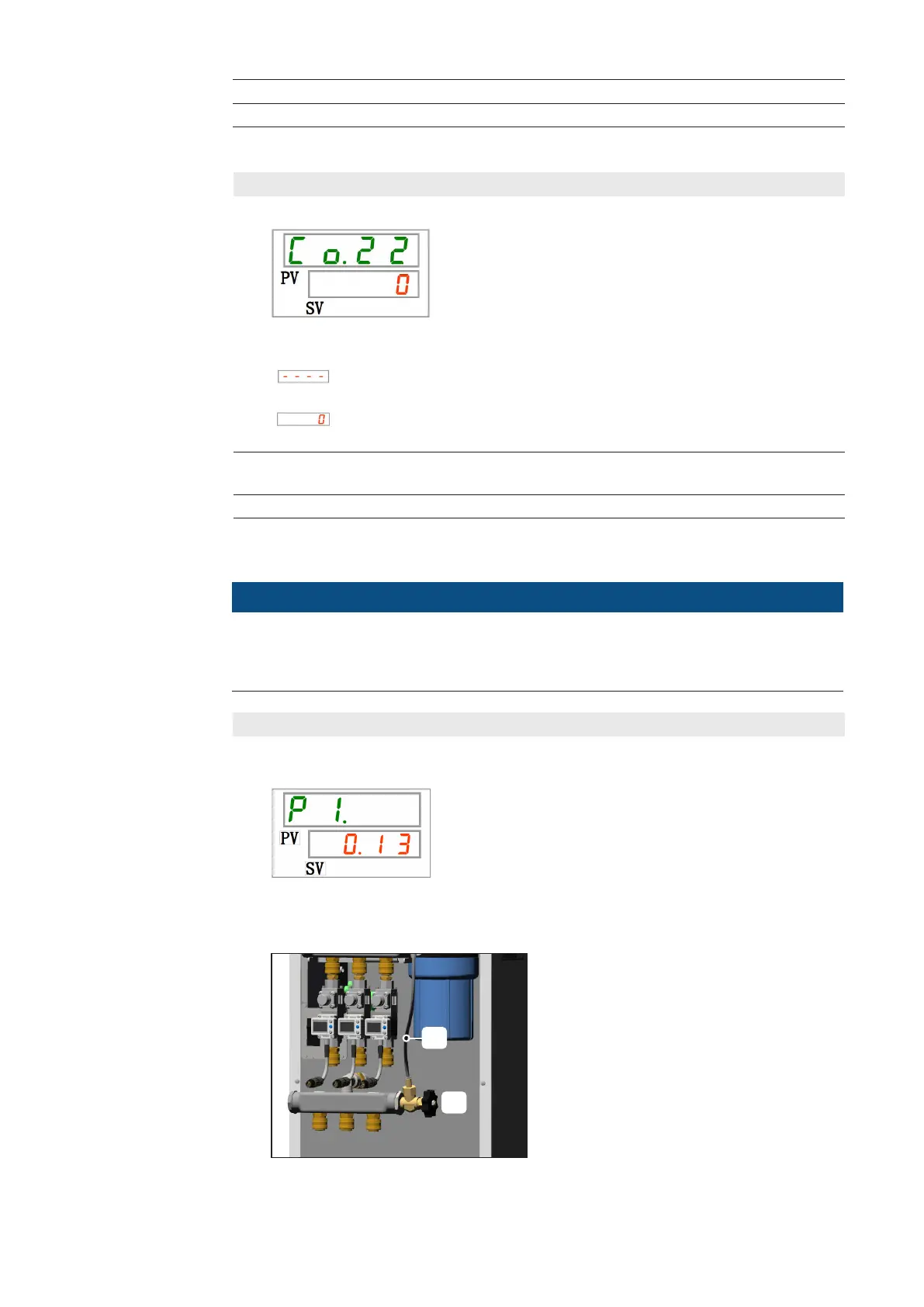
► Setting level Co.22 (OFF-detection time) is shown.
The following setting options are available:
Setting / checking is only possible if the selected signal type is
“Signal input of external switch N.O. or N.C. “.
Delay time until output of the contact input signal 2.
Setting range from 0 to 10 seconds.
11. Choose the required time with the ARROW buttons.
IMPORTANT! Factory set item is 0.
12. Press the SEL button, to conrm the choosen setting.
Dening Contact
input signal 2
(continued)
Setting the circulating uid outlet pressure:
1. Press the SEL button once.
2. Set the ow pressure (value SV), using the handwheel (a) at the bypass:
► Parameter level P1 is shown.
Setting the
circulating uid
outlet pressure
NOTE!
Check the following operating conditions before setting the circulating uid outlet
pressure:
- Pump / cooler switched on
- all water consumers connected
(a)
(b)
IMPORTANT!
If mains frequency is 50 Hz:
Use the bypass hose (b) unchanged.
If mains frequency is 60 Hz:
Shorten bypass hose (b) by exactly half.



 To Next Page