92
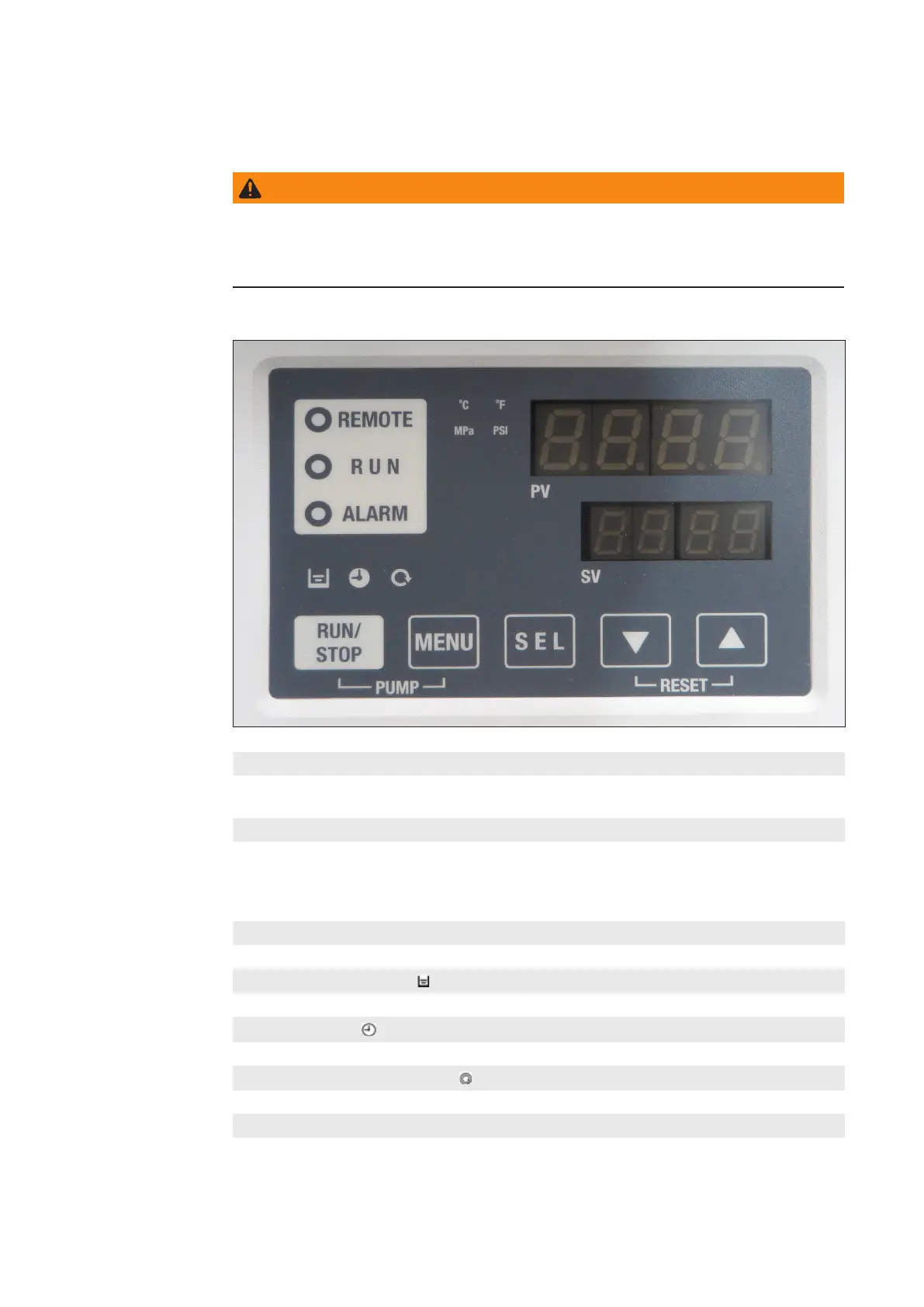
Description of the operation panels
Safety
Water chiller
operation panel
LED indicator REMOTE
Lights when the communication mode DIO is selected. See also chapter “Water chiller
parameterization”.
LED indicator RUN
- Lights up when the water chiller is started and in operation.
- Goes o when the water chiller is stopped.
- Flashes during stand-by for stop (Interval 0.5 seconds).
- Flashes during independent operation of the pump (Interval 0.3 seconds).
LED indicator ALARM
Flashes with acoustic signal when an error occurs (Interval 0.3 seconds).
Indicator FLUID LEVEL
Lights up when the uid level indicator falls below the LOW level.
Indicator TIMER
Lights up while the run timer or stop timer function is working.
Indicator AUTOMATIC MODE
Lights up when the product is in automatic mode.
Button RUN / STOP
Switches the water chiller on and o.
WARNING!
Operating the equipment incorrectly can cause serious injury and
damage.
Do not use the functions described until you have thoroughly read and understood the
user manual.



 To Next Page