X20/X20S and Ethos v1.0.11 User Manual
2. How to set up a battery capacity warning using a Neuron ESC
The best method of monitoring battery usage is to measure the energy or mAh consumed,
so that the remaining battery capacity can be calculated. The FrSky Neuron series of ESCs
offer this capability. If your ESC does not have this capability, an ammeter may be used
with a calculated Consumption sensor, please refer to the next example.
Connect the telemetry port of the Neuron ESC to your receiver via an S.Port cable, and
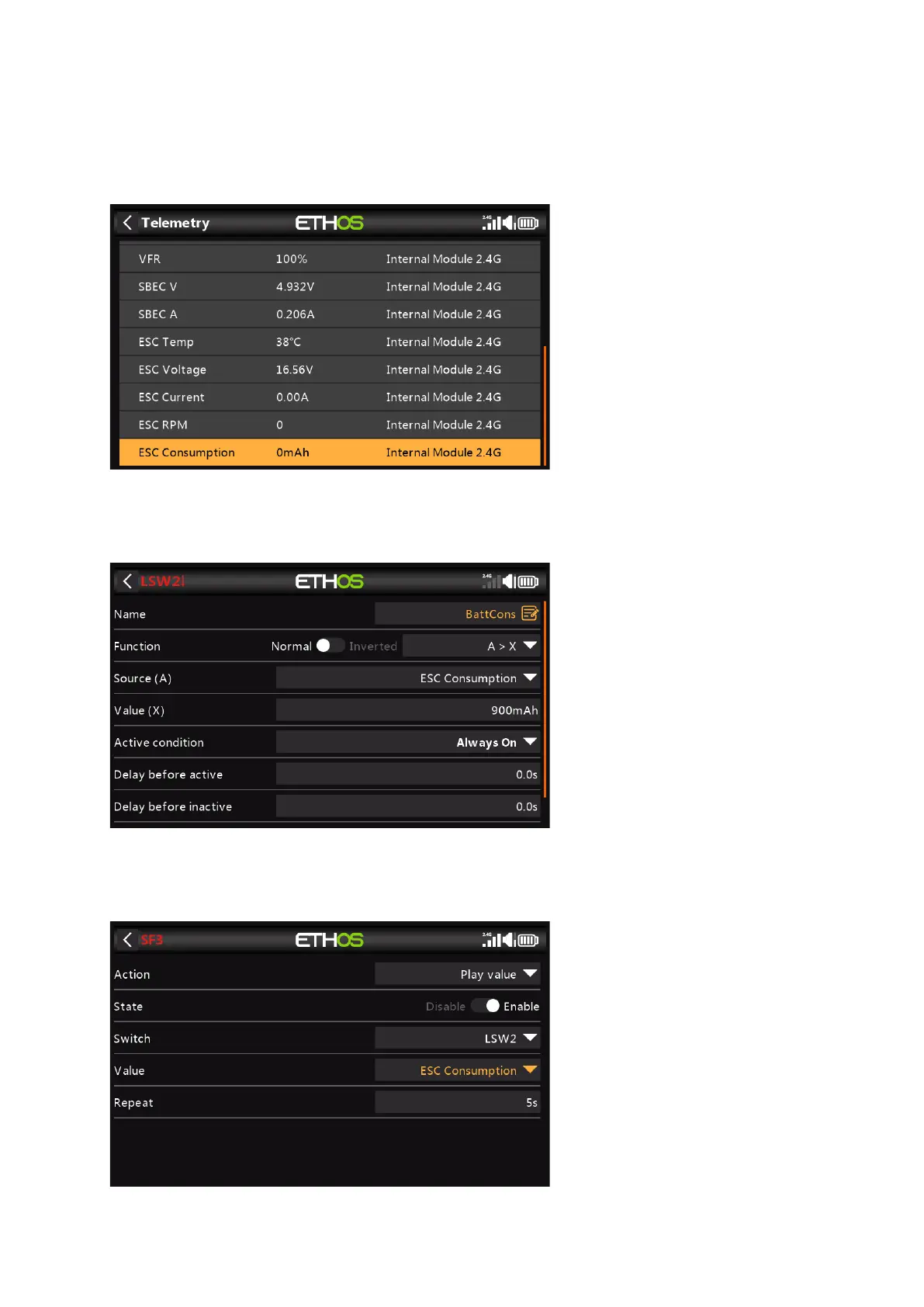
enable the 'Discover new sensors' option in Model / Telemetry. The additional sensors are
shown in the example above. The sensor of interest is 'ESC Consumption'.
Add a new Logical Switch to monitor the 'ESC Consumption', and become True/Active when
the consumption exceeds say 900mAh, or approximately 60% of the battery capacity,
allowing sufficient capacity to land and still have about 30% left.



 To Next Page