10
Before You Start
EN
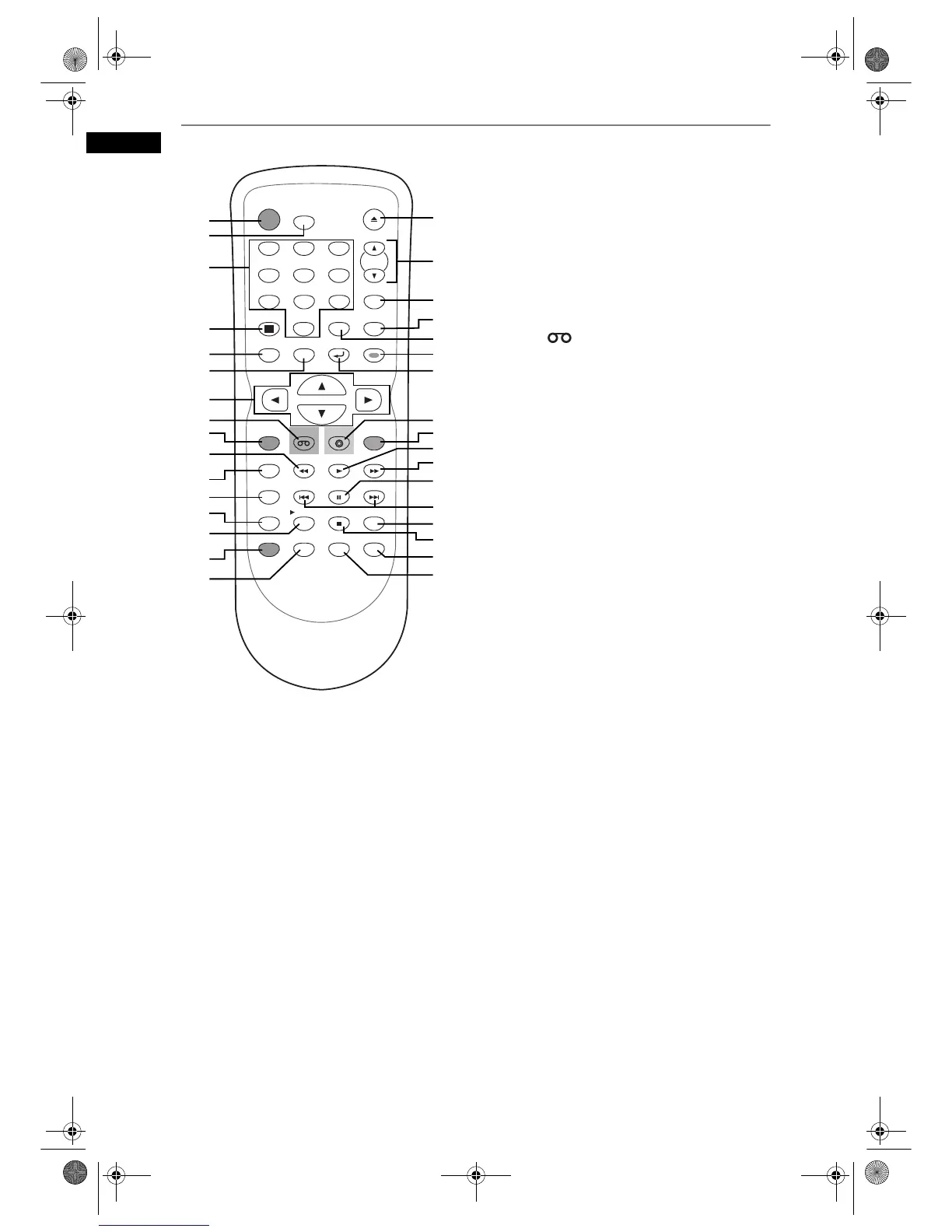
Remote Control
1 STANDBY-ON button (DVD / VCR)
• Press to turn on or off the unit.
2 T-SET button (DVD / VCR)
• Press to set the unit in timer-standby mode. In
the timer-standby mode, press to cancel the
mode and to turn on the unit.
3 Number buttons (DVD / VCR)
• Press to select channel numbers.
• Press to select a title / chapter / track on the
display.
• Press to enter values for settings in the Setup
menu.
• Press to enter the number in the Index or Time
search in VCR mode.
• Press to enter the characters in edit function.
4 DISPLAY button (DVD / VCR)
• Press to display the On-Screen Display.
5 TOP MENU button (DVD)
• Press to display the Title menu.
6 MENU / LIST button (DVD)
• Press to display the Disc menu during playback.
• Press to change the Original and Playlist on the
TV screen. (VR mode only)
7Cursor U / D / L / P buttons (DVD / VCR)
• Press to move the cursor and determine items
or settings.
8 VCR button (VCR)
• Press to select the VCR output mode. (See
page 12.)
9 REC / OTR button (DVD / VCR)
• Press once to start a recording.
• Press repeatedly to start a One-touch Timer
Recording.
10 r button (DVD / VCR)
DVD mode
• During playback, press to reverse fast.
• When playback is paused, press to reverse
slowly.
VCR mode
• Press to rewind the video tape.
• Press to view the picture rapidly in reverse
during the playback mode.
11 TIMER PROG. button (DVD / VCR)
• Press to display the timer programme setting
menu.
12 REC SPEED button (DVD / VCR)
• Press to switch the recording speed.
13 SYSTEM button (VCR)
• Press to change the video colour system.
14 Px1.3/0.8 button (DVD)
• During playback, press to playback in a slightly
faster/slower speed while keeping the audio
quality just as normal playback.
15 DUBBING button (DVD / VCR)
• Press to start VCR to DVD (DVD to VCR)
duplication which you set in the Setup menu.
16 SEARCH button (VCR)
• Press to call up the index or time search menu.
17 OPEN / CLOSE O button (DVD / VCR)
• Press to open or close the disc tray.
• Press to remove the tape from the unit.
STANDBY-ON
T-SET
DISPLAY SETUP
TOP MENU
MENU/LIST
TIMER PROG.
REC SPEED
SYSTEM
PAUSE
SEARCH
SKIP
PLAY
AUDIO
INPUT SELECT
OPEN/CLOSE
CLEAR
1
2
3
4
5
6
7
8
9
SPACE
0
ENTER
PROG.
RETURN
.
@
/: ABC DEF
GHI
JKL
MNO
PQRS
TUV
WXYZ
STOP
DUBBING
REC/OTR
CM SKIP
DVD
VCR
SKIP
REPEAT ZOOM
X1.3/0.8
9
1
17
18
20
21
19
23
25
24
29
33
3
4
5
12
11
2
6
7
8
13
14
10
27
15
16
28
26
32
31
30
22
E9G04ED_EN.book Page 10 Tuesday, March 27, 2007 10:27 AM



 To Next Page