32
Recording / Dubbing
EN
Hints for the Timer Recording
• If there is a power failure or the unit is unplugged for
more than 30 seconds, the clock setting and all
timer settings will be lost.
• If there is no disc or an unrecordable disc in the tray
(finalised DVD-RW/-R, a fully recorded disc, etc.),
the DVD on the front panel display will flash and the
timer recording will not occur. Insert a recordable
disc.
• If there is no tape or a tape with a record tab is not in
the cassette compartment, the VCR on the front
panel display will flash and the timer recording
cannot be performed. Please insert a recordable
tape.
• When all timer recordings are complete, the
icon flashes. To play back or eject the recorded disc,
press [T-SET], and then press [PLAY P] or
[OPEN / CLOSE O].
• The timer recording cannot be performed in DVD
and VCR at the same time. If you set two
programmings with the same channel and time both
in DVD and VCR, the programming that has priority
will be recorded.
• You cannot make any DVD operation during DVD
timer recording.
• You cannot make any VCR operation during VCR
timer recording.
• If the Start and End times are same, the length of
the recording will be set for 24 hours. If the disc or
tape becomes full during recording, the unit will turn
itself off. To continue recording, press [T-SET] to
cancel the timer-standby mode, insert a recordable
disc or tape and press [T-SET] again.
• When 2 or more programmes are overlapped,
“Timer program overlapped” appears, and the
overlapped programme will be displayed in blue. To
correct the timer programme refer to “Checking,
Cancelling or Correcting the Timer Programming
Information” on page 31.
• If the Start time is earlier and the End time is later
than the current time, the recording will start
immediately after you press [T-SET].
• If a videotape ends during the timer recording, the
unit will automatically stop, eject the videotape, and
turn itself off. To continue recording, insert a
recordable tape.
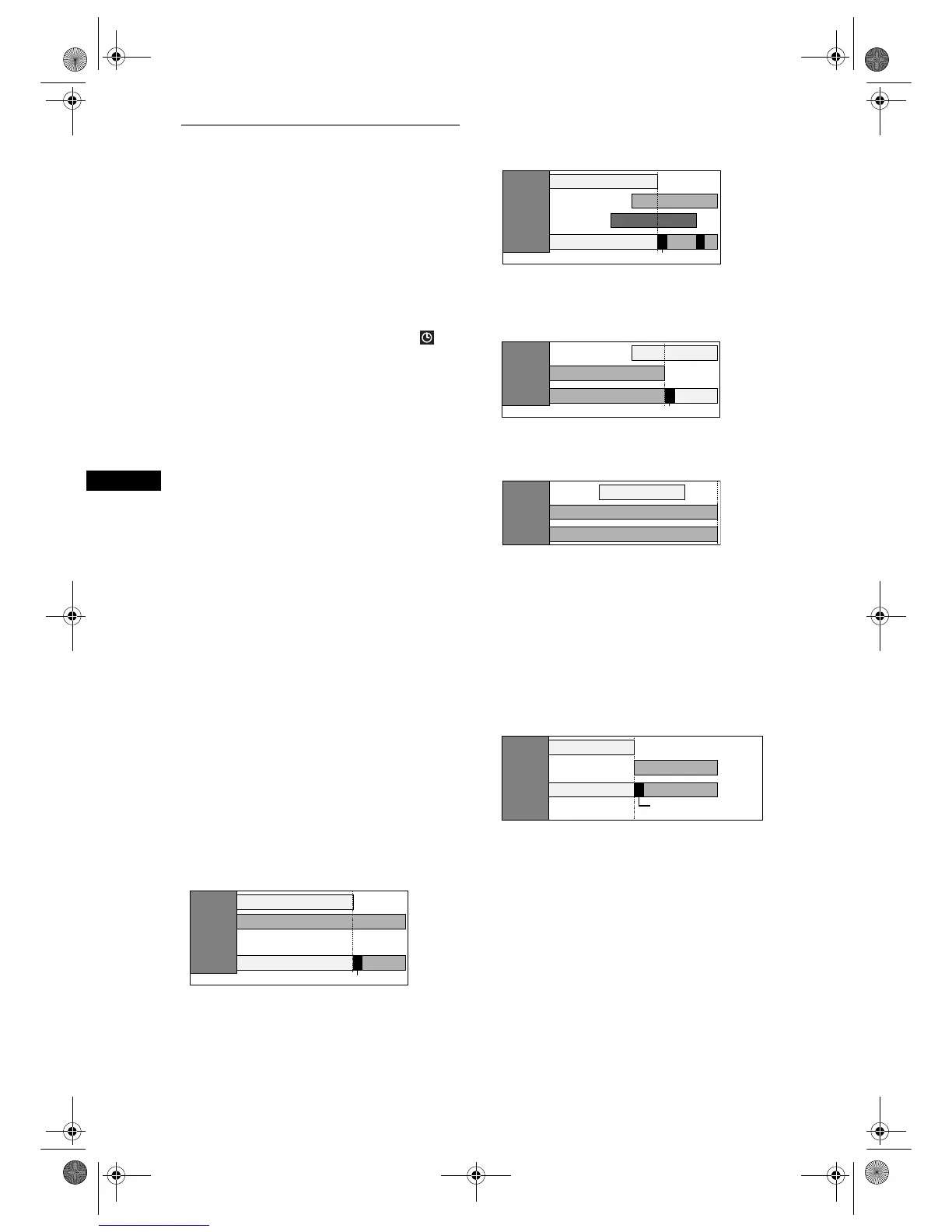
Priority of overlapped settings
The unit records programmes according to priority if
the timer programmes overlap.
If the starting time is same:
• The timer programming set first (PROG. 1) has
priority.
When the starting time and the ending time for
each programmes are different:
• A programme that has earlier start time has priority.
If the recording time is partially overlapped:
• The timer programming with the earlier start time
(PROG. 2) has priority. PROG. 1 will start after
PROG. 2 recording is complete.
If the recording time entirely overlaps:
• The shorter timer programming (PROG. 1) is not
recorded.
Note for DVD recording
• If the recording time of two programmes are
overlapped, or the End time of a programme and the
Start time of another is same, the first 2 minutes (at
the longest) of the subsequent programme will be
cut off.
If the End time of the programme currently being
recorded and the Start time of the subsequent
programme are same:
• If PROG. 1 is a DVD recorded programme, the
beginning of PROG. 2 may be cut off.
*If the cut off time exceeds 3 minutes, the error
number “E40” will appear in the Timer Programming
list.
PROG. 1
PROG. 2
PROG. 1 PROG. 2
PROG. 2
recording
will start
after
PROG. 1
recording is
completed.
Actual
recording
The first 2 minutes (at the longest) will be cut off.
PROG. 1
PROG. 2
PROG. 1
PROG. 3
PROG. 2
PROG. 3
Actual
recording
The first 2 minutes (at the longest) will be cut off.
PROG. 1
PROG. 2
PROG. 2 PROG. 1
The first 2 minutes (at the longest) will be cut off.
Actual
recording
PROG. 1
PROG. 2
PROG. 2
Actual
recording
PROG. 1
PROG. 2
PROG. 2PROG. 1
Actual
recording
The first 2 minutes
(at the longest) will be cut off.*
E9G04ED_EN.book Page 32 Tuesday, March 27, 2007 10:27 AM



 To Next Page