62
Other Setups
EN
Playback
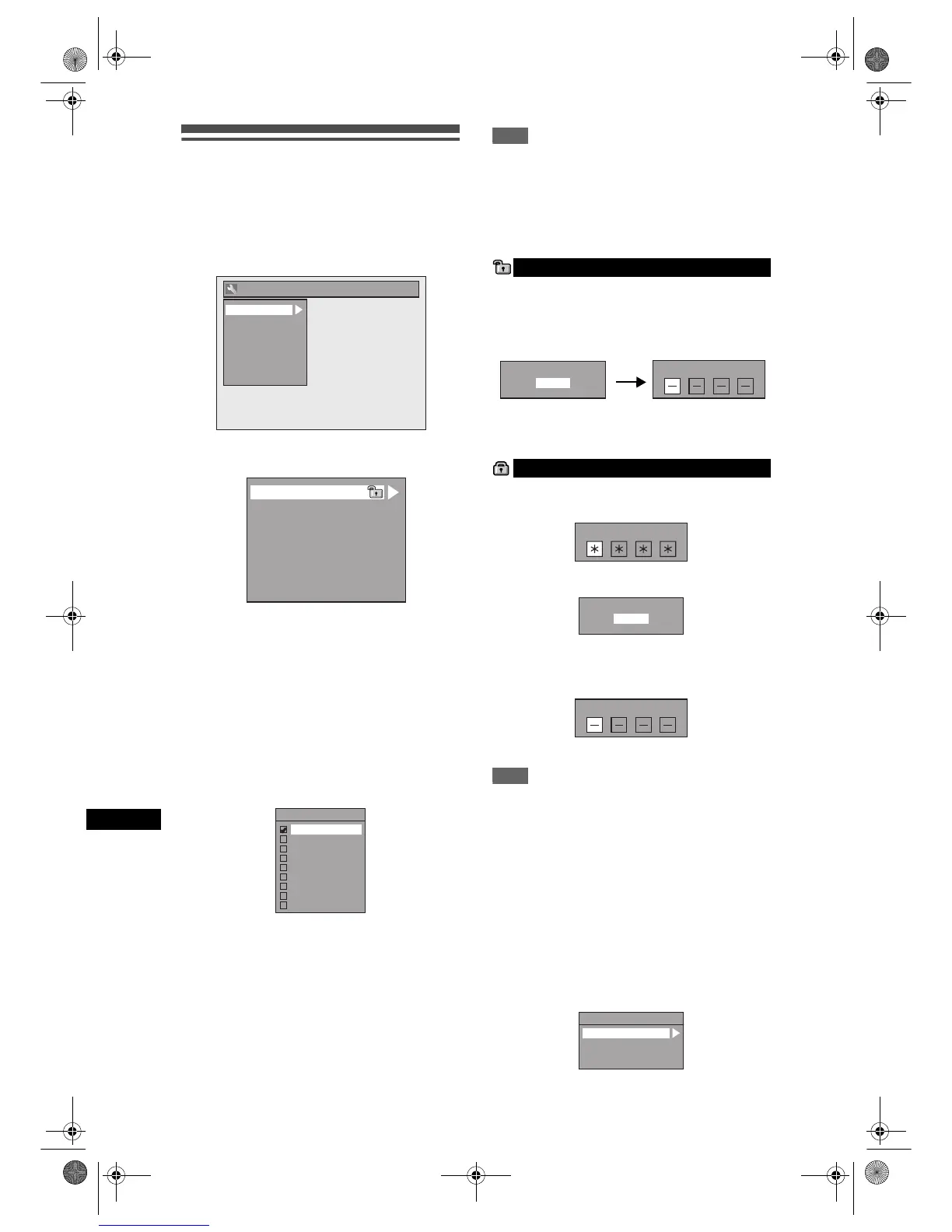
1 In stop mode, press [SETUP]. Select
“General Setting” using [U / D],
then press [ENTER].
2 Select “Playback” using [U / D],
then press [ENTER].
3 Select a desired item using [U / D],
then press [ENTER].
4 Refer to 1. to 8. on pages 62 to 64
and set the selected item.
5 When you finish with the setting,
press [SETUP] to exit.
1. Parental Lock (Default: All)
Set the Parental Lock level.
Change the Parental Lock level using
[U / D], then press [ENTER].
Proceed with either of the following steps.
Parental level
All: All parental locks are cancelled.
8: DVD software of any grade (adult /
general / children) can be played back.
7 to 2: Only DVD software intended for general
use and children can be played back.
1: Only DVD softwares intended for children
can be played back.
Note
• The parental lock function may not be available on
some discs.
• It may be difficult to determine if some DVDs
support the parental lock function. Be sure to
confirm that the parental lock function operates in
the way that you have set.
• Record the password in case you forget it.
Select “Yes” using [U / D], then
press [ENTER]. Enter a new
password using [the Number
buttons], then press [ENTER].
Your setting is activated.
If you select “No”, press [SETUP] to exit.
Enter the current password using
[the Number buttons].
If you want to change the password, select “Yes”
using [U / D], then press [ENTER].
Enter a new password using
[the Number buttons], then press
[ENTER].
Your setting is activated.
Note
•Press [CLEAR] to erase numbers entered
incorrectly.
• If you forget your password or you want to clear all
settings in Parental Lock, enter [4], [7], [3], [7] using
[the Number buttons] at the option window. Your
password is cleared and parental levels are set to
“All”.
2. Audio Out
Choose the appropriate audio setting for your
external device.
It will only affect a disc playback.
Select a desired item using [U / D],
then press [ENTER].
General Setting
Display
Video
Clock
Channel
DivX
Reset All
Recording
Playback
1
2
3
4
5
6
7
Parental Lock
Audio Out
Disc Menu Language
Audio Language
Subtitle Language
Angle Icon
Still Mode
8
TV System
Parental Lock
All
8
7
6
5
4
3
2
1
A password is not yet set
A password is already set
Change Password?
Yes
No
Password Input
Password Input
Change Password?
Yes
No
Password Input
Audio Out
Dynamic Range Control
PCM
Dolby Digital
MPEG
E9G04ED_EN.book Page 62 Tuesday, March 27, 2007 10:27 AM



 To Next Page