33
Recording / Dubbing
EN
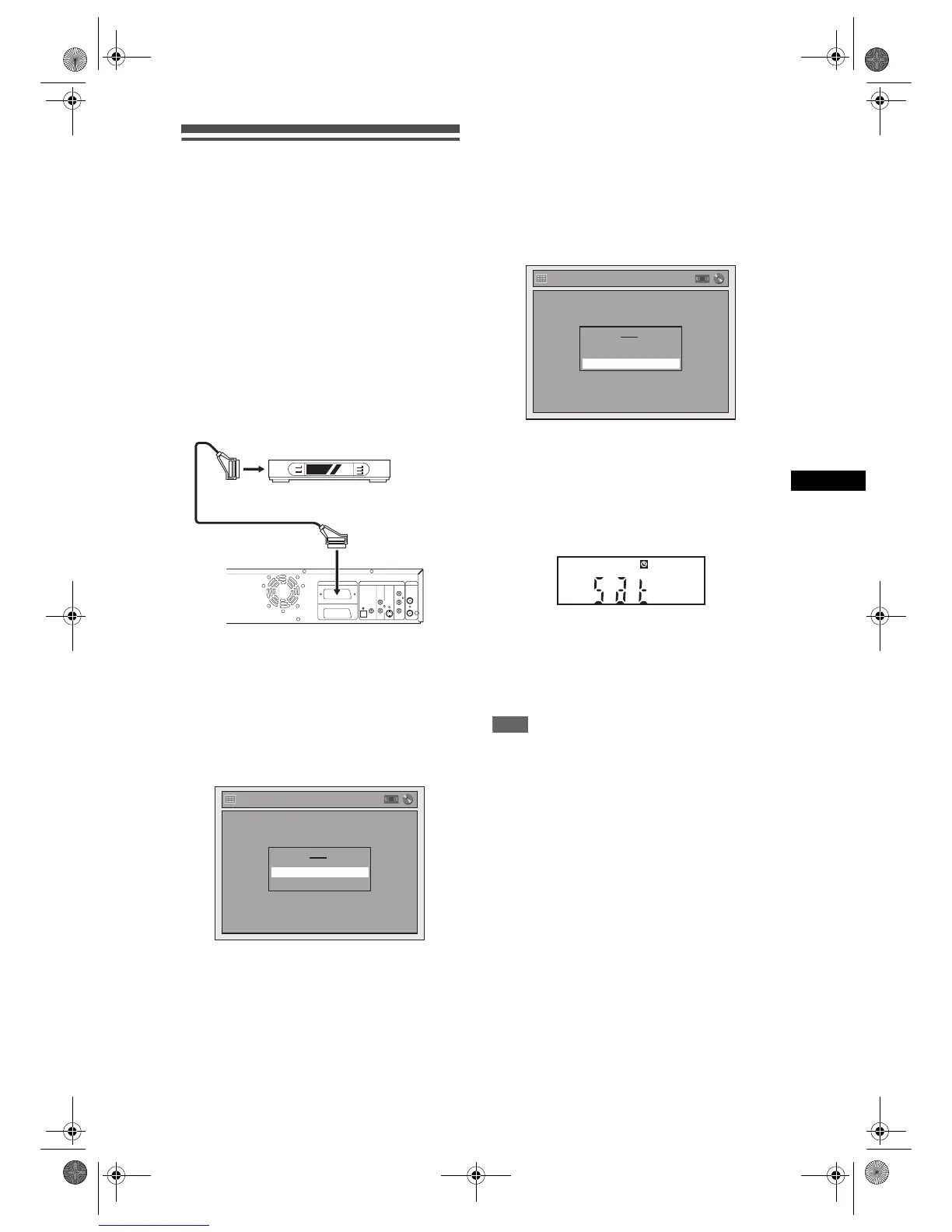
Satellite Link
You can set the unit to start recording whenever it
detects the video scart control from the external tuner.
Preparing for the Satellite Link Timer Recording:
[Preparation of the external tuner]
• The external tuner should be equipped with
some kind of timer function. Using timer function
of the tuner, set it to be turned on when it comes
to the time you want to start recording, and off
when it comes to the time you want to finish
recording. (Refer to the tuner’s manual on how
to set the timer.)
• Make sure to turn off the external tuner when
you finish setting.
[Preparation of this unit]
• Make sure to select the desired Recording
speed beforehand.
1 Press [SETUP].
2 Select “Timer Programming” using
[U / D], then press [ENTER].
3 Select “Satellite Link” using [U / D],
then press [ENTER].
4 Select the time, media or speed
using [U / D], then press [ENTER].
5 Set the desired start time using
[U / D], then press [P].
• The hour can be selected among 0-23.
• Repeat this step to set the desired minutes.
6 Select the recording media using
[U / D], then press [P].
7 Select the recording speed using
[U / D].
Refer to “Recording Speed” on page 23 for DVD
or page 68 for VCR.
• If you want to edit the time, media or speed
press [L], then press [U
/ D] to correct them.
8 Press [ENTER].
“To Standby Mode” is highlighted.
9 Press [ENTER] again.
In a second, the unit will be turned off
automatically as it goes into the Satellite Link
standby mode.
• Until the time you set in “Start”, the clock will
appear on the front panel display.
• “Sat” will appear on the front panel display at the
start time.
To cancel the Satellite Link function while in the
Satellite Link standby mode:
Press [T-SET] to turn on the unit.
To cancel the Satellite Link function while the
Satellite Link Recording is in progress:
Press [STOP S] on the front panel of the unit.
Note
• If you have not set the clock, the clock setting
window will appear at step 3. Follow to step 4 in
“Manual Clock Setting” on page 22.
• You cannot set the End time for the Satellite Link
Timer Recording on this unit.
• Recording picture will be distorted if the copy
protection signal is being detected during Satellite
Link Timer Recording.
• When a regular Timer Recording and the Satellite
Link Timer Recording are overlapped, the examples
are given below.
DVD/VCR DVD
IN
OUT
Y
P
B
/C
B
P
R
/C
R
L
R
COAXIAL
COMPONENT
S-VIDEO
OUT
AUDIO
DIGITAL
AUDIO OUT
OUT
VIDEO OUT
ANTENNA
AV2(DECODER)
AV1(TV)
OPTICAL
Scart cable (not supplied)
External tuner
(not supplied)
Satellite Link
To Standby Mode
Start
0:00 DVD
DVD
VCR
Speed
1H
Satellite Link
To Standby Mode
Start
3:00 DVD
DVD
VCR
Speed
1H
E9G04ED_EN.book Page 33 Tuesday, March 27, 2007 10:27 AM



 To Next Page