53
Editing
EN
Disc Editing
You can edit a disc recorded using the PAL system. It
is not possible to edit discs recorded using the NTSC
system.
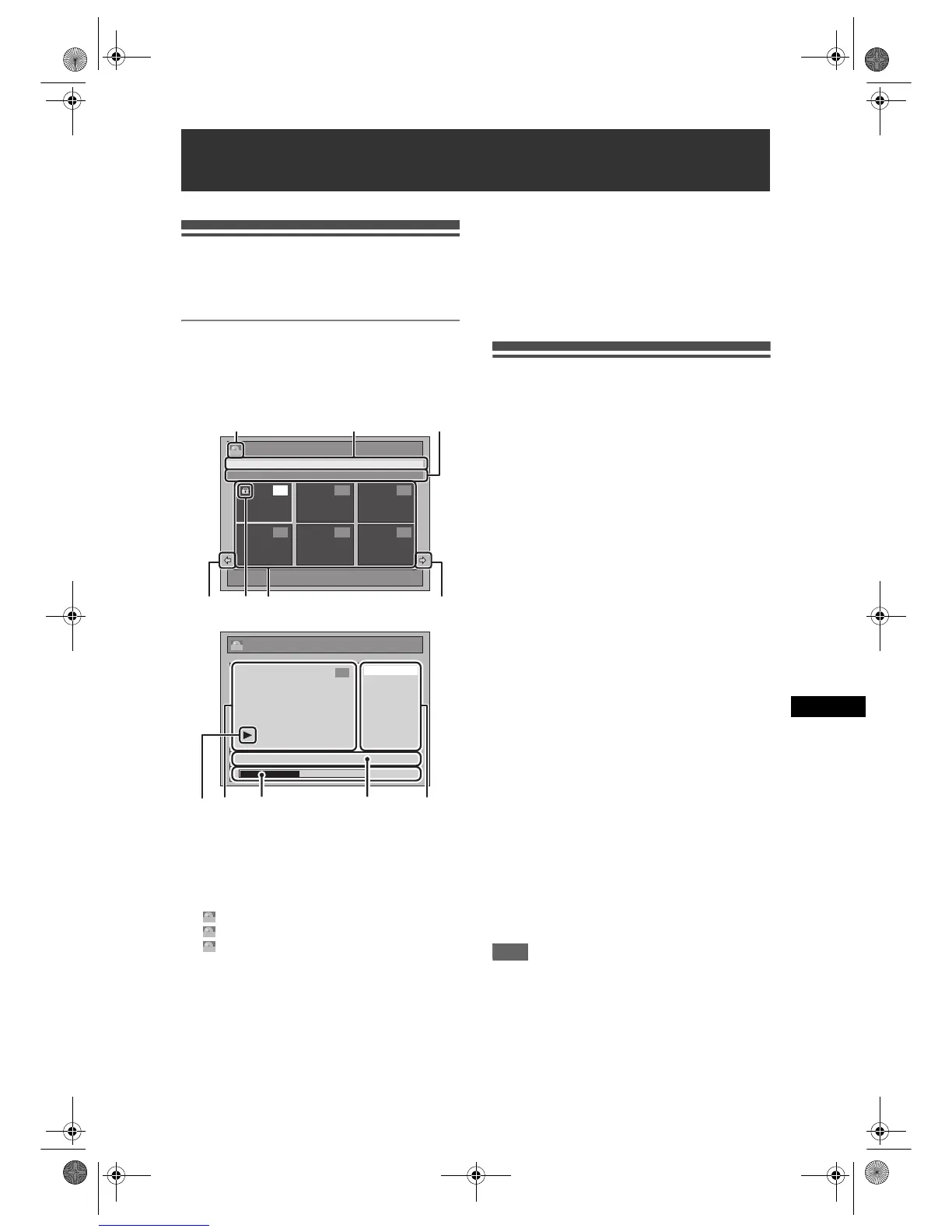
Guide to a Title List
Title list allows you to check the titles recorded on the
disc easily. You can choose a title to play back from
this list and easily edit the titles as you prefer.
Press [TOP MENU].
1 Title list: List of the titles recorded on the disc
and their information.
2 The protect icon, which appears when the title
has been protected. (Original titles only)
3 Arrow: Indicating there is a previous / next page.
4 Title list icon, which indicates a type of the
displayed title list.
: VR (original) mode
: VR (Playlist) mode
: Video mode
5 Title name.
6 Title information, which displays recorded time,
length of the title, date / month / year, recorded
CH, and the recording speed.
7Submenu: Submenus for the selected menu are
displayed here.
8 Title name (editable): If you do not name the title,
the recorded date, time, channel, and the
recording speed are displayed here.
9 Progress bar: Indicating the progress of the
playback.
10 Preview window: Preview of the selected title is
displayed here.
11 Playback status: Indicating the current playback
status of the selected title.
Press [RETURN R] to exit the title list.
Editing Discs
You will find editing discs is easy. This unit offers
convenient edit functions which are possible only with
DVD-RW/-R discs.
You can edit the following from a title list.
• Assigning a name to a title
• Dividing a title
• Combining titles
• Adding titles to a Playlist
• Erasing all Playlist
• Setting or releasing the title protection
• Adding or deleting chapter marks
• Deleting titles or parts of titles
(Possible editing functions depend on the recording
format and editing method.)
Original and Playlist (VR mode)
For VR mode DVD-RW disc, you can edit the
recordings in Playlist without changing the original
recordings. Playlist does not take up much disc space.
What “Original” or “Playlist” is for?
Throughout this manual, you will find Original and
Playlist which refer to the actual content and the
edited version.
• Original content refers to what’s actually recorded
on the VR mode DVD-RW disc.
• Playlist content refers to the edited version of the
VR mode DVD-RW disc; how the Original content is
to be played.
Finalising a Disc
• This will allow a disc that is recorded on this unit to
be played back on a different DVD player — without
finalisation it will not be playable on another player.
• After finalising a DVD-RW/-R disc, you cannot edit
any information that is on that disc.
Using these editing functions to modify
copyrighted content for any purpose other than
your private viewing may be prohibited under the
Copyright Laws of the United States and other
countries, and may subject you to civil and
criminal liability.
Note
• A Playlist is not available for DVD-R or Video mode
DVD-RW discs.
• It is not possible to edit a disc recorded in another
video system other than PAL, such as NTSC.
Editing
Title List
1 / 2
01/ 01/ 07 12:00 P01 4H
12:00 (2:00:00) 01/ 01/ 07 P01 4H
4 5 6
1 2 3
ORG
Chapter Mark
Protect
Edit Title Name
Scene Delete
Edit
0:00:59
1
ORG
01/ 01/ 07 12:00 P01 4H
456
231 3
1011 9 78
ORG
PL
Video
E9G04ED_EN.book Page 53 Tuesday, March 27, 2007 10:27 AM



 To Next Page