26
Recording / Dubbing
EN
Reformatting a Disc Manually
If you are using a DVD-RW disc, you can format the
disc by performing “Format”. You can format DVD-RW
disc for either Video mode recording or VR mode
recording.
Note
• When you reformat the disc, the contents of the disc
are erased.
• Make sure that the recording format is set to the
desired mode. (See steps 1 to 6 in “Choosing the
Recording Format of a Blank DVD-RW Disc” on
page 24.)
Insert a recordable disc.
1 In stop mode, press [SETUP].
2 Select “DVD Menu” using [U / D],
then press [ENTER].
3 Select “Format” using [U / D], then
press [ENTER].
4 Select “Start” using [U / D], then
press [ENTER].
5 Select “Yes” using [U / D], then
press [ENTER].
e.g.) VR mode DVD-RW disc
Formatting will start.
If you want to cancel formatting, select “No”.
6 Formatting is complete.
Note
• It is not possible to use a disc formatted with this unit
on other DVD recorder. When you use a disc with
another DVD recorder, format a disc using that DVD
recorder.
Selecting the Sound Mode
This unit can receive bilingual broadcasts.
You can switch between modes by pressing [AUDIO]
on the remote control. Each mode is indicated on the
TV screen as follows.
• During reception of bilingual broadcasts
Setting External Input Audio
When the external input audio is a bilingual
broadcast, you can choose “Stereo” or “Bilingual” to
record on a DVD.
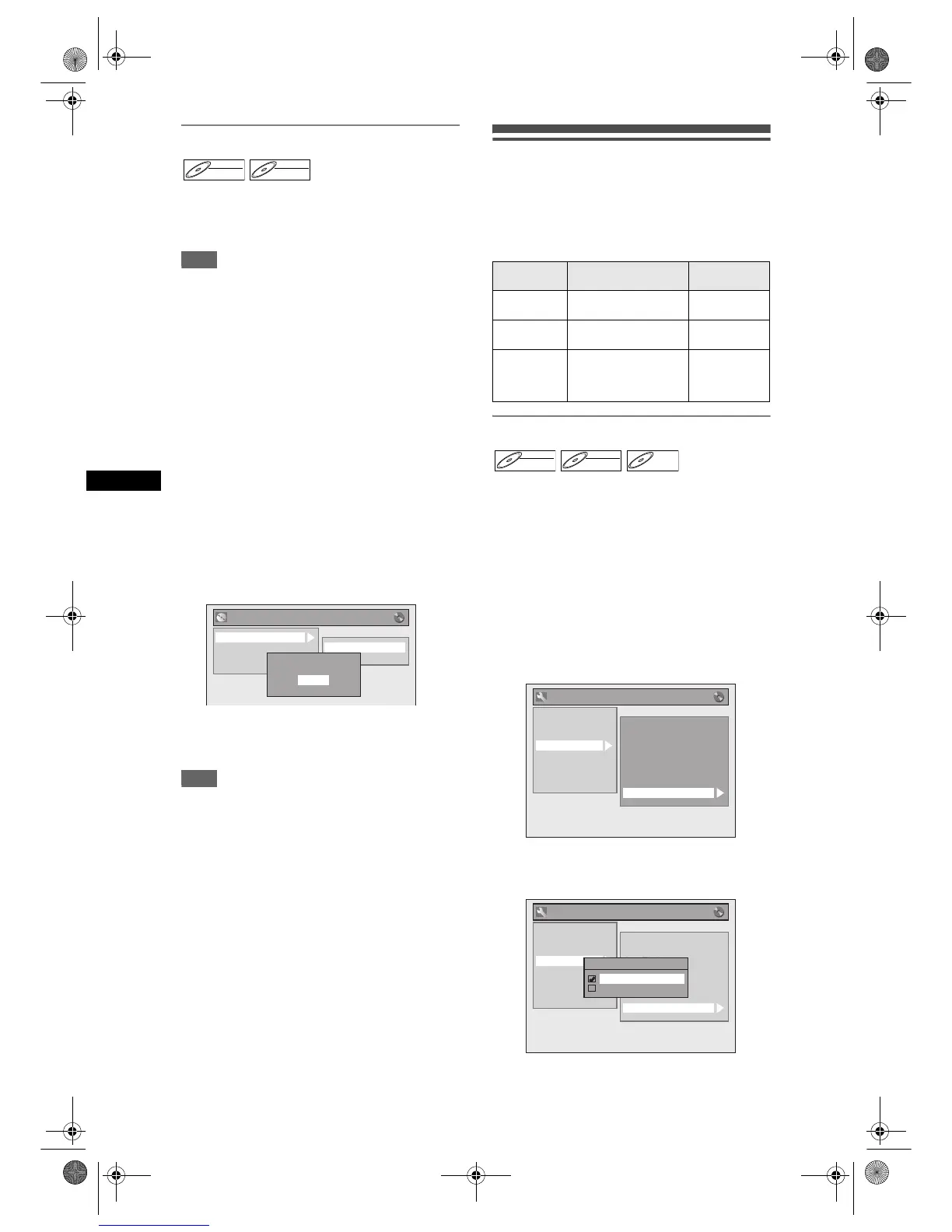
1 In stop mode, press [SETUP]. Select
“General Setting” using [U / D],
then press [ENTER].
2 Select “Recording” using [U / D],
then press [ENTER].
3 Select “External Input Audio” using
[U / D], then press [ENTER].
4 Select “Stereo” or “Bilingual” using
[U / D], then press [ENTER].
5 Press [SETUP] to exit.
DVD-RWDVD-RW
Video
DVD-RWDVD-RW
VR
DVD Menu
Start
Format Mode
Format
Finalise
Disc Protect OFF ON
Delete All Playlists
Are you sure?
Yes
No
Mode Audio output
Display on the
TV screen
Main
Main audio from both
speakers
Main
Sub
Sub audio from both
speakers
Sub
Main / Sub
• Main audio from the left
speaker
• Sub audio from the
right speaker
Main / Sub
DVD-RWDVD-RW
Video
DVD-RWDVD-RW
VR
DVD-RDVD-R
General Setting
Auto Chapter
Recording Audio Select (1H)
Auto Finalise
Aspect Ratio (Video mode)
Dubbing Mode
Make Recording Compatible
Bilingual Recording Audio
External Input Audio
Playback
Display
Video
Clock
Channel
DivX
Reset All
Recording
General Setting
Auto Chapter
Recording Audio Select (1H)
Auto Finalise
Aspect Ratio (Video mode)
Dubbing Mode
Make Recording Compatible
Bilingual Recording Audio
External Input Audio
Playback
Display
Video
Clock
Channel
DivX
Reset All
Recording
External Input Audio
Stereo
Bilingual
E9G04ED_EN.book Page 26 Tuesday, March 27, 2007 10:27 AM



 To Next Page