Title Installing the Device
Identifier GUID-12CE9464-C7D8-4F75-BEAC-7C007FCB6154
Language EN-US
Description
Version 3
Revision 3
Changes With Edge 1030 going forward, two rubber disks are included with larger devices. You can use version 2,
but confirm with PM.
Status Released
Last Modified 22/06/2017 15:25:15
Author cozmyer
Installing the Standard Mount
For the best GPS reception, position the bike mount so the front of the device is oriented toward the sky. You
can install the bike mount on the stem or the handlebars.
1 Select a secure location to mount the device where it does not interfere with the safe operation of your bike.
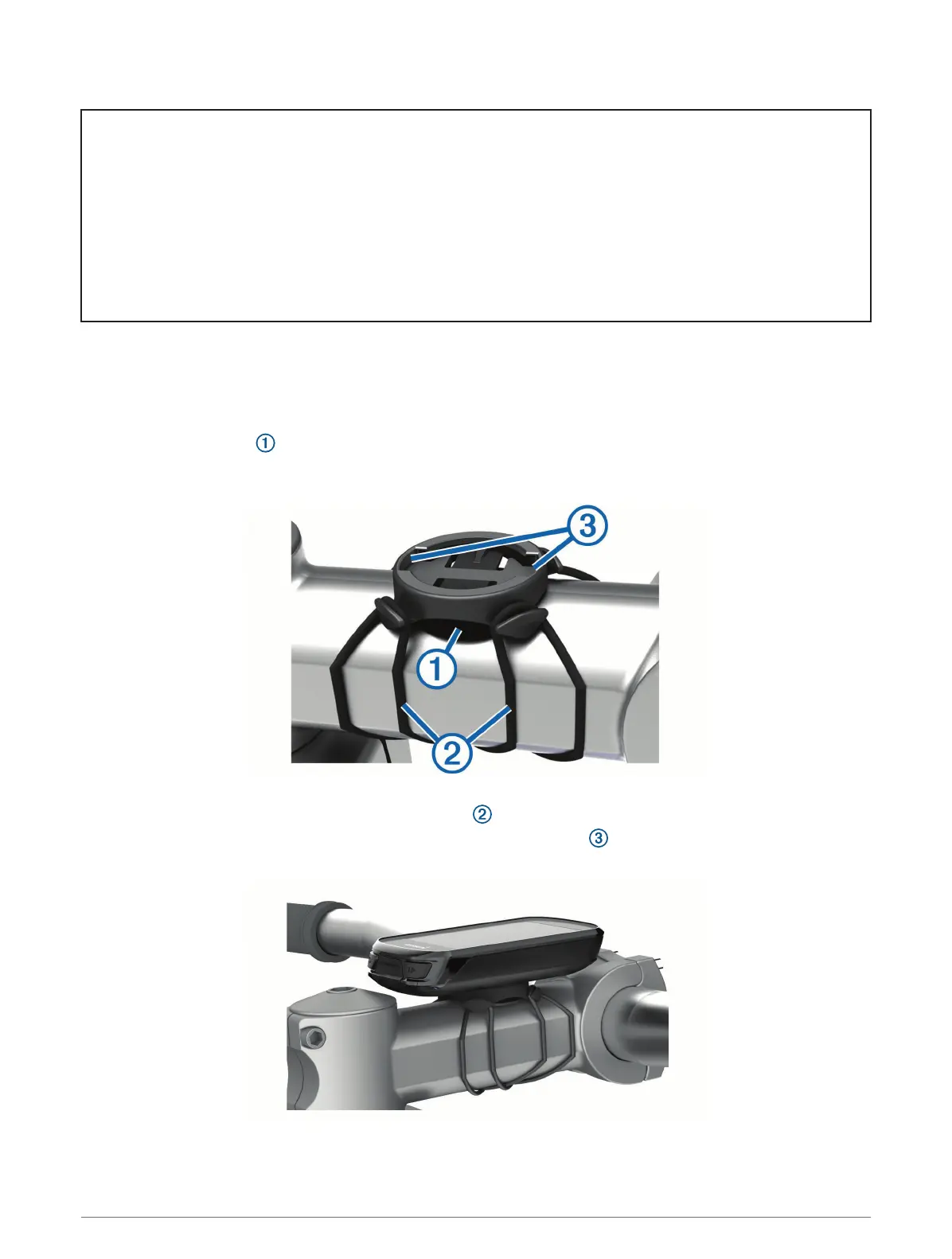
2 Place the rubber disk on the back of the bike mount.
Two rubber disks are included, and you can select the disk that best fits your bike. The rubber tabs align with
the back of the bike mount so it stays in place.
3 Place the bike mount on the bike stem.
4 Attach the bike mount securely using the two bands .
5 Align the tabs on the back of the device with the bike mount notches .
6 Press down slightly and turn the device clockwise until it locks into place.
Introduction 9















 To Next Page