Title Using Cycling Dynamics
Identifier GUID-AEA5BC72-9B27-4F4A-8E44-68E24DDC57D0
Language EN-US
Description
Version 5
Revision 4
Changes remove "Vector" so it will work with other pubs.
Status Released
Last Modified 08/02/2021 11:13:47
Author wiederan
Using Cycling Dynamics
Before you can use cycling dynamics, you must pair the power meter with your device using ANT+ technology
(Pairing Your Wireless Sensors, page 82).
NOTE: Recording cycling dynamics uses additional device memory.
1 Go for a ride.
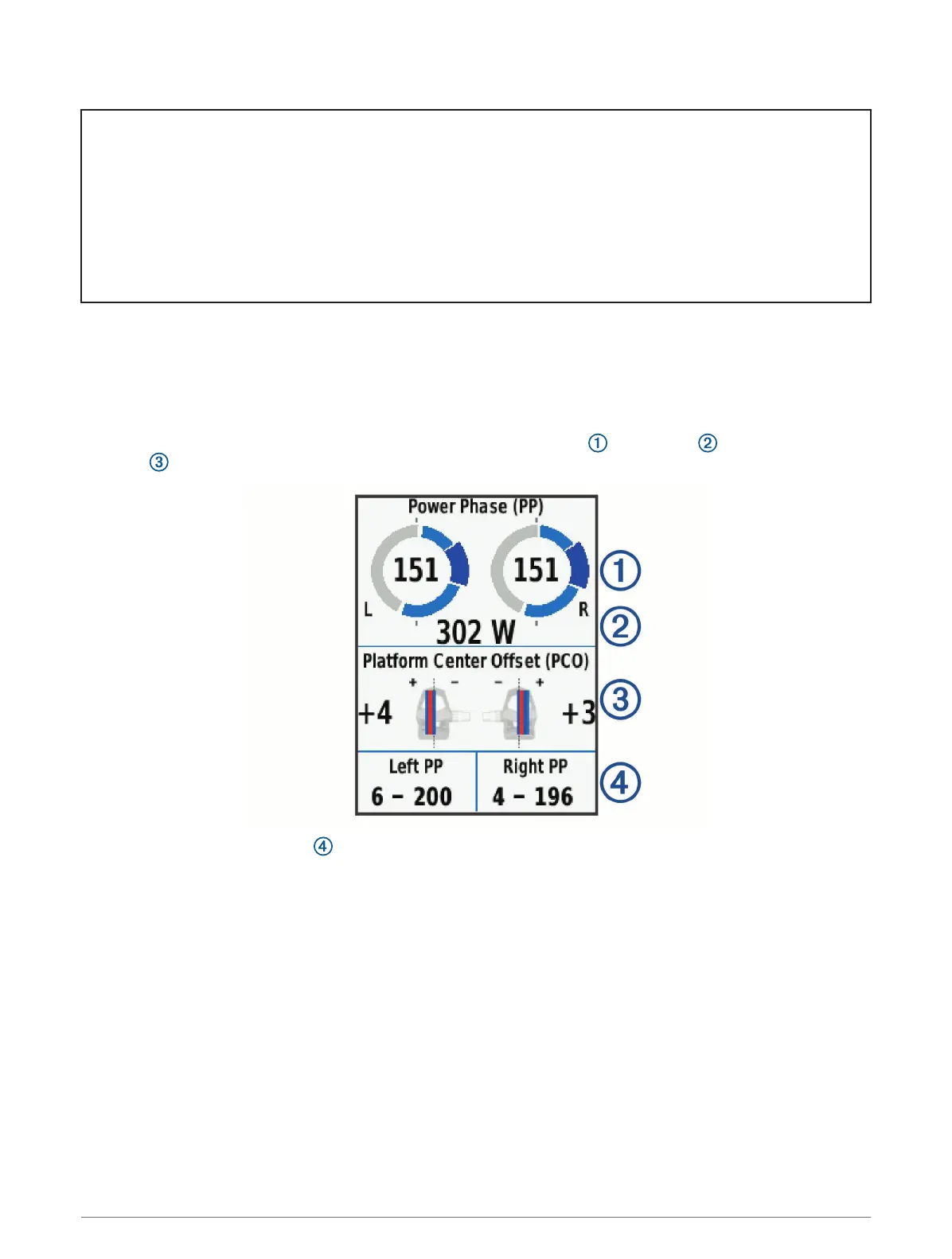
2 Scroll to the cycling dynamics screen to view your power phase data , total power , and platform center
offset .
3 If necessary, hold a data field to change it (Adding a Data Screen, page 101).
NOTE: The two data fields at the bottom of the screen can be customized.
You can send the ride to the Garmin Connect app to view additional cycling dynamics data (Sending Your Ride to
Garmin Connect, page 94).
Wireless Sensors 85















 To Next Page