Garmin GPSMAP 695/696 Owner’s Manual
190-00919-00 Rev. G
164
Hazard Avoidance
OverviewGPS NavigationFlight PlanningHazard AvoidanceAdditional FeaturesAppendicesIndex
Enabling/Disabling Flight ID Display:
On
the Traffic Page, press the
FLT ID
Softkey.
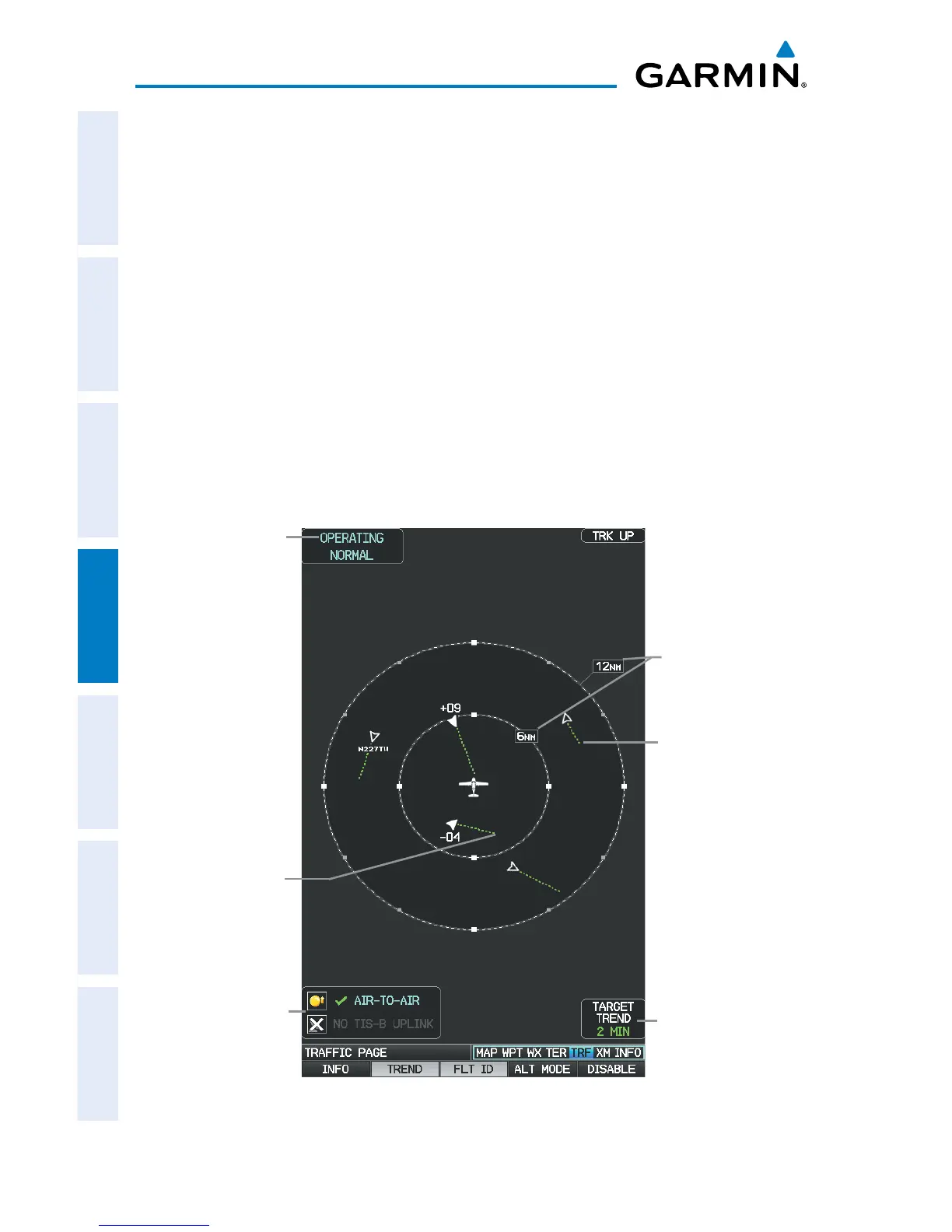
MOTION VECTORS
There are two pilot-selectable and mutually exclusive types of motion vectors, Absolute
and TargetTrend, which are differentiated by color and function. Absolute vectors are
white and indicate ground track as reported by the traffic. TargetTrend vectors are green
and indicate the flight path and position, relative to your aircraft, at which the traffic
will be after the passing of one of four predetermined look-ahead intervals. The end of
the TargetTrend vector indicates the traffic’s predicted location relative to your predicted
location at the end of the look-ahead time. For example, if traffic is ahead of you and
traveling along the same track but at a slower rate, the motion vector would point
opposite of its indicated direction of flight showing that you are overtaking the traffic.
Traffic Display
Range Rings
Traffic System
Status Receiving
Air-to-Air
Traffic Page TargetTrend (GDL 39)
TragetTrend
Look-ahead
Time
Altitude/
Operating
Mode
Traffic's
Predicated
Relative Location
in 2 minutes
Traffic's
Predicated
Relative Location
in 2 minutes














 To Next Page