Reference
13
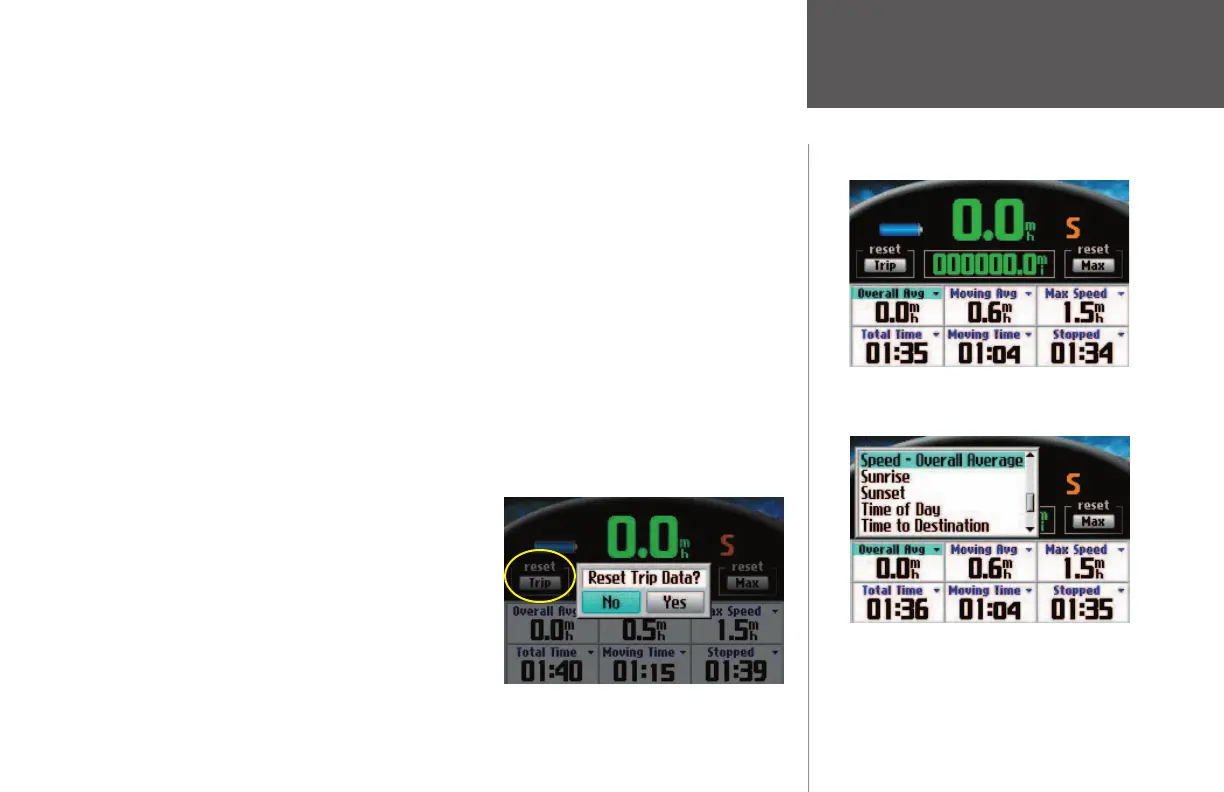
You can change the data fi elds on the Trip Information page. For a complete list and description of data
fi eld options, see Appendix B.
To Change the Data Fields on the Trip Information Page:
1. From the Trip Information page, press the MENU key to display a ‘Menu’ window.
2. From the ‘Menu’ window, select ‘Edit Fields.’ The title of the ‘Overall Avg’ fi eld (or the fi eld in the fi rst
row, fi rst column) is highlighted, indicating that it can be changed.
3. Use the rocker pad to select the fi eld you wish to change. Press OK to display a list of fi eld choices.
Select the appropriate choice and press OK. The new choice appears.
4. Repeat Step 3 until you have changed your intended fi elds. Then, press PAGE to exit the ‘Edit Fields’
mode.
To reset the Trip Data or the Maximum Speed:
1. Use the rocker pad to select the ‘Trip’ or ‘Max’ buttons on the Trip Information page.
2. Press OK. A message asking if you want to reset the data appears (‘Reset Trip Data?’ or ‘Reset Maximum
Speed?’).
3. Select ‘Yes’ and press OK. The data is reset.
Trip Information Page
The highlighted data fi eld indicates that it can
be changed. Press OK, and a list of options
appears, as shown below.
Select the Trip button and press OK. Select Yes
if you wish to reset the Trip Computer.
190-00323-00_0B.indd 13 8/20/2004, 11:08:09 AM



 To Next Page