Reference
22
Finding Places
1. Find the city which you plan to visit. See ‘Finding a City’ in this section of this
manual for more instructions if necessary. In our example, Overland Park, KS is
chosen.
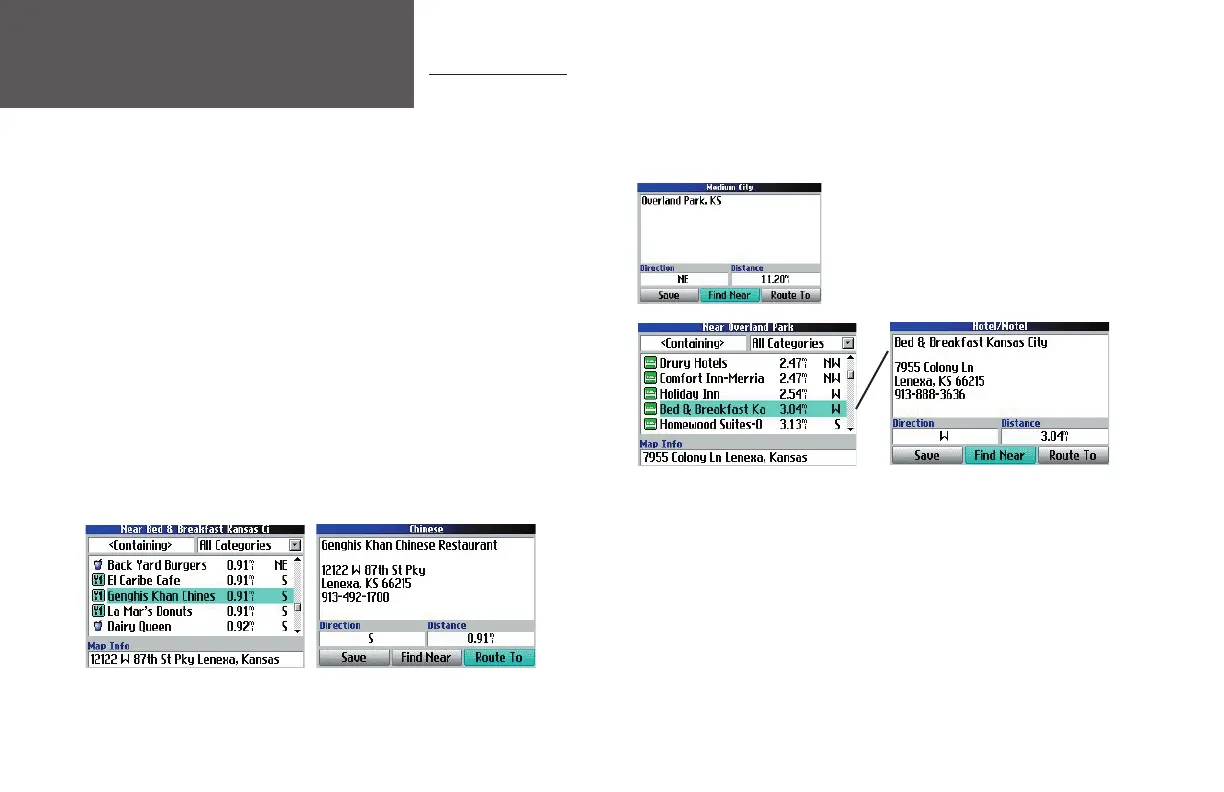
Overland Park, KS information page
2. While still on the information page for Overland Park, select ‘Find Near’ and
then select ‘Lodging’ (from the ‘Find’ page that appears) to look for a place
to stay in Overland Park. Your Quest returns the names of places to lodge.
Select the name of your desired lodging place and then press OK. To save the
lodge to your ‘My Locations’ list, select ‘Save’ from the information page that
appears. In our example, Bed and Breakfast Kansas City is the lodging place.
Lodging in Overland Park
3. From the information page for Bed and Breakfast Kansas City, select ‘Find
Near’ and then select ‘Food & Drink.’ A list of all eating establishments near
Bed and Breakfast Kansas City displays. Select the name of your desired eating
place and then press OK. To save the restaurant to your ‘My Locations’ list,
select ‘Save’ from the information page that appears
You can also fi nd entertainment, services, and a variety of other
places near your chosen lodging area in the city of your choice. When
you are ready to take your trip, simply fi nd these places in your Recent
Finds or My Locations list, discussed on the previous pages. For more
information on trip planning, see Planning and Modifying Routes,
page 24.
Planning a Trip
As you have discovered while reading this section, you can search for places by using a variety of “fi nd”
methods. If you are planning a trip and would like to fi nd lodging, restaurants, and interesting places ahead
of time, consider using the “chain fi nd” method below. (Note: You can also follow these instructions for
fi nding places while you are already on a trip. Do not attempt to fi nd places while driving.)
2
1
Restaurants near your Lodging choice in Overland Park
3
190-00323-00_0B.indd 22 8/20/2004, 11:08:18 AM



 To Next Page